Who is this set-up suitable for?

Script reader during video calls

You want to keep the video call screen clearly in view and adjust the script on a second screen as needed. Positioning each screen separately can help, but the best layout depends on your workspace. Neomounts describes the DS70-810BL2 as allowing independent positioning.

Home worker with limited desk space

You want to place two screens side by side without taking up unnecessary depth behind your desk. Compare a compact crossbar with separate arms, and measure the space available. ACT states that the AC8322 has a wall clearance of up to 14 cm.

Home worker without a suitable desk edge for a clamp

You have two screens but don’t want to, or can’t, use a desk clamp or grommet mount. A freestanding base may be an option if you have enough desk space; ACT describes the AC8320 as a stand with a base.

What should you consider when choosing?

Two independently adjustable arms

Choose this set-up if: you want to position the script differently from the video call screen, for example closer to you or in portrait orientation.

Bear in mind: the space needed behind and beside your desk, as well as the adjustment range of the specific model.

Dual monitor arm with a crossbar

Choose this set-up if: you mainly use the screens side by side and keeping them aligned matters more than having very different positions.

Bear in mind: a crossbar doesn’t automatically offer the same independent positioning as separate arms.

Freestanding dual monitor stand

Choose this set-up if: your desk doesn’t have a suitable edge for a clamp or a usable grommet hole, and you have room for a base.

Bear in mind: the base takes up desk space, so check that it will fit and sit securely on your work surface.

What to consider What to look for when buying Who should consider this?
Script position First decide where you want to see the video call screen and the script. Then compare the height, depth and rotation range of the exact model. If I want to read my script during a call, I need to be able to position the second screen without awkwardly moving the video call screen. Around 36% of consumers give script positioning top priority.
Compatibility with both screens Note the VESA size and weight without the stand for each screen, then compare them with the limits of each arm. Neomounts lists weight and VESA size as absolute product limits for its models. If I already own two monitors, I want to make sure they’ll both fit before I choose. Around 29% of consumers prioritise screen compatibility.
Space around the desk Measure the available depth and width, including room for cables and movement. Neomounts lists an adjustment range of 0–49 cm and a 180° stop for the DS70-810BL2; check that these model limits suit your space. If my desk is shallow or close to a wall, I want to know whether the screens can still move into the positions I want. Around 21% of consumers give limited desk space top priority.
Desk mounting Check whether a clamp or grommet mount will work with your desk. ACT lists a maximum desk thickness of 88 mm for the AC8322; the freestanding AC8320 takes up space on the desk. If a clamp or grommet mount won’t work, I want a mounting option that suits my desk and still leaves enough space on the surface. Around 14% of consumers give mounting without a clamp top priority.

Which mistakes can you avoid?

  • Choosing based only on screen size

    The right screen size in inches doesn’t tell you enough about the mounting or weight capacity. According to the manufacturer, weight and VESA size are absolute product limits for the Neomounts models reviewed.

    Check the VESA size and weight without the stand for each screen, then compare them with the specifications of the exact model.

    If the mount isn’t compatible, you may need a different arm or a suitable adapter.

  • Assuming a crossbar gives you two fully independent arms

    A shared side-by-side set-up doesn’t automatically give you the freedom to position the script independently of the video call screen.

    Sketch out the positions you want for your screens first, then compare the adjustment directions of the models.

  • Leaving mounting and clearance checks until after delivery

    A clamp, grommet mount and freestanding base each have different requirements for your desk. You’ll also need enough space to move the arms.

    Measure the desk edge, desktop thickness, clearance behind the desk and the space needed for any base before you buy.

Which brands are worth considering?

Neomounts

The models discussed include the independently adjustable DS70-810BL2 and the DS75-450BL2 with a crossbar.

  • Neomounts says the DS70-810BL2 has a 180° stop and supports both clamp and grommet mounting.
  • Neomounts lists a maximum of 9 kg per screen for the DS70-810BL2 and 8 kg per screen for the DS75-450BL2. This difference applies to these models, not the brand as a whole.

ACT

The range discussed includes the AC8322 with a crossbar and the freestanding AC8320, to suit different desks and mounting requirements.

  • ACT lists clamp and grommet mounting for the AC8322, with a maximum desk thickness of 88 mm.
  • The AC8320 stands on the desk and takes up space there.

Ergotron

According to the Dutch product page, the LX Dual Stacking Arm is designed to position two screens independently, including one above the other.

  • Independent positioning may be useful if the script doesn’t always need to sit beside the video call screen.
  • Check the version and specifications against your screens. The product description alone doesn’t confirm that it’s suitable for your specific monitors.

Humanscale

The M8 Pro is described as suitable for one screen or, with an optional crossbar, two screens.

  • For the dual-screen M8 Pro configuration, the manufacturer lists a maximum of 5.5 kg per screen.
  • Check whether the optional crossbar is included with your version. The capacity for one screen doesn’t automatically apply to each screen in the dual set-up.

Joybuy products for two screens

These Joybuy products are options for a desk set-up with two monitors. Check that each model’s mounting, screen sizes and positioning options suit your workspace.

Floordirekt monitor stand for 2 monitors, adjustable width and angle, MDF, white, 80–108 cm

Floordirekt monitor stand for 2 monitors, adjustable width and angle, MDF, white, 80–108 cm

A stand for two monitors with adjustable width and angle, if you’re looking for a desktop stand rather than monitor arms.

Material: MDF. The product name specifies a width of 80–108 cm and the colour white.

Joybuy

DELL Dual Monitor Arm MDA20

DELL Dual Monitor Arm MDA20

A dual monitor arm for a desk set-up with two screens. Before buying, check that the mounting and specifications are suitable for both monitors.

Joybuy

iiyama dual desk mount

iiyama dual desk mount

A desk mount for two monitors. Check that the mounting and screen positions you want suit your desk and how you plan to use it.

Joybuy
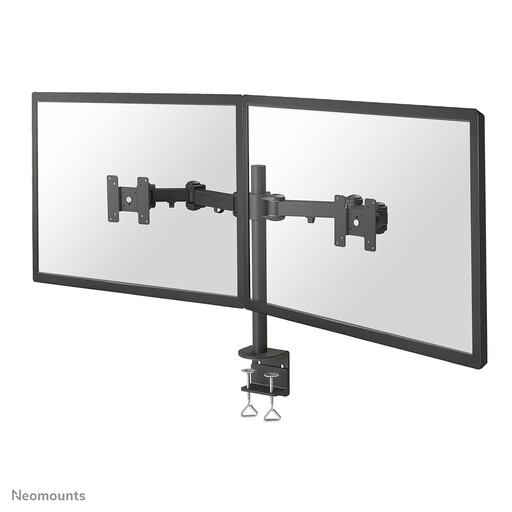
Neomounts FPMA-D960D monitor arm 10–27 inch

Neomounts FPMA-D960D monitor arm 10–27"

A dual monitor arm for a desk set-up with two screens. Check that the stated screen size and mounting are suitable for your monitors.

The product name specifies a screen size of 10–27 inches.

Joybuy

Frequently asked questions

How should I position my screens when reading a script?

Start with the video call screen directly in front of you, then position the script so you can read it without having to hold an awkward, fixed posture. Arboportaal advises placing the top of the screen slightly below eye level and looking slightly downwards. Which arm will allow this depends on its adjustment range and your workspace.

Can I mount a dual monitor arm on any desk?

No, the mounting method needs to suit both your desk and the model. ACT lists clamp or grommet mounting for the AC8322, with a maximum desk thickness of 88 mm. The AC8320 is freestanding and needs space on the desktop.

What should I do if a screen won’t stay in place after mounting?

First, check that the screen’s weight is within the limit for the arm, then follow the model’s mounting and adjustment instructions. Don’t exceed the stated weight limit. Neomounts lists weight and VESA size as absolute limits for the DS70-810BL2.

What are my rights when buying online in the Netherlands?

For a standard online consumer purchase, you’ll generally have 14 days from delivery to change your mind, subject to legal exceptions set out by ACM ConsuWijzer. Your statutory guarantee is separate from the manufacturer’s warranty. If a product used normally doesn’t meet the standard you could reasonably expect, the seller is responsible for providing an appropriate remedy at no cost.

Does Dutch law require a particular brand of monitor arm for home use?

Arboportaal’s guidance on screen work and working from home focuses on working conditions, not on a specific monitor arm brand. Employers remain responsible for providing a safe and healthy home working environment for their employees. Talk to your employer if you need to make changes to your workspace.
