
For comparing documents and moving screens separately
You switch which document is in the centre and want to position each screen independently.


Choose independently adjustable arms if you often move one screen separately while comparing documents. A crossbar is a better fit if the two versions usually stay side by side and you want to move them together. Check the weight and VESA pattern of each screen, and measure the available clamp space and clearance from the wall. Screen size alone isn’t enough to determine whether an arm will fit.
You switch which document is in the centre and want to position each screen independently.
You want to view two versions side by side without the arms hitting the wall or taking up unnecessary space. So check the desk edge, clamp and room for movement.
You usually keep the screens at the same height and are mainly choosing between a crossbar that adjusts both screens together and a dual arm that you set by hand.
| What to consider | What should you check? | Who is this important for? |
|---|---|---|
| Screen compatibility and weight capacity | Note the weight of each screen without its stand and its VESA mounting pattern. Compare both with the limits of the exact model. | If I use two screens with different weights, I want to know whether the weight capacity and mounting are suitable for both. Around 33% of consumers say screen compatibility is their top buying priority. |
| Positioning screens separately | Check whether height, depth, swivel and tilt can be adjusted independently for the setup you want. | If I alternate between placing one document in the centre while comparing, independent adjustment is useful. Around 27% of consumers give independent positioning their top priority. |
| Clamp and clearance from the wall | Measure the desk thickness and the clear space at the desk edge. Also check the distance from the wall and the arm’s range of movement. | At a desk with limited space, I want to know in advance whether the clamp will fit and the arms can move without hitting the wall. Around 20% of consumers name mounting and available space as their main consideration. |
| Fixed alignment | Decide whether you usually want to adjust the screens together, and check how the design and cable management work in that setup. | If my two documents usually stay side by side, a setup that adjusts them together may be enough. Around 20% of consumers prioritise fixed alignment over independent adjustment. |
A screen’s diagonal measurement doesn’t prove that its weight and VESA mount are within the arm’s limits. The Neomounts DS70-250BL2 also has different stated maximum weight capacities for flat screens and curved or ultrawide screens.
Check each screen against the specifications for the exact version.
The permitted desk thickness and clearance needed for movement vary by design. A movement stop doesn’t replace checking whether the clamp fits your desk edge.
Measure the desk thickness, clear space at the edge and distance from the wall beforehand. Follow the chosen model’s instructions for installation.
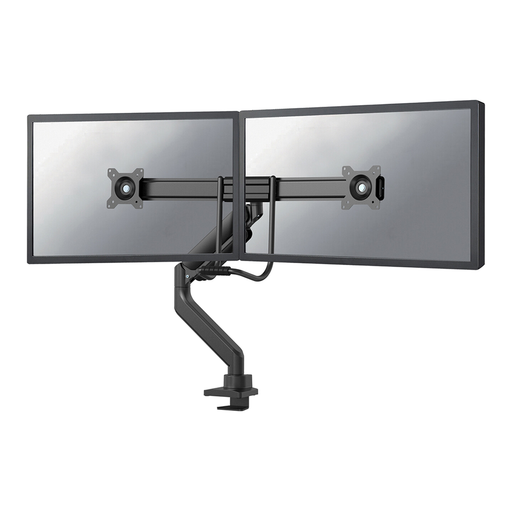
The ACT AC8344 is designed to adjust the crossbar’s position using a handle. That’s different from positioning two screens independently.
Decide in advance whether you usually align both versions together or move one screen separately each time you compare them.
iiyama lists the DS1002C-B1 as suitable for screens up to 32 inches, while the product description on Joybuy says 30 inches.
If your screen is larger than 30 inches, check which screen size applies to the exact version. Also check its weight and VESA pattern.
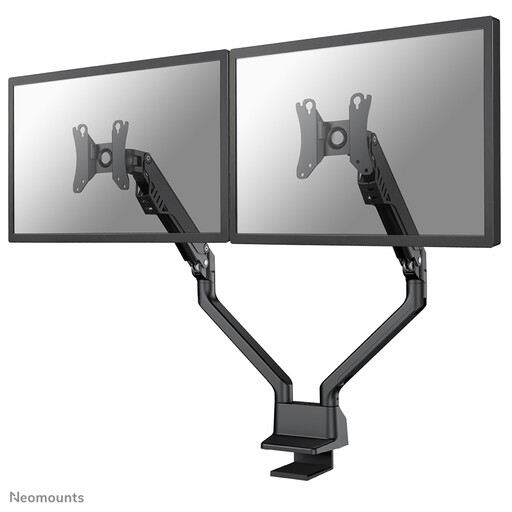
The DS70-250BL2 is worth considering if you want to position two screens independently, even when your desk is close to a wall.
The AC8344 is an option if two screens are usually side by side and moved together.
The DS1002C-B1 is a dual arm for screens that will mostly stay in place once set up.
The Platinum Series Dual Monitor Arm is worth considering if you want to set up two screens independently.
The LX Dual Side-by-Side Arm is an option for two screens positioned side by side and adjusted independently.
This selection includes stands and arms for two monitors. First decide whether you want to position the screens independently or usually keep them side by side and move them together.
 No image available
Designed for two monitors side by side; the product name specifies adjustable width and angle.
Material: MDF. Colour: white. Width: 80–108 cm.
 No image available
A dual monitor arm for a setup with two screens.
Model: MDA20.
 No image available
For anyone who wants to position two screens and is looking for a gas spring arm with a movement stop.
Screen size according to the product name: 10–32 inch. With gas spring, Topfix and 180° stop.
 No image available
For a two-screen setup if you’re looking for a gas spring arm.
Screen size according to the product name: 10–32 inch. With gas spring, Topfix and 180° stop.
 No image available
A dual monitor arm for anyone who wants to position two screens side by side.
Screen size according to the product name: 17–32 inch. With gas spring, Topfix and 180° stop.
No. For each screen, compare its weight without the stand and its VESA pattern with the chosen model’s limits per arm. Neomounts specifies a lower maximum weight for curved or ultrawide screens than for flat screens on the DS70-250BL2.
Measure the desk thickness and check that the desk edge is accessible, using the instructions for the exact model. For example, the Neomounts DS70-810BL2 manual describes clamp configurations for desktops measuring 10–50 mm and 45–85 mm thick; don’t use those measurements as limits for other models.
First check that the screen is within both the minimum and maximum weight limits per arm. Then consult the manual for the exact model to adjust the spring tension. ACT states that the gas spring tension on the AC8344 can be adjusted.
The Dutch government information referenced here doesn’t require a dual monitor arm as a separate product. Arboportaal does outline requirements for employees who work with screens, including a height-adjustable screen and additional conditions for more than two hours of screen work per day. Employers also have a duty of care when employees work from home, within what can reasonably be expected of them.
No. According to the Dutch government, there’s no fixed statutory warranty period in the Netherlands. You’re entitled to a product that works as you can reasonably expect it to. A manufacturer’s warranty is separate from this right.