
Call handler using a script
Uses one screen for calls and wants to read the script alongside it without constantly changing their working posture. STL describes a two-screen setup with both displays side by side at the same height.


Use the screen for your call as the main display and place the script beside it. A dual arm with independently adjustable screens is particularly practical if the position or user changes regularly. Arboportaal recommends readjusting a shared workspace each time, while STL describes placing two screens side by side at the same height. Before buying, check the weight and VESA pattern of each screen, and measure the desk mounting point and the available range of movement.
Uses one screen for calls and wants to read the script alongside it without constantly changing their working posture. STL describes a two-screen setup with both displays side by side at the same height.
Wants to readjust the screen height and viewing distance at the start of each session. Arboportaal recommends adjusting your workstation when you move to a different work area.
Wants to position two existing screens and work out how much room the screens, arm and mounting take up. So remember to measure the available space behind and on the desktop too.
First, consider whether the screens will need frequent readjustment. Then compare the screen mount and the space the arm needs on and behind your desk.
| What to consider | What should you check? | Who is this most important to? |
|---|---|---|
| Script beside the call | Decide which screen will be your main display and check that the script sits beside it at a comfortable viewing distance. | As a shopper, you want to follow the call and read the script at the same time without constantly moving the main display. Around 36% of shoppers are most concerned with this combination of tasks. |
| Readjusting the setup | Check whether the screens can be adjusted independently and whether there is enough room for them to move. | At a shared desk, you want to be able to readjust the screen position for a different user or task. Around 29% of shoppers consider readjustment their main concern. |
| Screen and desk mounting | Check the weight and VESA pattern of each screen, and make sure the desk allows for clamp or grommet mounting. | As a shopper, you want to know in advance whether both screens and the mount will fit your desk. Around 21% of shoppers prioritise screen and desk compatibility. |
| Clear desk space | Measure the desktop and the space behind the desk, then compare these with the room the arm needs to move. | If you need space for other work, you’ll want to know how much room the screens and arm will take up. Around 14% of shoppers put clear desk space first. |
Screen size alone won’t tell you whether the weight and VESA pattern are within the arm’s limits. For the Neomounts DS70-250BL2, the manufacturer specifies a lower maximum load for curved or ultrawide screens than for other screens.
Check each screen’s VESA pattern and weight without its stand, and allow for any model-specific variations.
According to Leitz, the height of the Leitz Ergo Slim 61640095 is adjusted using the supplied tools. This may be less practical if users need to readjust the workstation frequently.
Choose based on how often the screen position changes, and check what adjustments the model you’re considering requires.
An arm and screens need room to move. If you position them near a partition, the arm may hit it; according to the manufacturer, the Neomounts DS70-250BL2 has a 180° stop for situations like this.
Measure the space behind the desk and check the arm’s range of movement with the screens you plan to use.
The NEXT Slim DS70-250BL2 is a dual gas spring arm with Topfix mounting and a 180° stop. It’s worth considering if a partition limits the available range of movement.
The Essentials AC8314 is a dual gas spring monitor arm designed for screens that need readjusting at a shared or changing workstation.
The Ergo Slim 61640095 is a dual arm for setups where the screen height doesn’t change frequently.
The LX Dual Stacking Arm is designed for a setup with screens stacked one above the other, when two screens won’t fit side by side.
This selection focuses on dual desk mounts for a call screen and a script screen, with adjustability, screen mounting and available space all in mind.
 No image available
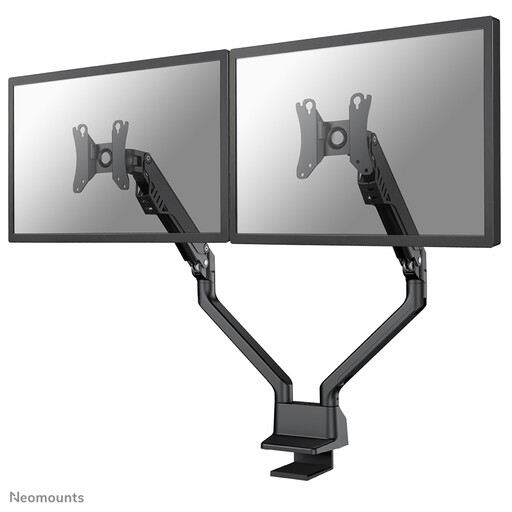
The stated height and depth adjustments give you options for positioning two screens.
Quick Release is specified for compatible Dell UltraSharp and P-series monitors.
 No image available
The stated height and depth adjustments are useful when the position needs to be reset at a shared workstation.
The product information specifies two screens, a gas spring, VESA 75×75 and 100×100 mm, and a maximum of 8 kg per screen. Check that the specified desk clamp will fit your desk.
 No image available
According to the product information, the short upper arm is designed for positioning close to a wall or partition.
The description specifies two screens up to 27 inches and a maximum of 8 kg per screen, VESA 75×75 or 100×100 mm, and manual height and depth adjustment.
 No image available
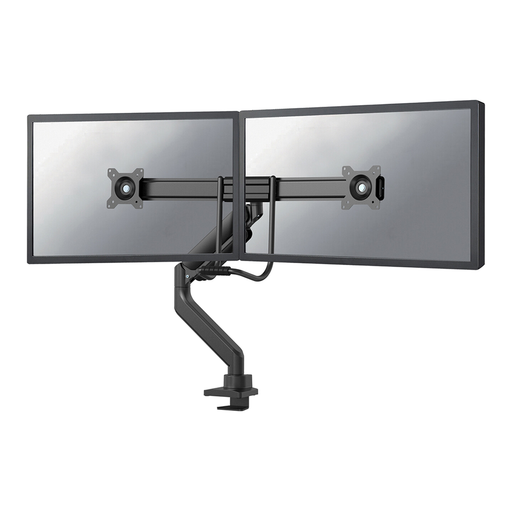
The specified pneumatic height and depth adjustment lets you reposition two screens.
According to the product information, the arm is suitable for screens up to 32 inches and a maximum of 8 kg per screen. Clamp and grommet mounting are specified.
 No image available
The stated height and depth adjustments are useful when screen positions change at a shared desk.
The product information specifies a maximum of 32 inches and 8 kg per screen, VESA 75×75 or 100×100 mm, and clamp or grommet mounting.
Place the screen you use most directly in front of you, with the script beside it. Adjust the screens for each user; Arboportaal recommends setting the top of the screen slightly below eye level. This is workstation advice, not a fixed angle that works for everyone.
No, it depends on the arm’s mounting method and the desk’s construction. Check which mounting methods the model supports and whether the owner allows clamps or a grommet hole. A stated clamp or grommet mount doesn’t, by itself, confirm that it will fit your desk.
First, compare the screen’s weight with the limit for each arm, then follow the instructions for adjusting the gas spring. Don’t use the arm beyond its specified weight or VESA limits.
Before you buy, check whether your setup needs any mounting or adapter parts, and read the returns policy. ACM ConsuWijzer states that for a standard online consumer purchase, a statutory cooling-off period generally applies for up to 14 days after delivery; exceptions apply. This cooling-off period doesn’t confirm that a monitor or desk is compatible.
No, Arboportaal doesn’t specify a particular product type, such as a dual monitor arm, as a requirement. However, rules and requirements apply to healthy screen-based work and the layout of the workstation; discuss your specific setup with your employer.