Choose independently adjustable arms if you often need to reposition your script screen in relation to your video-call screen; a mechanical or simpler dual mount may suit you if your setup tends to stay the same. Where possible, position your line of sight parallel to the window. Before buying, check the weight and VESA pattern of each screen, as well as how the mount attaches to your desk. A monitor arm won’t, by itself, prevent backlighting behind your camera.
Who is this setup for?
Caller using a script screen
You read text on one screen and keep an eye on participants on the other. An easily positioned script screen can help you arrange your screens and camera as you like. StarTech.com describes portrait rotation for the ARMDUAL3, while Logitech provides guidance on screen and camera placement in a meeting room.
Working beside a bright window
If your screens reflect light or daylight gets in the way of your view, their position and viewing angle matter. Arboportaal advises positioning your line of sight parallel to the window; Neomounts describes the adjustment options for the DS70-810BL2.
Buyer with a tricky desk
You have little space behind your desk, or want to know whether two screens and a clamp or grommet mount will fit. Check the mounting requirements for the specific model, as described by Neomounts and StarTech.com.
What should you look for?
Dual gas-spring arm
Suitable if: you often want to adjust the script screen or viewing angle independently during calls.
Bear in mind: check the weight limit and VESA size for each screen, and measure to make sure the arm can move freely.
Dual arm with mechanical adjustment
Suitable if: you mainly want a fixed layout but need to be able to turn the script screen by hand.
Bear in mind: StarTech.com specifies a maximum of 8 kg per arm for the ARMDUAL3 and a C-clamp for desk thicknesses of 4–8.5 cm.
Two separate monitor arms
Suitable if: the camera, window position or different screen positions call for two separately chosen mounting points.
Bear in mind: check the mounting position, screen compatibility and desk load capacity for both arms.
| What to consider |
What should you check? |
Who is this important for? |
| Light from the window and reflections |
Check that both screens can be rotated and tilted enough, and that the arms can move freely. Arboportaal advises positioning your line of sight parallel to the window. |
If I read in daylight, I want to be able to position the screens to reduce reflections; around 33% of consumers give light from a window their highest priority. |
| Repositioning the script screen |
Check the rotation and height and depth range of each arm. Also make sure the screens won’t touch in the position you want. |
If I switch between reading a script and making calls, I want to be able to position the script screen independently; around 27% of consumers prioritise this adjustment. |
| Camera and keeping yourself in view |
Decide where you can place the webcam and whether a screen will block the view. Also check that the window won’t appear as a bright light source behind you. |
If I want to stay clearly in view while reading, I need to be able to position the camera and screens to suit; around 20% of consumers make camera position their main consideration. |
| Screen and desk compatibility |
Compare the weight of each screen without its stand and its VESA pattern with the arm’s requirements. Measure the desk thickness and space behind the edge; follow the instructions for grommet mounting. |
If I want to mount my existing screens on this desk, I need to know first whether both the screens and the mount will fit; around 20% of consumers prioritise this mounting question. |
Common mistakes
-
Focusing only on the maximum screen size
The screen size in inches alone won’t tell you whether a screen is compatible with an arm’s weight limit and VESA mount. Neomounts states that the weight and VESA size are key for the DS70-810BL2.
Before choosing a model, check the weight of each screen without its stand and its VESA pattern.
If a screen is outside the limits, you may need a different arm or a suitable adapter.
-
Assuming every desk clamp will fit your desk
The permitted desk thickness varies by model and mounting method. The Neomounts DS70-810BL2 manual describes two clamp configurations.
Measure the desk thickness and available space at the back edge, and follow the instructions for the exact version.
If the clamp doesn’t fit, you may need a different mounting solution or model.
-
Treating screen reflections and backlighting on camera as the same problem
The position of your screens in relation to the window affects reflections. Logitech warns that a strong light source behind the speaker can create a dark silhouette.
Test how easy both screens are to read and check how you look on camera at the time you usually make calls.
Brands to compare
Neomounts
The DS70-810BL2 is a dual gas-spring arm for anyone who wants to position each screen independently or has limited space behind their desk.
- Neomounts says the DS70-810BL2 has a 180° rotation stop, clamp and grommet mounting, and supports 1–9 kg per screen with VESA 75 × 75 or 100 × 100 mm.
- These specifications apply to this model. Check that the supplied mounting option is suitable for your desk.
StarTech.com
The ARMDUAL3 is a dual mount with manual portrait rotation and mechanical height adjustment.
- StarTech.com specifies a maximum of 8 kg per arm, VESA 75 × 75 or 100 × 100 mm, and a C-clamp for desk thicknesses of 4–8.5 cm.
- If you often adjust the height of each screen separately, factor the mechanical adjustment into your decision.
Fellowes
The Platinum Series Dual Monitor Arm is a gas-spring option with a choice of clamp or grommet mounting, according to the product documentation.
- For variants 8042501, 8056301 and 8056501, Fellowes specifies 1.5–8 kg per arm and VESA 75 × 75 or 100 × 100 mm.
- Check whether the extra USB-A ports are useful for your setup; the mount itself isn’t a display hub.
Ergotron
The LX Dual Side-by-Side is an option for anyone looking to position two screens side by side with a wide range of adjustment.
- For US variant 45-491-216, Ergotron specifies a weight range of 3.2–9.1 kg per screen and a clamp for desks up to 66 mm thick.
- If buying in the Netherlands, check the variant, accessories and delivery terms separately.
Dual monitor arms on Joybuy
This Joybuy selection features dual monitor arms for a setup with a script screen and a video-call screen. Check the adjustment method and mounting compatibility for each model.
 Image unavailable
DELL Dual Monitor Arm MDA20
An option for mounting two screens on one arm. Check that each screen is within the specified limits of up to 27 inches and 10 kg per monitor.
Joybuy
 Image unavailable
Neomounts NM-D775DXSILVER, 10–32 inch, Gas Spring, Topfix, 180°-Stop
A dual gas-spring arm for anyone who wants to adjust their screens while reading a script and making calls. Check that both screens are within the specified limit of up to 8 kg per monitor and use a VESA pattern of 75 × 75 or 100 × 100 mm.
Joybuy
 Image unavailable
Neomounts DS60-425BL2, 17–27 inch, Space Saving
A dual arm with manual adjustment for anyone who wants to tweak a fixed layout. Check the specified limits of up to 8 kg per screen and VESA 75 × 75 or 100 × 100 mm, and measure to make sure the short upper arm will fit in the space behind your desk.
Joybuy
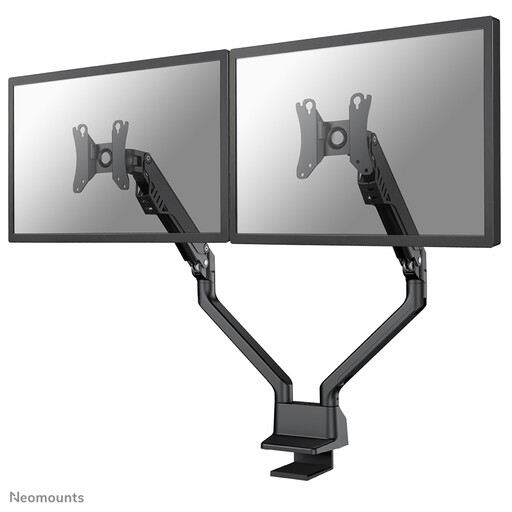 Image unavailable
Neomounts FPMA-D750DBLACK2, 10–32 inch, Gas Spring, Topfix, 180°-Stop
A dual gas-spring arm for anyone who often wants to adjust their screen positions. Check that each screen is within the specified range of 2–8 kg and uses VESA 75 × 75 or 100 × 100 mm.
Joybuy
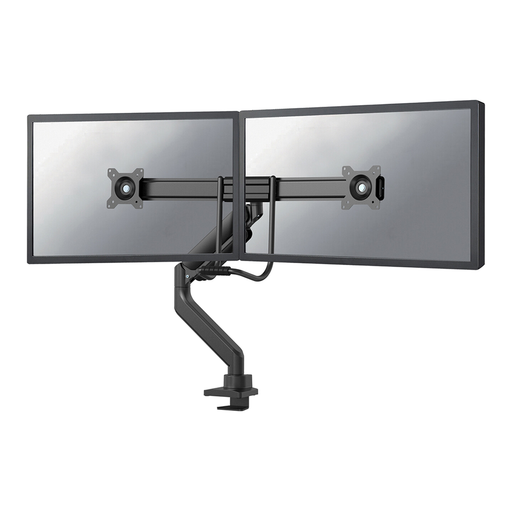 Image unavailable
Neomounts DS75-450BL2, 17–32 inch, Gas Spring, Topfix, 180°-Stop
A dual gas-spring arm with height and depth adjustment, according to the product description. Check that each screen is within the specified limit of up to 8 kg and uses VESA 75 × 75 or 100 × 100 mm.
Joybuy
Frequently asked questions
Will a monitor arm on its own help with bright light from a window?
No, a monitor arm won’t block bright light from a window by itself. Where possible, Arboportaal advises positioning your line of sight parallel to the window. If light continues to reflect or dazzle, Arboportaal also recommends moving further from the window and using suitable blinds or curtains.
How can I stop my script screen from sagging during a call?
First, check that the weight of each screen is within the range supported by the arm you’ve chosen. If the arm has an adjustable gas spring, set it according to the manual for your exact model; the Neomounts DS70-810BL2 manual includes instructions for adjusting it.
Am I legally required to have a dual monitor arm if I work from home for my employer?
The Dutch government information cited does not specify a dual monitor arm as a requirement. The Government of the Netherlands does, however, describe the responsibility to provide a safe and suitable home working environment. Check the Dutch workplace rules that apply to your situation.
What are my rights if the mount I bought online doesn’t fit or breaks too soon?
For an online consumer purchase, ACM ConsuWijzer says you generally have a 14-day cooling-off period from delivery, although exceptions may apply. Your statutory guarantee is separate from any manufacturer’s guarantee: according to ACM ConsuWijzer, a product must last as long as you could reasonably expect it to under normal use.


