
Vandaag of morgen in huis

Kwaliteit gegarandeerd

Welkomstaanbiedingen ontgrendelen: GRATIS bezorging | Tot 80% korting | Gratis 30 dagen JoyPlus-proefperiode
Download de app
Working with two screens boosts productivity, but it often leads to a cluttered desk and poor posture. Standard monitor stands take up a lot of space and are rarely adjustable to the correct height. A good dual monitor arm solves this, but the market is flooded with options that don't always live up to their promises.
Before making a purchase, it's important to know the common pitfalls. Many buyers fall for marketing claims and end up with a product that causes more frustration than convenience.
dual monitor arm only to discover that the mounting holes don't match those on your screens.A well-considered choice prevents these problems and ensures a tidy and ergonomic workspace.
To avoid buyer's remorse, there are a few technical specifications you should always check. These determine the stability, compatibility, and ease of use of your dual monitor stand.
The VESA standard is a universal measurement for the distance between the screw holes on the back of your monitor. The most common sizes are 75x75 mm and 100x100 mm. Check the specifications of both your monitor and the VESA monitor mount to ensure they match. You can usually find this information in your monitor's manual or by measuring the distance between the holes.
Every adjustable monitor arm has a maximum weight capacity per arm and is designed for a specific screen size (in inches). Do not exceed these limits. A monitor that is too heavy will cause the arm to sag and compromise stability. Weigh your monitors without their original stands and compare this to the mount's specifications.
A desk monitor mount for 2 monitors can be attached in two ways:
A good ergonomic monitor mount also offers full flexibility: tilt, swivel, rotation (pivot for a vertical screen orientation), and height adjustment. This allows you to position the screens exactly at eye level, which helps prevent neck and back pain. Also, look for a cable management system to keep cords neatly tucked away.
Based on functionality and specifications, we have selected a few options that suit different user profiles.
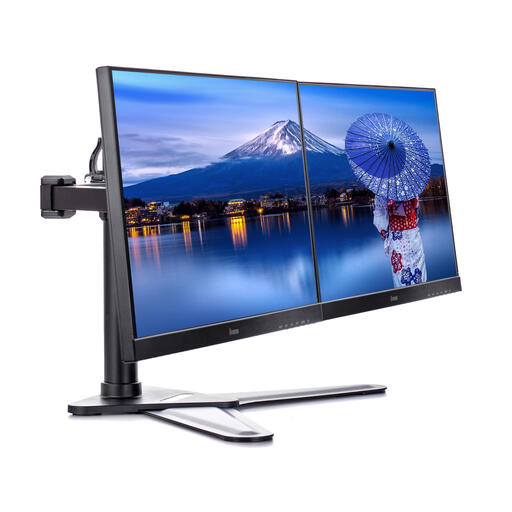
Why This Fits Their Persona: Ideal for remote workers, programmers, or gamers who need a robust and fully adjustable solution for two screens. This mount provides the stability and flexibility required for long and intensive work sessions.
The sturdy construction supports up to 10 kg per arm, preventing screen sag. The specifications clearly state VESA 75x75 and 100x100 compatibility, which eliminates the VESA mismatch pitfall.
Full ergonomic control (height, tilt, swivel, rotation) for two screens up to 30 inches. Built-in cable management system for a tidy desk.
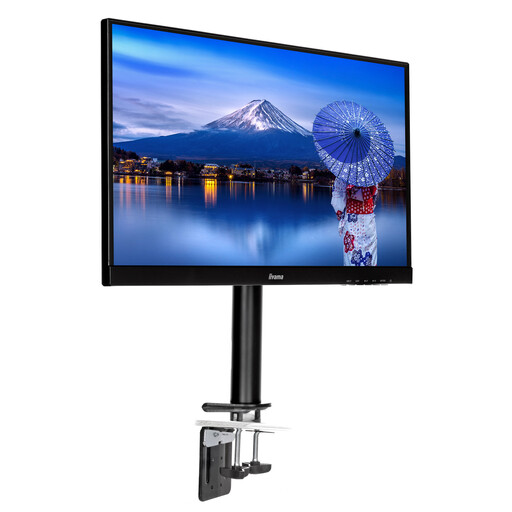
Why This Fits Their Persona: A practical first step for those looking to improve their workspace without immediately investing in a dual arm. Mount your primary screen for optimal ergonomics and keep the second one on its original stand. This instantly creates more desk space.
This single arm from a reputable brand has a high weight capacity (10 kg) and a reliable clamp. This avoids the "wobbly arm" pitfall and ensures a stable mount for your main monitor.
Frees up significant desk space and offers excellent adjustability for one monitor up to 30 inches. An affordable way to experience the benefits of a monitor arm.
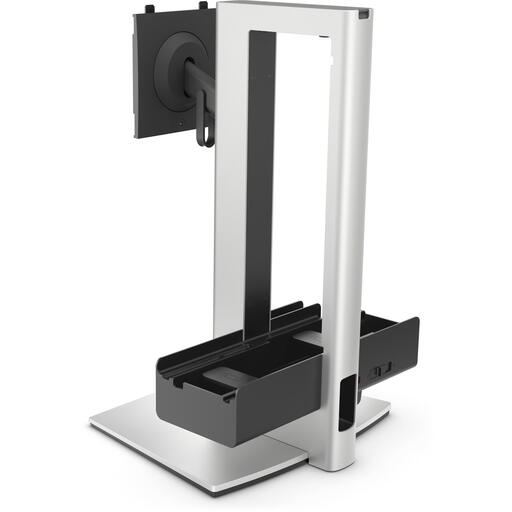
Why This Fits Their Persona: For users with a compatible Dell monitor who appreciate a sleek, integrated look. This monitor stand replaces the standard base and offers ergonomic benefits similar to an arm, but with a minimalist design.
As a manufacturer-provided stand, this product guarantees perfect compatibility and stability for the specified Dell monitors. This completely eliminates the risks of a VESA mismatch and instability.
Sleek design with integrated cable management and tool-less installation (Dell Quick Release). Offers height adjustment, tilt, and rotation for an ergonomic setup.
A tidy desk goes beyond just a monitor arm. Discover accessories that help you complete your workspace.
Most modern monitors are equipped with a VESA mount. You can recognize it by the four screw holes in a square pattern on the back of the screen. Sometimes these holes are hidden behind the standard stand, which you must first remove. Your monitor's manual will provide definitive information.
Installation is generally straightforward and usually takes less than half an hour. Most mounts come with a clear manual and all the necessary mounting hardware. The steps typically involve: attaching the clamp to the desk, assembling the arms, and finally screwing the screens onto the arms. It's helpful to have a second person, especially when mounting the screens.
Some higher-end monitor arms are equipped with a gas spring mechanism. This allows you to adjust the height and position of your monitor with minimal effort, often with just a single finger. This is especially useful if you regularly switch between sitting and standing work positions throughout the day or if different people use the same workstation.
