Start by looking at where your desk is positioned in relation to the window. Arboportaal recommends sitting with your line of sight parallel to the window, as a monitor arm won’t eliminate glare from daylight. Then choose arms that adjust independently if you want to position your email and calendar differently, or a more compact stand if desk space is limited. Check the weight and VESA pattern for both screens, and measure to make sure the desk mount will fit.
Who is a dual monitor arm suitable for?
Working beside a bright window
You keep two applications open, but want to adjust your line of sight or screen angle to suit the daylight. Arboportaal recommends sitting with your line of sight parallel to the window; then work out how much adjustment you need.
Calendar and email multitasker
You want to see both screens at once and position one differently from the other. So compare models with independently adjustable arms, such as the options mentioned from Neomounts and ACT.
Working at a shallow desk
You want to keep two screens without the mount or arm movement taking up too much space behind or on your desk. Measure the available space and check the mounting requirements for the specific model.
What should you look for in a dual monitor arm?
First, consider your desk position and line of sight in relation to the window. Then compare the screen adjustment options, compatibility with both monitors and the way the arm attaches to your desk.
| What to consider |
What should you check? |
Who is this most relevant to? |
| Window and line of sight |
Check where the desk and window are positioned, and whether both screens can be turned in the direction you want. |
If daylight makes the screens difficult to read, I want to get my line of sight right first; around 31% of consumers cite light exposure as their main buying concern. |
| Positioning screens separately |
Check whether the arms can be adjusted independently for height, depth and angle, or whether they move together. |
I want my email directly in front of me and to be able to angle my calendar differently beside it; around 25% of consumers say independent screen positioning is their main buying concern. |
| Weight and connections |
Check the weight and VESA pattern of each screen, and compare them with the limits for the exact model. |
With two existing screens, I want to know in advance whether they’ll both fit the arm; around 25% of consumers cite compatibility as their main buying concern. |
| Desk space and mounting |
Measure the desk thickness, available edge or cable grommet hole, and the space behind the screens. |
At a shallow desk, I want to leave enough room for the mount and screens; around 19% of consumers prioritise desk space and mounting. |
Buying pitfalls to avoid
-
Choosing based on screen size alone
A suitable screen size in inches doesn’t tell you whether the arm can support the weight of both monitors or is compatible with their VESA patterns.
Check the weight and VESA pattern of each screen, then compare them with the specifications for the exact model.
If a screen falls outside the model’s limits, you may need a different stand or mount.
-
Assuming adjustability will automatically eliminate glare
Arboportaal explains that glare depends on both the light entering the room and how your workspace is set up. An arm won’t change the light levels.
First consider your line of sight in relation to the window, then check whether the arms can position the screens to suit.
-
Checking the desk mount only after buying
Desk thickness and suitable mounting options vary by model, and the space available behind your desk can also limit where you can position it.
Measure your desk and check the installation instructions for the exact model before choosing.
An unsuitable clamp may mean you need a different mounting solution.
Brands and models to compare
Neomounts
The DS70-810BL2 is worth comparing if you want to position two screens independently and need to consider the space behind your desk.
- Neomounts lists gas spring adjustment, a 180° rotation stop and clamp or grommet mounting for the DS70-810BL2.
- The stated range is 1–9 kg per screen, with VESA 75 × 75 or 100 × 100 mm. Check these limits for both screens.
ACT
The AC8314 is a dual arm; the AC8312 is a separate model to compare if screen weight is an important factor.
- ACT specifies a maximum of 9 kg per screen for the AC8314.
- For the AC8312, ACT specifies a maximum of 16 kg per flat screen or 13 kg per curved screen. The stated mounting option has a maximum desk thickness of 50 mm; these limits don’t automatically apply to the AC8314.
Kensington
The SmartFit Space-Saving Dual Monitor Arm is designed for smaller workspaces; the One-Touch is a separate model with different adjustment options.
- Kensington specifies screens up to 27 inches and 8 kg for the Space-Saving version, with a swivel and tilt range of ±10°.
- For the One-Touch, Kensington specifies a maximum of 9 kg and VESA 75 or 100 mm. Compare the exact models and check that the stated adjustment options suit your screen set-up.
Ergotron
The LX Dual Side-by-Side Arm is a model to compare if you want to place two screens side by side.
- For the version reviewed, Ergotron specifies 3,2–9,1 kg per screen, VESA 75 × 75 or 100 × 100 mm, and a clamp for desk edges up to 66 mm thick.
- These specifications are for a specific version on the manufacturer’s US website. They don’t, on their own, tell you whether it’s available in the Netherlands.
Joybuy products for two screens
This Joybuy selection includes dual monitor arms and a separate stand for two screens. The models vary in their adjustment options, design and stated screen limits; also check how they’ll work with your desk and line of sight.
 No image available
DELL Dual Monitor Arm MDA20
Suitable for a two-screen set-up if you want to adjust the height and depth. The description states that it supports screens up to 27 inches.
Joybuy
 No image available
Neomounts DS60-425BL2 Monitor Arm 17-27" Space Saving
According to the description, the short upper arm is designed for positioning close to a wall. The stated limits are 17–27 inches and a maximum of 8 kg per screen, with VESA 75 × 75 or 100 × 100 mm. The arm can be tilted, rotated and swivelled.
Joybuy
 No image available
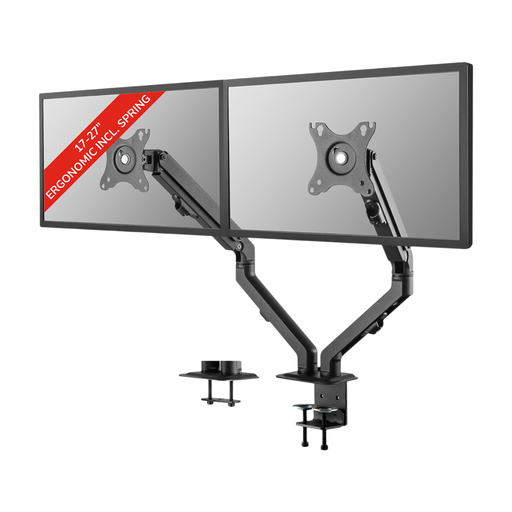
Neomounts FPMA-D650DBLACK Coil Spring
This dual arm lets you adjust screen angle, height and depth. The description specifies screens from 17–27 inches, up to 7 kg per screen and VESA 75 × 75 or 100 × 100 mm.
Joybuy
 No image available
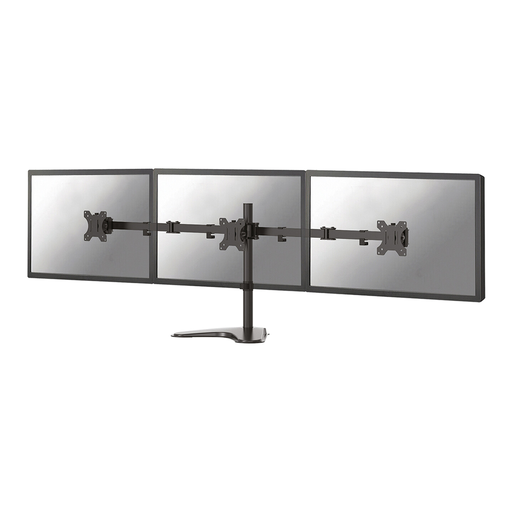
Neomounts FPMA-D550DDBLACK Monitor Stand 10-32"
An option if you want to adjust the height and depth of two screens manually. The description specifies screens up to 32 inches, a maximum of 8 kg per screen and VESA 75 × 75 or 100 × 100 mm; tilt, rotation and swivel are also listed.
Joybuy
 No image available
Floordirekt Monitor Stand for 2 Monitors, black
This stand is designed to position two screens side by side; the rotating side platforms let you adjust their angle. The width adjusts from 80 to 108 cm, and the stated fixed height is 10,4 cm.
Joybuy
Frequently asked questions
Can a monitor arm eliminate glare from a bright window?
Not on its own. Arboportaal recommends sitting with your line of sight parallel to the window; if glare persists, you may need to reposition your workspace or use suitable blinds. An arm only helps you position the screens within that set-up.
How do I check whether the arm will fit my desk and monitors?
For each monitor, compare its weight and VESA pattern with the limits for the exact model. Also measure your desk thickness and check that a clamp or grommet mount will fit; mounting limits vary by model.
What should I do if a screen rises or sinks after installation?
For the AC8314, ACT recommends adjusting the gas spring tension with the Allen key: turn towards plus if the screen sinks, and towards minus if it rises. For another model, follow its accompanying instructions.
Who can help if a product is faulty, and what about the guarantee in the Netherlands?
When you buy as a consumer, the seller must offer a solution if the product is faulty. According to the Dutch government, there is no fixed statutory guarantee period in the Netherlands; a manufacturer’s guarantee is in addition to your statutory rights.
Is a dual monitor arm required for screen-based work?
No. Arboportaal doesn’t say that you have to use a dual monitor arm specifically. For applicable employee workstations, it does set out requirements covering things such as screen adjustability and avoiding glare; the employer is responsible for providing a safe and healthy workspace.


