First decide whether you want to make a freehand sketch or need an editable CAD drawing. Then check whether the software you need runs on a standalone tablet or computer. A pen display is a good choice if you want to draw directly on the screen using software on a connected computer; a screenless tablet uses the monitor you already have. If window glare is a problem, Arboportaal recommends adjusting your workstation: a coating or stated screen brightness alone does not guarantee good visibility.
Who is this guide for?
Sketching by a bright window
You want to draw an initial floor plan directly on a screen and need to consider reflections and the position of the window. For screen-based work, Arboportaal recommends positioning your line of sight parallel to the window.
CAD drafter working with DWG files
You want to turn a sketch into an editable drawing, so you check the software and file workflow first. Autodesk describes various features, including viewing, measuring and editing 2D drawings.
Drawing at a desktop computer
You already have a computer and are comparing a pen display with pen input on a screenless tablet. With a screenless tablet, you look at the monitor as you draw.
What should you look for when choosing?
Standalone tablet with pen
Choose this if: you want to sketch directly on the screen without a connected computer, and the app you need is available for the tablet platform.
Bear in mind: app features, pen compatibility and what’s included in the box; screen specifications don’t predict how easy your own setup will be to see.
Pen display for a computer
Choose this if: you want to see the line directly beneath the pen tip and your floor-plan software runs on your computer.
Bear in mind: a pen display doesn’t replace your computer. Check the connections and consider how window light will affect your chosen screen position.
Screenless drawing tablet
Choose this if: you already have a suitable computer, monitor and drawing programme, and want to look at the monitor as you draw.
Bear in mind: you don’t draw on the image itself; the monitor and any reflections remain important factors.
| Consideration |
What to look for when buying |
Who should prioritise this? |
| Visibility in daylight |
Assess the screen from your drawing position; check the coating and stated brightness of the exact model. Arboportaal recommends positioning your line of sight parallel to the window. |
If I want to see lines clearly by the window, I’ll focus on reflections and screen position; around 36% of consumers prioritise visibility in daylight. |
| Sketching or editing CAD |
Check that the app has the features you need for creating, editing, measuring, using layers and exchanging files, and find out what subscription terms apply. |
If you need to edit DWG floor plans, you’ll want to know in advance whether the app you choose is suitable; around 29% of consumers prioritise an editable CAD workflow. |
| Work area and setup |
Compare the size of the exact model and decide whether you want to draw directly on the image or use your existing monitor. |
If I need space for the layout and notes, I’ll weigh up the work area against the desk space it takes up; around 21% of consumers prioritise drawing space and setup. |
| Complete working setup |
Check which pen and cables are included, and whether you’ll need a computer or paid software features. |
If you’re comparing the complete setup rather than just the tablet, you’ll want to know in advance which extra components or software you need; around 14% of consumers prioritise the overall setup. |
Common buying mistakes
-
Focusing only on anti-glare features or brightness
A coating or stated brightness doesn’t prove that the screen will be easy to see in the light by your window; the angle of the light and screen position still matter.
View the screen from the position you plan to draw in and, if possible, try out the setup. Arboportaal recommends, among other things, positioning your line of sight parallel to the window and considering blinds or shades.
-
Confusing a pen display with a standalone tablet
A pen display is designed to be used with a computer. With a screenless tablet, you also need to look at a separate monitor.
Check where the software you need runs, which devices you’ll need to connect and which screen you’ll look at while drawing.
-
Assuming pen support means a pen is included
Apple lists support for Apple Pencil models with the iPad Air, but the stated box contents don’t include a Pencil.
Check compatibility and the contents of the exact model before you order.
-
Assuming a sketching app offers full CAD editing
Autodesk distinguishes between mobile features for viewing and measuring, and options for creating and editing 2D drawings and working with layers.
Check that the current app version and terms suit your DWG editing and file-sharing needs.
Brands to consider
Apple
Standalone iPad Air models for sketching directly on a portable screen with a suitable iPad app.
- For the 13-inch iPad Air, Apple lists an anti-reflective coating, 600 nits of stated brightness and support for Apple Pencil Pro and Apple Pencil (USB-C).
- These specifications don’t tell you how easy it will be to see your drawing next to your window. The listed box contents don’t include a Pencil.
Samsung
The Galaxy Tab S11 series is a range of standalone Android tablets with an S Pen for sketching.
- Samsung describes the S Pen as suitable for writing and drawing, and lists compatibility with the Galaxy Tab S11 and S11 Ultra.
- Check that the app you want and the exact tablet-and-pen combination are suitable for your floor-plan work.
Wacom
Wacom offers screenless Intuos tablets for use with a computer, and Cintiq pen displays for drawing on screen.
- According to Wacom, the wired Intuos Medium CTL-6100K-B uses USB and has a battery-free pen. Wacom’s product specifications list the Cintiq 16 DTK168K0B as having a 2.5K screen with an anti-reflective coating.
- The Intuos needs a separate monitor. The Cintiq’s coating doesn’t guarantee clear visibility in bright window light.
Huion
Kamvas pen displays are designed for drawing directly on screen with a connected computer.
- Huion lists the Kamvas 16 (Gen 3) as having a 15.8-inch screen with 2560 × 1440 pixels and nano-etched glass.
- These manufacturer specifications aren’t an independent measure of visibility in bright daylight.
XPPen
Artist Pro pen displays are an option for a drawing setup connected to a computer.
- XPPen lists the Artist Pro 16 (Gen 2) as having a built-in fold-out stand and a pen with 16.384 stated pressure levels.
- The number of pressure levels alone doesn’t indicate an advantage for drawing straight floor-plan lines or seeing the screen next to a window. Check your setup and software.
Drawing tablets and tablets at Joybuy
This selection includes everything from standalone tablets with a pen to pen and writing tablets. Check whether each model’s screen, connection method and required drawing app suit your floor-plan work.
 No image available
Wacom MovinkPad 11 – standalone drawing tablet, 11.45-inch, 8GB RAM, 128GB storage, Android 14, Wacom Pro Pen 3
A standalone tablet for sketching directly on screen without a computer.
11.45-inch IPS screen, 8GB RAM, 128GB storage and Android 14.
View at Joybuy
 No image available
Wacom Intuos Pro Large – Pro Pen 3, 8,192 pressure levels, Bluetooth and USB-C
For pen input with a computer and existing monitor; according to the product information, this tablet doesn’t have its own drawing screen.
Active area of 349 × 195 mm, with Bluetooth and USB-C.
View at Joybuy
 No image available
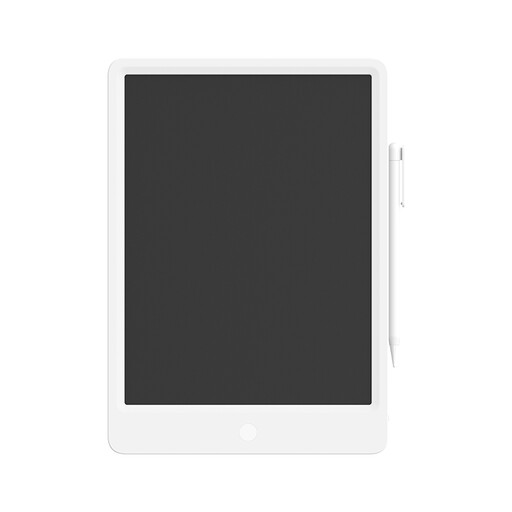
Mi LCD Writing Tablet 13.5-inch Digital – stylus, reusable
An LCD writing tablet with a stylus for simple freehand sketches.
13.5-inch writing surface.
View at Joybuy
 No image available
TECLAST ArtPad Pro – 12.7-inch 2K screen, 20GB (8GB + 12GB virtual) RAM, 256GB storage, stylus
For sketching directly on a tablet screen with a stylus.
12.7-inch 2K screen and 256GB storage; the stated RAM consists of 8GB plus 12GB of virtual memory.
View at Joybuy
 No image available
iFLYTEK AINOTE 2 – 10.65-inch E-Ink tablet, 4.2 mm
For handwritten concept notes with a stylus; check that the drawing features suit the way you create floor plans.
10.65-inch E-Ink screen and a stated thickness of 4.2 mm.
View at Joybuy
Frequently asked questions
Does an anti-reflective screen always help by a sunny window?
No. A stated coating doesn’t guarantee good visibility in your lighting conditions. If daylight causes reflections, Arboportaal recommends, among other things, positioning your line of sight parallel to the window, sitting further away or using blinds or shades.
Can I edit a DWG floor plan on a tablet without a computer?
That depends on the app and the features you need. Autodesk distinguishes between mobile viewing and measuring, and features for creating and editing 2D drawings and working with layers. Check the current app terms too.
What do I need to connect to draw with a screenless Wacom Intuos Medium?
For the wired Intuos Medium CTL-6100K-B, Wacom specifies a USB connection to a Mac or PC. You look at the connected monitor as you draw; also check that your drawing or CAD software supports the pen input you need.
What components or software might I still need?
Check whether a compatible pen is included and whether you’ll need a computer or paid software features. Apple doesn’t list an Apple Pencil in the stated iPad Air box contents; Autodesk distinguishes free mobile features from more advanced CAD options.
When buying online in the Netherlands, am I always entitled to exactly two years’ legal guarantee and a 14-day cooling-off period?
No. According to the Dutch government, there is no fixed statutory guarantee period in the Netherlands: you’re entitled to a product that works properly, and the retailer is your point of contact. For eligible distance purchases from a business, a 14-day cooling-off period applies in many cases, but there are exceptions.


