
Artists with limited desk space
If you already have a screen, compare the overall dimensions of a compact tablet with the space available beside your keyboard and reference images. XPPen and Wacom list the overall dimensions for specific models.


If you already have a suitable computer and want to save desk space, compare compact screenless drawing tablets by their overall dimensions as well as their active drawing area. If you want to see each brushstroke directly beneath your pen, consider a connected pen display or a standalone tablet; a pen display does not automatically work without a computer. Before buying, check the connection, compatibility and included accessories.
If you already have a screen, compare the overall dimensions of a compact tablet with the space available beside your keyboard and reference images. XPPen and Wacom list the overall dimensions for specific models.
If you want to see brushstrokes directly beneath your pen, compare a connected pen display with a standalone tablet. Wacom describes the One 12 as a pen display that connects to a compatible computer; Samsung says the Galaxy Tab S10 Lite comes with an S Pen.
If you already own an iPad, make sure your chosen Apple Pencil is compatible with your exact iPad model. Apple lists compatibility for each Pencil version.
| What to consider | What to look for | Who is this important for? |
|---|---|---|
| Desk space | Measure the available space and compare it with both the overall dimensions and the active drawing area. | I want to keep space free for my keyboard and animal photos. Around 33% of consumers prioritise keeping their workspace as small as possible. |
| Pen control | Check the pen features of the exact model and whether your drawing app supports them. | When painting fur, outlines and shading, I want to know how the pen can control my brushstrokes. Around 27% of consumers prioritise this level of control. |
| Drawing on screen | Understand the difference between a screenless tablet, a connected pen display and a standalone tablet. | I want to see each stroke directly beneath the pen, and am happy to have a screen setup on my desk. Around 20% of consumers prioritise drawing on screen. |
| Equipment you already own | Note down the exact computer or iPad model, its ports and what comes in the package you choose. | I want to make use of the equipment I already own and avoid choosing a pen or connection that isn’t compatible. Around 20% of consumers start by reusing their existing equipment. |
The active area doesn’t tell you how much space the entire device takes up. With a pen display, you also need to allow for cables and possibly a power supply.
Measure the available desk space and compare it with the model’s overall dimensions, allowing room for connections too.
A pen display such as the Wacom One 12 needs to be connected to a compatible device. A separate Apple Pencil is designed for compatible iPads.
Check the exact device model, the available ports and what’s included with the version you choose.
Depending on your setup, you may also need a compatible computer or iPad, pen, cable or power adapter.
A stated number of pressure levels is a model specification, but it doesn’t prove how the pen will work with your drawing app or painting style.
Alongside the pen specifications, check whether your drawing app supports the features you want.
Wacom offers screenless pen tablets for use with a computer, as well as the Wacom One 12, a connected pen display.
The screenless Deco mini7 is an option for a computer setup, with a compact active drawing area and customisable shortcut keys.
The screenless Inspiroy 2 S H641P is a compact option for drawing on a connected device.
An Apple Pencil is an option if you already own a compatible iPad or are choosing an iPad setup.
Samsung describes the Galaxy Tab S10 Lite as a standalone tablet supplied with an S Pen.
This selection includes compact screenless drawing tablets for computers, a standalone tablet with a pen and an Apple Pencil for a compatible iPad.
 No image available
For drawing on a computer, with a compact active drawing area.
Active area: 152 × 95 mm. Battery-free pen with 4.096 pressure levels and four ExpressKeys.
 No image available
For painting on a computer, with pen control for pressure and tilt.
Active drawing area: 187 × 105 mm. The description lists Bluetooth, USB-C and four customisable ExpressKeys.
 No image available
For digital drawing on an existing computer setup, with a battery-free pen.
Active area: A6. The description lists Bluetooth 5.1 and USB-C.
 No image available
For drawing and sketching on a tablet screen with the included pen.
Screen: 12,1 inch, 2.5K. Memory: 8 GB RAM. Storage: 256 GB.
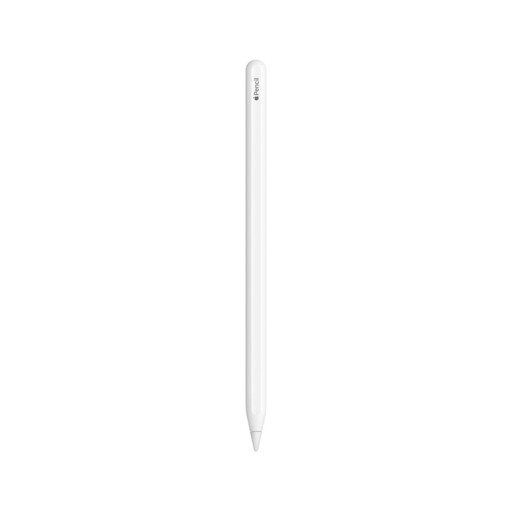 No image available
For drawing, sketching and colouring on a compatible iPad model.
The description lists magnetic attachment, pairing and charging. Works only with compatible iPad models.
No. The Wacom One 12 is a pen display that needs to be connected to a compatible device. Wacom says the computer port must support video output and that additional power may sometimes be needed. Also check the version you choose and the included accessories.
Check whether the buttons on your chosen model can perform the commands you use, and whether your drawing app supports those settings. XPPen lists eight customisable shortcut keys for the Deco mini7; Huion lists six buttons and a scroll wheel for the Inspiroy 2 S.
According to the Dutch government, the seller must offer a solution if a product is faulty. For distance purchases, a 14-day cooling-off period applies in many cases, with some exceptions. Check the terms that apply to your specific purchase.
That depends on whether the product falls under specific EU product rules; CE marking does not automatically apply to every accessory. Check the product information for the version in question. A CE mark is not, in itself, an assessment of painting performance.