
Vandaag of morgen in huis

Kwaliteit gegarandeerd

Welkomstaanbiedingen ontgrendelen: GRATIS bezorging | Tot 80% korting | Gratis 30 dagen JoyPlus-proefperiode
Download de app
A wireless keyboard and mouse set is a great choice for working from home, office work and studying. It means fewer cables on your desk, and you can use the keyboard and mouse together with ease. However, some pitfalls only become clear after a few weeks: an unfamiliar layout, loud clicking or a mouse that doesn’t feel comfortable in your hand.
The points below will help you tell useful features apart from marketing claims and choose a set that suits your everyday needs.
A full-size keyboard isn’t automatically right for every user. The Trust Trezo Comfort has a US/QWERTY keyboard layout. This means that the position and shape of the Enter and Shift keys, as well as some punctuation marks, may differ from a UK layout.
Before buying, check:
This layout can be practical for English-language work, programming or anyone used to QWERTY. If you touch-type on a UK layout, allow yourself a little time to get used to it.
A quiet keyboard usually uses membrane keys or dampened switches. This reduces typing noise, but typing will still make some sound. With a quiet keyboard and mouse set, the aim is generally to make keystrokes softer and reduce clicking.
According to Trust’s product information, the Trezo Comfort has soft, dampened keys and mouse buttons. This can be useful in a shared workspace, during video calls or when someone else is working in the same room. The manufacturer describes it as a quiet set; treat this as a product claim by Trust, rather than a universal measurement.
A battery life of several months sounds appealing, but it’s also important to check how the set connects. A wireless keyboard and mouse may use:
The Trust Trezo Comfort uses a 2.4GHz nano receiver with a stated range of up to 10 metres. According to the product specifications, the keyboard battery lasts up to 48 months and the mouse battery up to 12 months. These are stated usage figures; actual battery life depends on use, battery type and conditions.
Do you work with figures, spreadsheets or administrative software? Choose a keyboard with a numeric keypad. A compact model saves space, but may be less practical for everyday number entry.
The Trust Trezo Comfort is a full-size model with a numeric keypad. According to the specifications, the keyboard measures 440 × 140 × 25 millimetres. Measure your desk space beforehand, especially if you also use a monitor stand or keep documents beside your keyboard.
A keyboard with a wrist rest can create a more comfortable transition between your desk and the keyboard. It doesn’t guarantee a comfortable working posture, though. Position the keyboard so your shoulders stay relaxed and your wrists aren’t held at a sharp upward angle for long periods.
The Trezo Comfort has an integrated wrist rest and low-profile, quiet keys. This makes it suited to office and home use, rather than to users looking for a mechanical feel or hot-swappable switches.
A mouse should suit your hand, working pace and preferred style of movement. DPI determines cursor sensitivity: a higher value moves the pointer further with the same hand movement. For documents and office software, an adjustable sensor is often enough; a high DPI isn’t automatically useful.
Also check:
When choosing a complete set, it’s worth considering the keyboard and mouse together. A good keyboard won’t make up for a mouse that feels too small or too heavy.
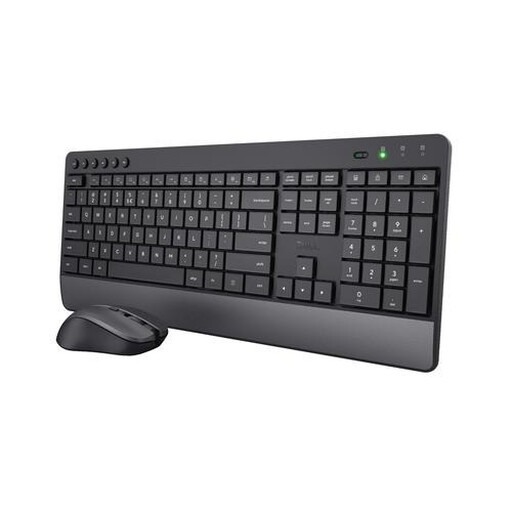
Why it suits this user: This complete set combines a full-size US/QWERTY keyboard with a numeric keypad and a wireless mouse. It’s a practical choice for people working from home and students looking for an all-in-one solution.
The product information clearly states the US/QWERTY layout, 2.4GHz receiver and membrane keys. This lets you check in advance whether the set suits your PC and working style.
Integrated wrist rest, quiet keys and mouse buttons, numeric keypad, adjustable mouse sensitivity of 1000/1400/1800 DPI and a stated keyboard battery life of up to 48 months.
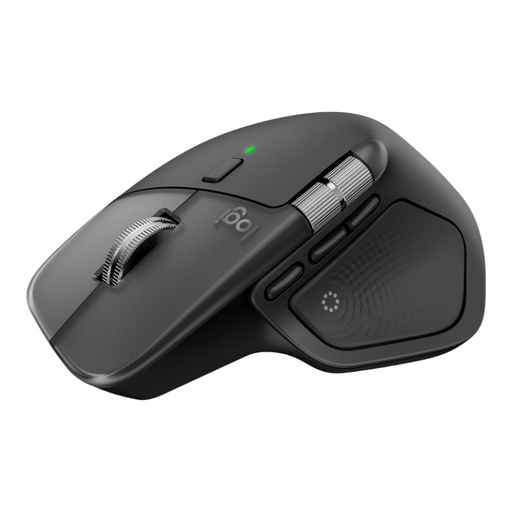
Why it suits this user: A good fit for people who regularly switch between devices and use extra mouse functions for office work, large spreadsheets or creative software.
You’re not limited to a basic two-button mouse: the specifications list eight programmable buttons, Bluetooth and a Logi Bolt USB-C receiver.
Connects to up to three devices, USB-C charging, a horizontal scroll wheel and a stated battery life of up to 70 days per full charge.
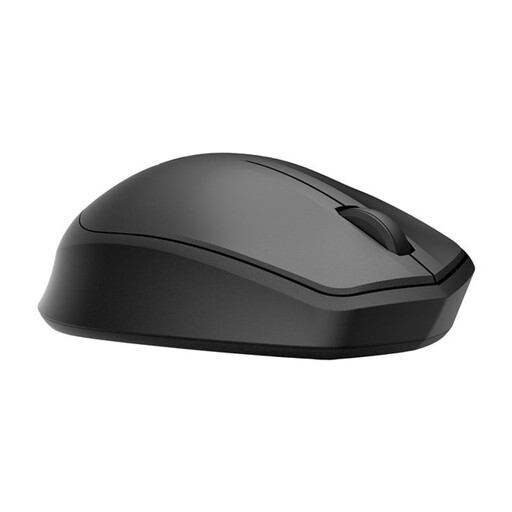
Why it suits this user: A useful addition for anyone who already has a keyboard and is mainly looking for a quiet wireless mouse for the office, working from home or a shared space.
The product specifications list a 2.4GHz receiver, a range of up to 10 metres and a specific quiet-click feature. Check that your computer has a free USB-A port.
Ambidextrous design, 1200 DPI optical sensor, stated battery life of up to 18 months and, according to HP, up to 90% noise reduction from the left and right buttons.
We’ve put together a complete, up-to-date list of products that meet these strict selection criteria and current European safety regulations.
With a set that uses a 2.4GHz nano receiver, you’ll usually just need a free USB port. According to the product information, the Trust Trezo Comfort is plug-and-play: insert the batteries, plug the receiver into a USB-A port and wait for your operating system to recognise the devices. Check in advance whether your laptop has USB-C ports only; you may need a suitable adapter.
It varies by model and usage. The stated battery life for the Trust Trezo Comfort is up to 48 months for the keyboard and up to 12 months for the mouse. These aren’t guaranteed figures for every user. Frequent typing, heavy mouse use and leaving the mouse switched on can all shorten battery life.
Yes, provided the keys and mouse buttons are dampened and the wireless connection remains stable within its stated range. Also consider your microphone: a quiet mouse prevents clicking noise at the source, but won’t completely eliminate sound that has already been picked up by a microphone. For shared workspaces, practical things to consider include a quiet typing feel, a comfortable mouse shape and an easily accessible receiver.
