
Vandaag of morgen in huis

Kwaliteit gegarandeerd

Welkomstaanbiedingen ontgrendelen: GRATIS bezorging | Tot 80% korting | Gratis 30 dagen JoyPlus-proefperiode
Download de app
A wireless gaming headset gives you more freedom to move while gaming, chatting with friends and watching films. But a long battery life or an impressive range of sound modes doesn’t automatically mean a headset is right for your setup. For PC, PS5, PS4 and Nintendo Switch in particular, connectivity, microphone quality and compatibility are crucial.
The main pitfalls to watch out for:
A 2.4GHz gaming headset usually uses a USB dongle. This is convenient for PCs and many consoles, as it connects directly to the supplied receiver. Check whether the dongle supports USB-A, USB-C or both.
A Bluetooth gaming headset is more versatile for phones, tablets and laptops. Bluetooth 5.3 or Bluetooth 6.0 tells you which generation of Bluetooth is used; it doesn’t guarantee lag-free gaming. For competitive games, a dedicated wireless dongle is often the more sensible choice.
You should also check platform compatibility:
A headset with a long battery life is especially handy if you don’t want to charge it all the time. Check the difference between the stated battery life over Bluetooth and over 2.4GHz. According to its product description, the HyperX Cloud III S offers up to 120 hours in 2.4GHz mode and up to 200 hours over Bluetooth. These figures apply to separate usage modes; they don’t guarantee that combined battery life.
Charging options matter too. USB-C is practical these days, especially if you already have a suitable cable for other devices. Also check whether you can use the headset while it’s charging; this information should be in the manual or on the product page.
For long sessions, memory foam ear cushions, an adjustable headband and a suitable weight are important things to check. The HyperX Cloud III S weighs 340 grams according to its listed specifications and has memory foam in the headband and ear cushions. This may be comfortable for some users, but fit is a personal thing.
A detachable microphone is handy if you also want to use the headset as regular headphones when you’re out and about. Check:
Surround sound can help you distinguish the direction sounds are coming from, but how well it works depends on the game, platform and software. According to HyperX’s own product information, the Cloud III S offers DTS Spatial Audio with virtual 3D sound on computers. Treat this as a feature to check, rather than a guarantee that it will work with every game.
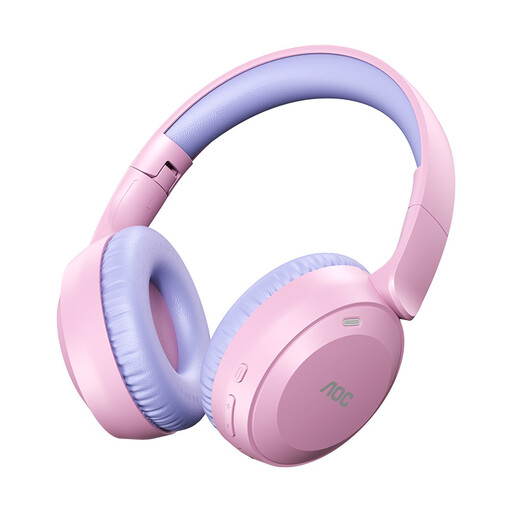
Why it suits this user: This model is aimed at anyone looking for lightweight Bluetooth over-ear headphones for gaming, music and everyday use. The product title states up to 75 hours of playback and a weight of 182 grams.
The stated battery life and Bluetooth 6.0 specification make the key usage details clear. However, check first whether Bluetooth is suitable for your particular console.
Lightweight design, Bluetooth 6.0 according to the product title, and stated battery life of up to 75 hours.

Why it suits this user: This wireless headset for PC is designed for people who use several devices. According to the product description, it works with PC, PS5, PS4, Nintendo Switch, Mac, phones and Bluetooth devices.
With both 2.4GHz and Bluetooth, you won’t need a separate headset for every device. Check which connection is recommended for each platform.
Up to 120 hours over 2.4GHz and up to 200 hours over Bluetooth according to HyperX; detachable 10mm boom microphone, 53mm drivers and memory foam ear cushions.
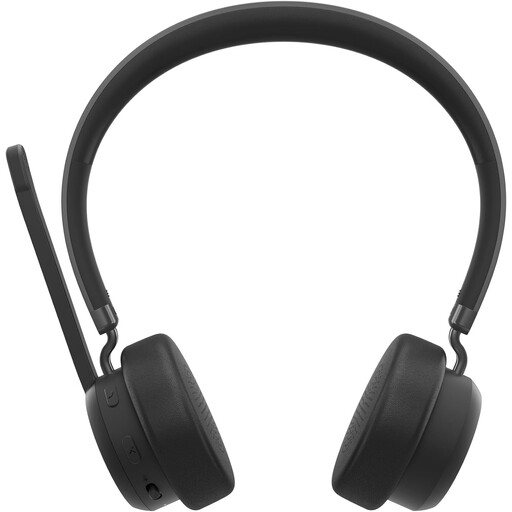
Why it suits this user: According to Lenovo, this over-ear model is designed for calls and music. It’s a good fit for anyone looking for a headset for gaming, working from home and general multimedia use.
The specifications list Bluetooth 5.3, a range of up to 30 metres and a foldable microphone. This makes the product’s limitations clearer than those of a model with only broad marketing claims.
Up to 60 hours of playback, three microphones according to the product specifications, and a weight of 137 grams.
We’ve put together a complete, up-to-date list of products that meet these strict selection criteria and current European safety requirements.
It depends on the model. A USB dongle connected via USB-A or USB-C is often more convenient than direct Bluetooth, but always check the manufacturer’s list of supported platforms. The HyperX Cloud III S lists support for PS5, PS4 and Nintendo Switch. For other models, Bluetooth may be intended mainly for use with a PC, phone or tablet.
Not in every situation, but 2.4GHz via a USB receiver is often designed to provide a direct, low-latency connection. Bluetooth is more versatile and suitable for mobile use. For multiplayer games with voice chat, it’s a good idea to check which connection the manufacturer recommends for gaming.
Battery life varies considerably between models and connection modes. As well as the stated playback time, check the charging port, charging time and whether you can keep listening with a wired connection. Use the headset at a moderate volume, charge it with a suitable cable and store it somewhere dry. This helps limit unnecessary wear to the battery, ear cushions and microphone.
