If you often need your script and research side by side, start by looking at a 34-inch ultrawide monitor. If desk space is limited, a 27-inch QHD monitor may be a better fit. If you mainly read long scenes and transcripts, also consider a 3:2 screen with extra vertical pixels. Whatever size you choose, try your own editor layout and text scaling, and check that the connections and adjustability suit your workspace.
Who is this choice relevant to?
Writer who keeps research beside the script
You keep an editor and, for example, a transcript or research document open at the same time, and want enough usable width for both windows. Microsoft Support explains how to snap windows side by side in Windows.
Writer working on long scenes
You read and edit a lot of continuous text, so vertical space and comfortable text scaling matter more to you than the widest possible window layout. BenQ specifies that the RD280U has a 3:2 screen with 3840 × 2560 pixels.
Writer using a shared desk
You move between workstations or laptops and want the screen size, stand and connections to suit your desk and computer. Arboportaal outlines considerations and requirements for display-screen work.
What should you look for?
34-inch ultrawide
Choose this if: you usually want to see your script and research in separate windows at the same time, and have enough desk space.
The trade-off: extra width does not automatically mean more vertical lines of text; connections and features vary by model.
27-inch QHD
Choose this if: you have less desk space or only occasionally place your editor beside your research.
The trade-off: you can use two windows, but together they have fewer horizontal pixels than on a 3440 × 1440 screen.
3:2 with extra vertical pixels
Choose this if: reading long scenes, transcripts and notes one after another matters more than maximum width.
The trade-off: a 3:2 screen is narrower than a 21:9 screen; BenQ positions the RD280U’s specialist features for programming, not specifically for scriptwriting.
| Consideration |
What should you check? |
Who is it for? |
| Room for two windows |
Test your editor and source window at your preferred text size. Dell lists 3440 × 1440 for the P3425WE and 2560 × 1440 at 27 inches for the P2725D. |
If you want to keep your script and transcript readable at the same time while writing, usable width matters a lot; around 36% of consumers prioritise space for two windows. |
| Reading long texts |
Compare the width of your script column with the number of visible lines at your usual text size. BenQ specifies 3840 × 2560 pixels and a 3:2 aspect ratio for the RD280U. |
If you read lots of continuous scenes or transcripts, you’ll want to be able to edit the text at a comfortable size; around 29% of consumers give long texts top priority. |
| Fit and adjustability |
Measure your desk and viewing space, and check the stand adjustments on the exact model. Arboportaal outlines considerations for display-screen work. |
If you work at a shared desk, the screen needs to fit your available space and be easy to position correctly; around 21% of consumers prioritise how well it fits their workspace. |
| Connecting devices and switching between them |
Check the video connection, charging capacity and any KVM features on the specific model. Dell lists up to 90 W USB-C power delivery for the P3425WE; Philips lists Smart KVM for the 34B2U3600C/00. |
If you switch between laptops or computers, you’ll want to know which features your devices can actually use; around 14% of consumers prioritise connections and switching. |
Common buying mistakes
-
Comparing screen size alone
Ultrawide and 3:2 screens arrange their pixels differently. One may give you more room for side-by-side windows, while the other has more vertical pixels for long documents.
Compare the aspect ratio and resolution with your own editor layout, not just the screen size in inches.
-
Assuming every USB-C port carries video and charges your laptop
USB-C features vary by monitor model. Video, laptop charging and connecting peripherals through a hub are not necessarily all supported by the same port.
Check the video and charging capabilities of both your laptop and the exact monitor model, including its specified charging capacity.
-
Confusing an extended warranty with your statutory rights
An extra warranty product does not replace your statutory rights. ACM ConsuWijzer distinguishes between the statutory guarantee and additional cover.
Check what cover an additional product actually provides, and keep it separate from your statutory rights.
Relevant brands to consider
Dell
The Pro Plus models reviewed include a 27-inch QHD screen and a 34-inch ultrawide model with a USB-C hub.
- Dell lists 2560 × 1440 pixels for the P2725D and up to 90 W USB-C power delivery for the P3425WE.
- The 34-inch model’s features do not automatically apply to the P2725D; check the connections on the exact model.
Philips
The business-focused 34B2U3600C/00 reviewed is an ultrawide model with features for switching between sources.
- Philips lists 3440 × 1440 pixels, a VA panel, Smart KVM and USB-C to RJ45 for this model.
- These are model specifications and product claims from Philips, not independent measurements of their usefulness for scriptwriting.
LG
The 34U650A-B reviewed is a 34-inch UltraWide model with an IPS panel and USB-C.
- LG lists a 21:9 aspect ratio and a resolution of 3440 × 1440 pixels.
- LG notes that images showing applications in use at the same time are simulated; try your own editor layout and text size.
BenQ
The RD280U offers a different screen aspect ratio for anyone who values long documents over maximum ultrawide space.
- BenQ specifies a 28.2-inch screen, a 3:2 aspect ratio and 3840 × 2560 pixels for the RD280U.
- BenQ positions its specialist reading and coding features for programming, so their usefulness for writing a documentary script has not been established.
Joybuy monitors for writing
This selection is mainly made up of larger screens for viewing your script and research side by side, with a 27-inch option for a more compact workspace too.
 No image available
LG UltraWide 34U601B-B WQHD VA monitor, 34-inch
A 34-inch option to consider if you want to arrange your script and research side by side.
The product name lists WQHD, a VA panel, a curved screen with 1800R curvature and 120 Hz.
View at Joybuy
 No image available
Philips 34B2U5900C/00 34-inch dual-mode business monitor
A 34-inch model to consider if you’re looking for a curved screen with dual-mode functionality for work.
The product name describes a curved business monitor with dual-mode functionality.
View at Joybuy
 No image available
INNOCN CB27U1 27-inch 4K UHD monitor
A 27-inch alternative to consider if you want to show two sources on one screen and need something smaller than a 34-inch monitor.
The product name lists 3840 × 2160 pixels, IPS, 120 Hz, PIP and PBP, plus USB-C 90 W PD.
View at Joybuy
 No image available
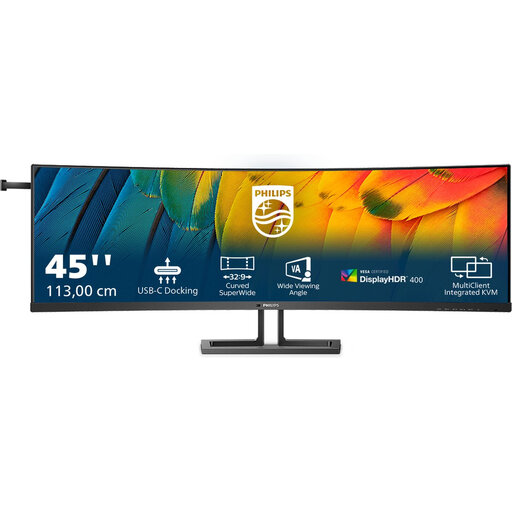
Philips 45B1U6900C/00 44.5-inch business monitor
Consider this larger model only if you have enough desk width for a 44.5-inch screen.
The product name lists 5120 × 1440 pixels, a 32:9 aspect ratio and HDMI and DisplayPort connections.
View at Joybuy
 No image available
Philips E Line 346E2CUAE/00 34-inch monitor
A 34-inch model to compare if you’re looking for a spacious screen for your editor and source material.
The product name lists 3440 × 1440 pixels and an LCD screen.
View at Joybuy
Frequently asked questions
Do I need a monitor with a built-in split-screen feature to use two windows?
Not necessarily if you use Windows: Microsoft Support explains how to snap two windows side by side and drag the divider between them. Do check that your editor remains usable at the chosen window width; this does not tell you how the feature works on other operating systems.
How should I set up a monitor for long writing sessions?
Check that you can position and adjust the screen to suit you, reduce distracting reflections and take regular breaks from screen work. Arboportaal outlines requirements for employees who use a display screen for more than two hours a day; this does not guarantee that any particular model will prevent discomfort.
Should I buy an extended warranty when ordering a monitor online?
No, an extended warranty is not a condition of your statutory rights. ACM ConsuWijzer explains the statutory guarantee; for online consumer purchases, the Dutch government generally provides a 14-day cooling-off period. The terms and how they apply depend on your purchase.
Which rules are relevant when buying and using a monitor in the Netherlands?
For electronic displays, the European Commission explains the energy label; the Dutch government provides information about CE marking for products sold in the EU. Arboportaal outlines requirements for certain types of display-screen work. This general information does not, without a separate check, confirm that a specific product listing has the correct marking or complies with the requirements.


