Start with the navigation and shortcut keys you use in your writing software to move between scenes and revision notes. A scissor mechanism may be a good fit for typing in a shared space, while a different shape or configurable keys may be worth considering if workspace comfort or repetitive editing tasks are your priorities. Before buying, check the layout, software compatibility and exact model variant.
Who is this buying guide for?
Screenwriter who revises frequently
Writes long passages and regularly jumps back to earlier scenes or notes. The presence and position of navigation keys matter more than having the smallest possible keyboard. RTINGS.com explains why key layout is important when choosing a keyboard.
Writer in a shared space
Wants to consider how much noise the keys make when typing and editing, without treating a manufacturer’s description as a sound measurement. RTINGS.com describes scissor mechanisms as generally quieter; that doesn’t mean every version is silent.
Writer who spends long hours at a screen
Prioritises a suitable workspace setup and wants to assess whether a differently shaped keyboard will work at their desk. Arboportaal describes repetitive hand movements and static strain associated with computer work.
What should you look for when buying?
Start with the navigation and shortcut keys you use when revising. Then compare key noise, shape and connectivity based on your workspace and equipment.
| What to consider |
What to check before buying |
Who is this important for? |
| Revision and navigation keys |
Compare the layout with the shortcuts you use; check which keys are available separately. |
If I often jump between scenes and notes while revising, I want the keys I need to be easy to reach. Around 31% of consumers give top priority to accessible revision keys. |
| Key noise and feel |
Check the mechanism and exact model variant; try the key feel yourself if possible. |
When writing in a shared space, I want to consider the noise made by each keystroke. Around 25% of consumers prioritise quiet keys. |
| Shape for long sessions |
Consider whether the shape and positioning suit your hands and workspace; look at your entire setup. |
If I write at a screen for long periods, I want a keyboard shape that suits my workspace. Around 25% of consumers give top priority to workspace comfort. |
| Switching between devices |
Check the connectivity, operating system requirements and layout for each device you use. |
When I edit drafts and notes on different devices, I want to know whether the keyboard works with my equipment. Around 19% of consumers prioritise switching between devices. |
Common buying mistakes
-
Choosing a compact keyboard without checking the revision keys
A smaller keyboard may not have separate arrow, function or other keys, as RTINGS.com explains. This could mean changing the way you usually work.
Compare the key layout with the shortcuts you actually use.
If a key is only available through a function layer, you may need time to get used to using it.
-
Treating a manufacturer’s claim about quietness as a measurement for every model variant
Noise also depends on the mechanism and switch variant. CHERRY describes the STREAM KEYBOARD as whisper-quiet; that’s a claim about this model, not a sound measurement for all keyboards.
Check the full model name and variant, and try the key feel if possible.
-
Assuming an ergonomic shape will solve all workspace issues
Arboportaal describes both repetitive hand movements and static strain associated with computer work. A keyboard is only one part of your workspace, and a product claim about comfort doesn’t prove that a particular shape prevents discomfort.
Assess your entire workspace setup and vary your tasks.
-
Confusing a manufacturer’s warranty with all your rights against the seller
The Dutch government distinguishes between additional manufacturer or seller warranties and statutory rights. If there’s a problem with a faulty product, the seller is your point of contact.
Before buying, read what an additional warranty actually covers.
Brands to consider
Logitech
The MX Keys S we looked at is designed for wireless typing with configurable functions; the Wave Keys has a wave-shaped design and a palm rest.
- Logitech describes the MX Keys S as having programmable functions and the Wave Keys as having customisable keys.
- These model features don’t prove that all Logitech keyboards work the same way or that the Wave Keys prevents discomfort.
CHERRY
The wired STREAM KEYBOARD we looked at has a low-profile design and an SX scissor mechanism.
- CHERRY lists office and multimedia keys for this model.
- CHERRY describes the key feel as whisper-quiet; this is a manufacturer’s claim. If you want a wireless keyboard, consider a different variant.
Keychron
The Q6 Ultra 8K we looked at is a full-size mechanical keyboard with model-specific switch and layout options.
- Keychron lists hot-swappable switches and key remapping for this model.
- The variant described has an ANSI layout. Check the exact variant and the noise level of your chosen switches.
Microsoft
The Designer Compact Keyboard we looked at is a compact model for use with multiple devices.
- Microsoft documents pairing with up to three devices for this keyboard.
- For the setup described, Microsoft specifies Windows 10 or 11 and Bluetooth 4.0 or later. Also check that the layout suits your writing software.
Keyboards at Joybuy
These product picks include keyboards for scriptwriting and revision, with options for anyone who prioritises a mechanical design, a particular layout or use with multiple devices.
 No image available
AULA F75 MAX, 75%, QWERTY US, Reaper Switch
Check whether the 75% layout includes the revision and navigation keys you use.
The product name lists a QWERTY US layout, tri-mode connectivity via cable, Bluetooth or 2.4 GHz, and a Reaper Switch. Check that the US layout suits your writing.
View at Joybuy
 No image available
REDRAGON, wired mechanical keyboard with 94 keys
A wired model may suit you if you don’t need a wireless connection; check where the keys you use for revisions are positioned.
The product name lists 94 keys, a metal case and a wrist rest. It has a wired connection.
View at Joybuy
 No image available
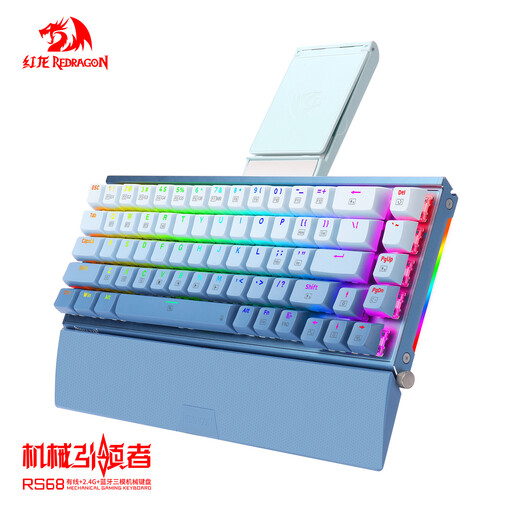
RS68, 65% mechanical keyboard
With this compact layout, check whether the keys you use when revising are available separately.
The product name lists an aluminium case, hot-swappable switches, and wireless and wired use via Bluetooth. Check your preferred connection method and key layout.
View at Joybuy
 No image available
AULA S75 Pro, 75%, tri-mode
Check whether the 75% layout includes the navigation and revision keys you need.
The product name lists tri-mode connectivity, a TFT display with rotary knob, and hot-swappable Star Vektor switches. Check the variant and layout you choose.
View at Joybuy
 No image available
HP 725 Multi-Device Rechargeable Wireless Keyboard
This model may suit a multi-device setup. Check the key layout and supported connections for your writing software.
The product name lists wireless use with multiple devices and a rechargeable design.
View at Joybuy
Frequently asked questions
Do I need a keyboard with a number pad for revisions?
Not necessarily if you’re only working with text. Focus on the arrow, function and navigation keys you use in your writing software; a smaller layout may leave some keys out or move them.
How can I set up a keyboard for repetitive revision tasks?
First, check which shortcuts your writing software supports. Logitech describes configurable functions through Logi Options+ for the MX Keys S and Wave Keys; Keychron lists key remapping through the Launcher for the Q6 Ultra 8K. Check that everything works on your device and in your software.
Does an ergonomic keyboard replace breaks during long writing sessions?
No. Arboportaal recommends taking breaks from screen work and setting up your workspace properly. A different keyboard shape doesn’t replace the need to consider your workspace and how you organise your work.
What are my rights when buying online in the Netherlands?
For qualifying consumer purchases made at a distance, you generally have a 14-day cooling-off period, according to the Dutch government. You’re also entitled to a product that works as it should. The Dutch government states that there is no general fixed term for the statutory guarantee in the Netherlands, and that you can contact the seller if a product is faulty.
Am I legally required to use a separate keyboard when writing a documentary script on a laptop?
Not if you’re writing as a private individual. Arboportaal states that employees who work at a screen for more than 2 hours a day must use a screen and keyboard that aren’t attached to each other. For laptop work, it must be possible to use a separate screen or keyboard; whether these rules apply to your working situation needs to be assessed separately.


