
Someone handling piles of forms
You regularly process batches and want to spend less time feeding forms in by hand, including when they have printing on both sides.


For recurring batches, choose a document scanner with an automatic document feeder and duplex scanning, with a feeder capacity suited to the batches you usually process. A compact USB scanner may be enough for smaller volumes and limited storage space. Also check whether the software creates searchable files, and make sure personal data is stored securely.
You regularly process batches and want to spend less time feeding forms in by hand, including when they have printing on both sides.
You scan smaller quantities and want to be able to put the scanner away or use it at another desk.
You want to be able to find scanned forms later and set up appropriate storage and access arrangements.
Start by considering the size of your usual batch and the condition of the forms. Then measure your available workspace and decide how you want to find and protect your files.
| What to consider | What should you check? | Who is this important for? |
|---|---|---|
| Batches and double-sided forms | Compare your usual batch size with the feeder capacity, and check that the exact model scans both sides. | I regularly process piles of forms and don't want to feed in sheets one at a time, especially when they have writing on the back too. Around 40% of consumers prioritise handling batches. |
| Workspace and storage space | Measure the space with the input and output trays in use. Also check where your computer and power socket are. | I have a small or shared desk and want to be able to put the scanner away after use. Limited space is the main buying priority for around 30% of consumers. |
| Finding and storing files | Check whether the software creates searchable text, and decide in advance who will have access to the storage location. | I want to find digitised membership forms quickly later and control access to personal data. Around 20% of consumers primarily prioritise finding and storing files. |
| Fragile originals | Check whether the forms are suitable for feeding through the scanner. For fragile originals, consider a flatbed scanner as an alternative. | I mainly scan damaged or fragile individual forms and don't want to feed them through a paper feeder. This type of original is the main consideration for around 10% of consumers. |
If membership forms contain personal data, the organisation must establish an appropriate lawful basis and security measures, and must not keep the data for longer than necessary. The Dutch Data Protection Authority explains these principles; choosing a scan destination or using OCR does not take care of them automatically.
Feeder capacity and stated speed describe different things. Processing time can also vary from the stated speed when forms are mixed, creased or handwritten.
First compare how many suitable sheets you can feed in per batch, then look at the speed.
OCR can make printed text searchable, but it doesn't tell you how well handwritten answers or the layout of your own forms will be recognised.
Test representative forms and keep a verifiable scan of the original.
A network folder or cloud destination makes sharing possible, but doesn't remove your responsibility to manage access, security and retention periods appropriately.
Before scanning, decide where the forms will go, who is authorised to access them and how long they will be kept.
Brother positions the ADS-1300 as a compact USB-C document scanner for smaller batches. According to Brother, the ADS-1800W adds Wi-Fi and a touchscreen.
The imageFORMULA P-215II is designed for portable scanning, while the R30 is a desktop model with a higher stated feeder capacity.
Epson describes the ES-C380W as a compact scanner with Wi-Fi and scan destinations including network folders and cloud services.
The ScanJet Pro 2000 s2 is a document feeder scanner designed for larger batches.
This selection includes compact feeder scanners, models for recurring batches, and a combination of a flatbed scanner and an automatic document feeder.
 No image available
Suitable for smaller batches and limited workspace. Canon lists duplex scanning and a 20-sheet feeder.
Canon provides separate dimensions for this model with the tray closed and open. Measure the space with the tray open.
The product title lists 600 x 600 DPI and A4.
 No image available
A desktop model to compare if you regularly process batches of forms. Allow for the space it needs on your desk.
The stated depth is 606 mm. The product title lists 600x600 DPI and A4.
 No image available
The combination of a flatbed and an automatic document feeder may be useful if you need to scan fragile individual originals as well as standard forms.
The product title lists 600x600 DPI and A4. Check which types of media are suitable for the automatic document feeder.
 No image available
A feeder model to compare for recurring batches of forms. Check that the feeder and software work with your forms and computer.
The product title lists 600 x 600 DPI, A4 and the colour options Black, White.
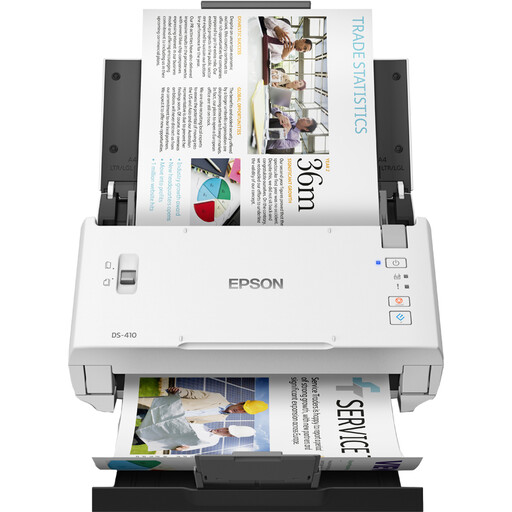 No image available
A feeder model to compare if you want to process several pages of forms per batch. Check the paper support and workspace required for your needs.
The product title lists 600 x 600 DPI, A4 and the colour options Black, White.
No. OCR is mainly useful if you want to search or edit printed text in a scan. Test the results with your own forms; a listed OCR feature doesn't prove that handwriting will be recognised reliably.
Measure the space with the input and output trays in use, and check that the connection is compatible with your computer. For example, Canon publishes separate dimensions for the P-215II with the tray closed and open; Brother describes the ADS-1300 as powered via USB-C.
No. The retention period depends on the purpose of processing and any other applicable legislation. The Dutch Data Protection Authority states that personal data must not be kept for longer than necessary.
Only if the organisation has set up the processing appropriately. Personal data requires an applicable lawful basis and appropriate security measures. If an external service processes data on the organisation's behalf, the Dutch Data Protection Authority says a written data processing agreement is required. A scan-to-cloud feature does not take care of this automatically.
Check which accessories are needed for the exact model and whether the software supports your operating system. Brother lists separate optional power accessories and an output tray for the ADS-1300; don't assume these are included with every purchase.