What should you look for when buying?
First, choose the scanning method that suits your contracts. Then carefully consider batch size, use by multiple people and storage.
| What to consider |
What should you check? |
Who is this important for? |
| Confidential storage and sharing |
Check the scan destination, who will have access, and whether a third-party service processes personal data on behalf of your organisation. |
I want to decide in advance where signed documents will be stored and who can open them. For around 33% of consumers, storage and access are the top priorities. |
| Double-sided batches |
Compare the feeder capacity with the size of your usual file, and check what the manufacturer means by pages and images per minute. |
If I regularly scan multi-page, double-sided contracts, I want to spend less time loading sheets individually and topping up the feeder. Around 27% of consumers prioritise batch processing. |
| Fragile originals |
Check the condition of the paper and whether the model has a flatbed as well as an automatic feeder. |
For a fragile or difficult-to-feed original, I want a scanning method that doesn’t require me to feed the sheet through the machine. Around 20% of consumers prioritise preserving these kinds of originals above all else. |
| Shared use and finding files |
Check the connection, computer compatibility, OCR and configured scan destination; assess confidentiality separately. |
In a shared workspace, I want to find scans easily without files being stored unnoticed in an unsuitable location. Around 20% of consumers give the greatest weight to shared use and findability. |
Document scanners at Joybuy
These models are designed for contract sheets in a small workspace, with options for double-sided batches and originals that need a flatbed.
 No image available
Canon imageFORMULA DR-F120
An option for files containing ordinary sheets as well as fragile or bound originals, as this model combines an automatic feeder with a flatbed.
The product description lists duplex scanning and a 50-sheet feeder.
The product name specifies A4 and 600 × 600 DPI.
View at Joybuy
 No image available
Canon imageFORMULA R10
An option for smaller double-sided batches if you want a scanner you can put away or take with you after use.
The product description lists duplex scanning, a 20-sheet feeder and a USB connection to a computer.
The product name specifies A4 and 600 × 600 DPI.
View at Joybuy
 No image available
Epson DS-C490
An option for double-sided contract sheets if feeder protection is an important consideration.
The product description lists automatic duplex scanning, Paper Protection and an ultrasonic sensor.
The product name specifies A4 and 600 × 600 DPI.
View at Joybuy
 No image available
Epson ES-C320W
An option for double-sided contracts if Wi-Fi and a compact setup suit your scanning workflow.
The product description lists Wi-Fi, a U-path and a straight paper path. Scanning documents with staples or wet ink is not recommended.
The product name specifies A4 and 600 × 600 DPI.
View at Joybuy
 No image available
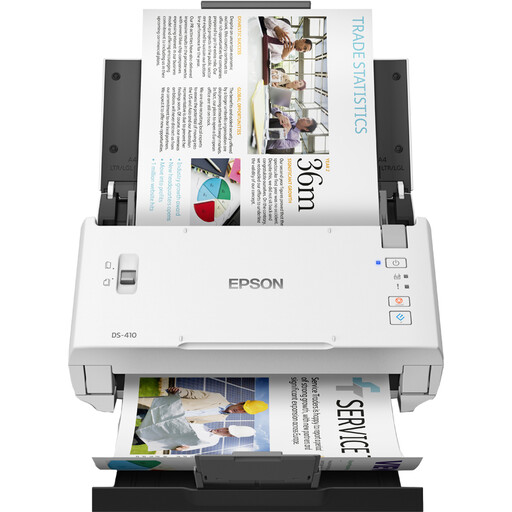
Epson WorkForce DS-410
An option for double-sided files if you need an automatic feeder and a connection to a Windows or Mac computer.
The product description lists a 50-sheet automatic feeder and duplex scanning via USB.
The stated width and depth are 297 × 152 mm. The product name specifies A4 and 600 × 600 DPI.
View at Joybuy
Frequently asked questions
Do you need Wi-Fi if several people use the scanner?
No, Wi-Fi isn’t always necessary: Canon says the imageFORMULA R30 can be used via USB with a supported Mac or Windows computer. Wi-Fi can be useful for network destinations; decide in advance where contract files are allowed to be stored.
What does OCR do with a scanned contract?
OCR can make text in a scan searchable; Canon lists it for the R30, and Epson for the ES-590W. Check the finished file for legibility and make sure all pages and signatures are visible. OCR doesn’t guarantee that every character will be recognised correctly.
What can I do about streaks or feeding problems?
Follow the cleaning instructions for your exact model. Brother explains how to clean the glass strips and rollers on the ADS-1800W, and notes that dirt on a glass strip can cause a vertical line.
What should I check besides the scanner?
For the model you choose, check which power supply and software are included, and what replacement parts and service options are available. Brother lists separate power accessories for the ADS-1800W; Epson offers conditional CoverPlus extensions for the DS-1730.
Which privacy rules apply to contracts containing personal data?
An organisation must protect personal data appropriately and not keep it for longer than necessary; the GDPR does not set a general fixed retention period. If a third-party service processes personal data on behalf of the organisation, a written data processing agreement is required. The Dutch Data Protection Authority also highlights general GDPR obligations for primary and secondary schools.


