What should you look for?
Start by deciding whether the work surface needs to stay in view for an extended period, or whether you mainly want to switch between your face and a short demonstration during calls. Then check the framing, focus and how well the camera fits into your workspace.
| Consideration |
What should you check? |
Who is this important for? |
| Overhead view of the sheet |
Compare the stated capture area with your paper size and check that your hands stay in frame while you fold. |
For a long demonstration, I want to show the whole sheet and my hands from one fixed angle. Around 36% of consumers give a useful overhead view top priority. |
| Switching between your face and the work surface |
Check how the camera attaches to your screen and whether a whole sheet is visible from that position. |
For a video call with the occasional short folding demonstration, switching easily between your face and the paper matters. Around 29% of consumers prioritise this option. |
| Focus while folding |
Check the focus features of the exact model and consider the distance and movements involved in your demonstration. |
When I show a series of folds, I want the paper and my hands to stay in focus as they move. Around 21% of consumers prioritise focus during movement. |
| Simple setup |
Check the camera angle, mounting requirements, connection and compatibility with your video-calling software before weighing up extra features. |
If you want to keep your workspace uncluttered, you may prefer to avoid unnecessary setup steps without losing sight of the paper. Around 14% of consumers give a simple setup top priority. |
Products for demonstrating paper
This selection of Joybuy products includes webcams for calls and a document camera for showing paper. Check whether the viewing angle and setup of each model suit your workspace.
 Image unavailable
Philips 4000 Series 4K UHD Webcam, SPL6408BT/00
A webcam to consider if you’re looking for a model with autofocus. Check whether the camera angle is suitable for showing your paper and hands.
4K UHD; 8MP; autofocus; built-in dual microphones; privacy cover; EU Version; Black.
Joybuy
 Image unavailable
Philips 2K QHD PC Webcam, SPL6308S/00
A clip-on webcam to consider if you want to attach a camera to a monitor or laptop screen. Check the viewing angle for desk demonstrations.
2K QHD; clip-on; microphone with noise reduction; EU Version; Silver.
Joybuy
 Image unavailable
Insta360 Link 2C Standard Bundle, Graphite Black
The Link 2C is worth considering for video calls and occasional work-surface demonstrations; Insta360 lists DeskView for the Link 2 series.
4K webcam; 1/2" sensor; auto-framing; HDR; microphone with AI noise cancellation; gesture control; for PC and Mac.
Check whether desk mode shows the whole sheet from your screen position.
Joybuy
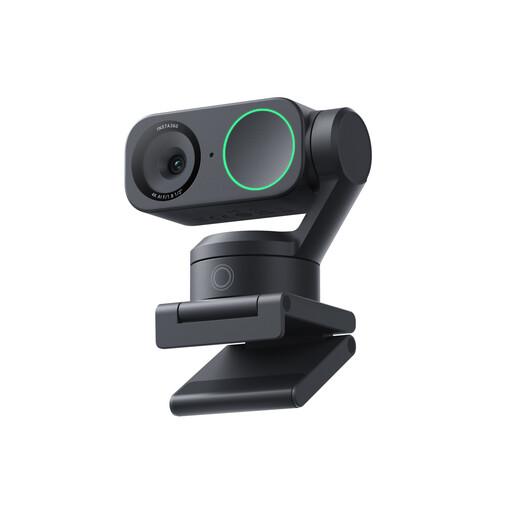 Image unavailable
Insta360 Link 2 Standard Bundle
Insta360 lists DeskView for the Link 2. Check whether the monitor position and corrected table view suit your folding demonstration.
4K webcam; 1/2" sensor; AI tracking; HDR; microphone with AI noise cancellation; gesture control; compatible with Zoom.
Speaker tracking doesn’t guarantee that the paper will stay properly framed throughout.
Joybuy
 Image unavailable
CZUR Shine 800 A3 Pro Document Camera
A document camera to consider if you want to show paper using a separate camera setup. Check whether the setup and capture area suit your demonstration.
Supports A3 sheets; OCR; compatible with Windows and macOS.
Joybuy
Frequently asked questions
Does the camera need to be directly above the paper?
Not always: a webcam mounted on a screen can use desk mode to correct an angled view of the table. Insta360 describes DeskView as a mode for a temporary demonstration. For longer sessions or a fully visible sheet, you could compare this setup with a document camera that has a specified capture area.
How do I set up the Logitech Brio 500 for a short demonstration?
According to the Logitech manual, you place the Brio 500 on your monitor and tilt the camera down for Show Mode. If you use the micro-suction mount, you can do this with one hand; without it, hold the mount while tilting the camera. Then check what viewers can actually see in your video-calling software.
How do I care for the Brio 500’s micro-suction mount?
Logitech recommends removing dust with water and allowing the mount to air-dry before attaching it again. The manual says not to dry the micro-suction mount with a cloth or tissue.
What cooling-off period and warranty apply to online purchases in the Netherlands?
For a standard online purchase by a consumer, ACM ConsuWijzer says there is usually a statutory cooling-off period of up to 14 days after delivery, subject to exceptions. You are also entitled to a statutory warranty for as long as you could reasonably expect the product to last under normal use; this is not automatically a fixed two-year period.
Can I record or share a demonstration involving other people?
If an organisation processes personal data about identifiable people, the Dutch Data Protection Authority says it needs a lawful basis under the GDPR. Consent is one possible lawful basis, but it is not automatically the only one. Consider recording and sharing separately; this information does not provide a general conclusion for every private situation.


