What should you look for when choosing?
First, consider how you want to show your sketchbook. Then test the focus and how easy it is to switch between your face and your work. Finally, check that the complete setup works with your desk and computer.
| What to consider |
What should you check? |
Who is this most important for? |
| Entire work area |
Measure your open book and compare it with the stated capture area. IPEVO lists a maximum of 440 × 330 mm for the V4K PRO 120. |
If I want to show my entire open sketchbook and my drawing hand, the frame needs to have enough room for both. Around 36% of consumers prioritise having a full work area. |
| Visible details |
Test the focus and lighting at your working distance. Google Meet says that streaming in 1080p requires, among other things, a 1080p camera and sufficient processing power. |
When I demonstrate fine pencil lines, I want to be able to assess them on my own paper during a test call. Around 29% of consumers prioritise clearly visible lines and details. |
| Switching between your face and your work |
Try the framing and controls with your book open. The Logitech Brio 500 user guide explains how to tilt it down towards the desk and back up again. |
If I also want to show my face during a call, switching smoothly is important. Around 21% of consumers prioritise switching between their face and their sketch. |
| Complete setup |
Check your computer’s port and any mounting parts you’ll need. The Logitech Brio 4K has a ¼-inch tripod thread; Logitech says the tripod is not included. |
I want to know in advance which parts and connections I’ll need for my desk and computer. Around 14% of consumers prioritise an easy, complete setup. |
Joybuy products for sharing your sketchbook
This selection includes webcams and a document camera to consider for sharing your sketchbook live. Check that each model’s framing and mounting options suit your workspace.
 No image available
Philips 4000 Series 4K UHD Webcam SPL6408BT/00, EU Version, Black
A standard webcam to consider if you want to use a webcam setup. First, test whether your book is clearly in frame from your chosen mounting position.
4K UHD, 8 MP, autofocus, dual built-in microphones and privacy cover.
Joybuy
 No image available
Philips 2K QHD PC Webcam SPL6308S/00, EU Version, Silver
A webcam to consider if you’re looking for a PC webcam. Use a test image to check whether you can get the overhead view you want.
2K QHD, noise-cancelling microphone and clip-on design.
Joybuy
 No image available
Insta360 Link 2C Standard Bundle, Graphite Black
The product description lists DeskView and Whiteboard Mode for showing your work surface. Check that the framing suits your open sketchbook.
4K webcam for PC/Mac with a 1/2-inch sensor. According to the product information, this model is not compatible with ARM-based Windows systems.
Joybuy
 No image available
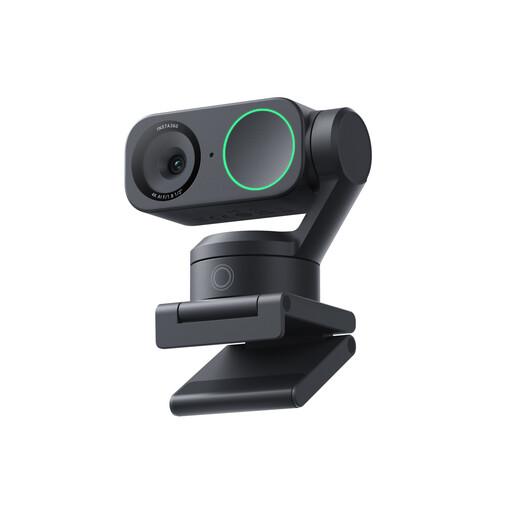
Insta360 Link 2 Standard Bundle
The product description lists DeskView and Whiteboard Mode for showing your work surface. Check the image with your sketchbook and preferred viewing angle.
4K webcam for PC/Mac with a 1/2-inch sensor; compatible with Zoom according to the product name.
Joybuy
 No image available
CZUR Shine 800 A3 Pro Document Camera
A document camera to consider if you want to show paper from above. Check that the capture area and working distance suit your open book.
Model designation: A3 Pro.
Joybuy
Frequently asked questions
Do I need a 4K camera to show pencil lines during a video call?
Not necessarily. First, test the focus and lighting on your own paper, then check your video-calling app’s settings. Google Meet says that streaming in 1080p requires, among other things, a 1080p camera and sufficient processing power. The camera specification alone doesn’t determine what other people will see.
How do I set up a tilting webcam to show a sketch?
For the Brio 500, Logitech explains that you can tilt the camera down to show your desk, then tilt it back up to show your face. Hold the mount while adjusting the camera if the micro suction cup isn’t secured, and test the framing with your book open.
What are my rights if a camera bought online isn’t suitable or develops a fault soon after purchase?
For a typical online product purchase, ACM ConsuWijzer says you have up to 14 days from delivery to change your mind, subject to legal exceptions. Your statutory rights are separate from any manufacturer’s warranty. If a product doesn’t meet reasonable expectations when used normally, the retailer is responsible for providing an appropriate solution.
Can I film other people in a way that identifies them and share the video publicly?
Not necessarily. According to the Dutch Data Protection Authority, the exception for personal or household use does not apply when identifiable footage is shared more widely or used for business purposes. In that case, you need a lawful basis under the GDPR; according to the regulator, this often means getting consent from the people shown. If you’re only showing your own sketchbook and no one else is identifiable, this issue does not arise.


