
Maker creating step-by-step folding lessons
You want hands, fold lines and the whole sheet to stay visible during the demonstration. A stable overhead view is more important than seeing your face.


If the paper and folds are the main focus, a document camera is a targeted choice. If you want to switch between shots of the work surface and the teacher, a standalone camera gives you more flexibility. Before buying, check that the whole sheet fits in focus, how you’ll capture the spoken instructions and which mount will give you the camera angle you need.
You want hands, fold lines and the whole sheet to stay visible during the demonstration. A stable overhead view is more important than seeing your face.
You record instructions while other people are working in the same space. You want to capture your spoken instructions clearly and avoid inadvertently showing other people in a recognisable way.
You want to film more than just the paper, including introductions or on-camera explanations. You’ll need a setup that lets you adjust the framing.
Choose this option: if the paper and each successive fold are the main focus.
Keep in mind: measure the capture area and working height. Some setups also require a suitable computer and software.
Choose this option: if you want to switch regularly between the work surface, your hands and the teacher.
Keep in mind: the lens, working distance and mount need to work together to give you the overhead angle and focus you want.
Choose this option: if you want to move the camera between workspaces or film the teacher.
Keep in mind: a built-in stand or gimbal doesn’t automatically let you position the camera directly above the paper.
| Concern | What to look for when buying | Who is this important for? |
|---|---|---|
| View of the paper and fold lines | Compare the capture area with your sheet and check the focus and space for your hands at the planned height. | If I want to follow every fold, the whole sheet needs to stay visible without my hands covering the fold line. Around 36% of consumers say having a clear view of the paper is their top priority. |
| Clear instructions and privacy | Test the audio from the distance you intend to speak from while the workshop is in use. If people are recognisable, check which GDPR legal basis applies to filming and publishing, as explained by the Dutch Data Protection Authority. | If I record instructions while other people are working, I want my voice to be clear without inadvertently capturing other people in a recognisable way. Around 29% of consumers prioritise clear instructions. |
| Switching between the work surface and the teacher | Check that the camera, lens and mount can capture both the whole sheet and the shot of the teacher you want. | If I switch between folding and on-camera explanations during the lesson, I want to be able to adjust the framing. Around 21% of consumers put being able to switch camera angles ahead of other buying concerns. |
| Compact setup | Check that the mount gives you the angle you need and that storage and power suit your planned recordings. | If I often move the camera or have little room on the worktable, I want a setup that’s easy to position. Around 14% of consumers say a compact, portable setup is their top priority. |
A stated video resolution doesn’t tell you whether the whole sheet will fit in the frame or whether the fold line will stay in focus at your chosen working distance.
Check the capture area, focus range and height above the table using the paper you actually work with.
A built-in stand or gimbal won’t necessarily let you position the camera directly above the work surface.
Sketch out the camera angle you want and check that the mount you’re considering can hold the camera securely without obstructing the work surface.
A built-in microphone or a stated microphone feature doesn’t prove that spoken instructions will be clear in your workshop.
Make a test recording from the distance you’ll actually speak from while the room is in normal use.
The Dutch Government explains that there is no fixed period for statutory guarantees in the Netherlands; a manufacturer’s warranty may offer additional cover.
Keep your proof of purchase and contact the seller if the product is faulty.
Document cameras for a fixed view of paper and other objects. The V4K PRO is designed for a USB setup with a computer.
Document cameras for showing paper. The European MX-P3 offers several output and recording options.
Interchangeable-lens cameras for recordings where you want to choose the lens and framing yourself.
Compact standalone gimbal cameras for makers who want to move their camera between workspaces.
Compact standalone cameras for recording from a workbench or tripod.
The Joybuy products below are standalone cameras for portable recording, plus one Sony camera with a zoom lens for changing the framing. They are not document cameras designed for a fixed overhead view.
 Image unavailable
Could suit recordings where you want to switch between the work surface and the teacher. Check that the included mini tripod setup gives you the overhead angle you need.
The product title lists a 330° rotating lens, a 1.72-inch touchscreen, face recognition and Type-C.
 Image unavailable
A pocket camera for portable recording. Check separately whether you can mount it securely in the position you want above the paper.
The product title lists 4K/240 fps, 3-axis stabilisation, 2× lossless zoom and 107 GB of built-in storage.
 Image unavailable
A compact camera you can move between workspaces. Test the included microphone in the workshop where you’ll be filming.
The product title lists 4K/120 fps, 3-axis stabilisation, face and object tracking, and an included microphone.
 Image unavailable
The zoom lens gives you the option to change the framing. Check that the camera, lens and mount you choose can also capture the whole sheet from above.
The product information lists a 16–50 mm zoom lens. A compatible SD card is not included, according to the product description.
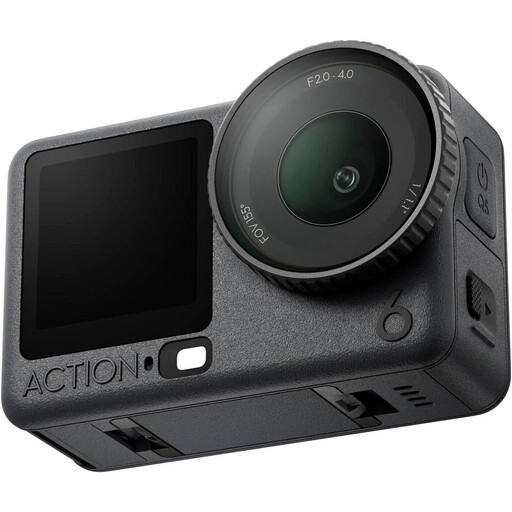 Image unavailable
A compact action camera for portable recording. Check that the mount gives you the overhead view you want, and test how well it captures spoken instructions.
The product description lists video recording up to 8K and a connection for two DJI microphone transmitters.
Start with the size of your paper and the space you need for your hands, rather than video resolution alone. IPEVO specifies a maximum capture area of 342 × 255 mm for the V4K PRO. Test it with your own paper at the planned height. With a standalone camera, you’ll need to check the overhead mount separately.
It depends on the model and how you plan to record. IPEVO describes the V4K PRO as a USB camera for use with a computer. ELMO lists HDMI output and SD card recording for the MX-P3; check which display and recording method you need.
Make a short audio test from the distance you intend to speak from while the workshop is in use. Before the lesson, also check the focus, available storage, power and mount. IPEVO recommends a speaking distance of 30–70 cm for the V4K PRO; this doesn’t guarantee clear speech in the presence of background noise.
Compare the complete setup: a document camera may need a computer and software, while a standalone camera may need a lens, mount, storage or extra audio equipment. The Dutch Government explains that there is no fixed period for statutory guarantees in the Netherlands, and that a manufacturer’s warranty may offer additional cover. When buying online from a business, you’ll often have a 14-day cooling-off period.
First check which privacy rules and GDPR legal basis apply to your situation. The Dutch Data Protection Authority explains that a GDPR legal basis is needed to film and publish recognisable people for professional or organisational purposes. Consent is one possible legal basis, but it isn’t automatically the only one. An exception may apply to filming solely for private use, but sharing more widely may affect whether that exception still applies. Consider filming and publishing separately, and frame other people out of the shot wherever possible.