What should you look for when choosing?
First decide whether you mainly want to show complete album pages or examine small details. Then choose the connection and any storage features that suit the way you want to present your collection.
| What to consider |
What should you check? |
Who should pay particular attention? |
| Showing album pages |
Compare the capture area with your album page and check that the arm is easy to adjust. IPEVO lists a maximum area of 342 × 255 mm for the V4K; check that the part you want to show remains in focus. |
If I want to show someone an album page, I don’t want to keep reframing it. Around 40% of consumers give showing complete stamps or album pages their highest priority. |
| Examining small details |
Check the minimum focusing distance, the lighting, and whether magnification is optical or digital. Lumens lists a close-up distance of 5 cm for the DC172; this is not a measurement of how sharply it can show a stamp. |
When I want to look at a small detail on one stamp, focus and lighting matter more than a large capture area. Around 30% of consumers give viewing details on an individual stamp their highest priority. |
| Presenting without a computer |
Check whether the exact model has HDMI output or a built-in screen, and find out which cables and power supply you’ll need. ELMO lists HDMI for the MX-P3; according to its manual, the Leuchtturm DM 5 has a 4.3-inch LCD screen. |
If I want to present directly on a screen, I don’t want to rely on a computer. Around 20% of consumers give presenting without a computer their highest priority. |
| Saving images |
Check whether the device can save photos or video, where the files are stored and whether storage media are included. According to the Lumens datasheet, a USB flash drive is not included with the DC172. |
If I want to save images of my collection, I want to know in advance how storage works and what I’ll need. Around 10% of consumers give capturing images of their collection their highest priority. |
Brands to compare
The features listed apply to the models described, not necessarily to the entire brand. The devices also serve different purposes: a document camera is not the same as a microscope for examining small details.
IPEVO
Document cameras for viewing via a computer.
- According to the V4K specifications, the model has autofocus, USB video and a maximum capture area of 342 × 255 mm.
- USB video is the specified output for the V4K. If you want to present directly on an external screen, check the connection on the exact model.
ELMO
Document cameras for presenting via HDMI, USB and other connections.
- According to ELMO, the MX-P3 has HDMI and USB output, as well as a button for autofocus.
- The stated 16× zoom is digital; don’t take this as proof of 16× optical detail enhancement.
Leuchtturm
Collecting accessories, including a digital microscope for viewing details.
- The DM 5 manual lists a 4.3-inch LCD screen, a 720p image sensor and 20× to 200× magnification, as well as digital zoom.
- A microscope for examining small details is a different choice from a document camera for showing complete album pages.
Lumens
Document cameras with HDMI, USB and close-up features.
- The DC172 datasheet lists focusing from 5 cm, a maximum capture area of 420 × 316 mm and storage on a USB flash drive.
- The USB flash drive is not included, according to the datasheet. The listed features are not an independent test of image quality when viewing stamps.
SAFE
Collecting accessories, including a USB microscope for small objects.
- Europost Filatelie & Numismatiek’s product information lists manual focus, USB 2.0 and an adjustable stand.
- Before buying, check that the software is compatible with your computer; the product information cited is from a retailer.
Products at Joybuy
This Joybuy selection includes camera and document-scanning equipment. For stamps, check that the focus, image area and connection suit the way you want to show them. For electrical or electronic devices, check that the specific model meets the applicable product requirements.
 No image available
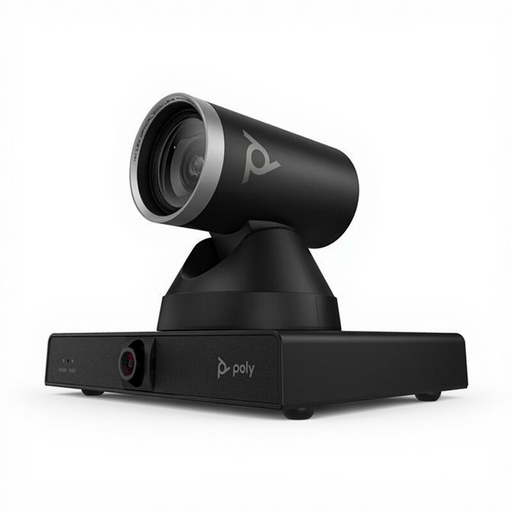
HP Poly Studio E60 Smart Camera, 4K, MPTZ with 12x Optical Zoom
The product name describes a smart camera; check whether the image area and focus are suitable for your stamps and album pages.
The product name lists 4K, MPTZ and 12x optical zoom. These details alone don’t tell you whether the device can show small stamp details sharply at the distance you need.
View at Joybuy
 No image available
CZUR Shine 800 A3 Pro Document Camera
This document camera and portable scanner is designed for flat documents up to A3; check that its image area and focus are also suitable for showing individual stamps.
The product name lists OCR and compatibility with Windows and macOS. Before buying, check that the software and connection are suitable for your computer.
View at Joybuy
Frequently asked questions
Can I connect a USB document camera directly to my HDMI monitor?
Not with USB output alone. IPEVO’s V4K specifications describe USB video, while ELMO lists HDMI output for the MX-P3 and Lumens for the DC172. Check the connections on the exact model and your monitor.
How can I avoid blurry or poorly lit detail images?
First adjust the distance and focus for the individual stamp, then adjust the lighting. The manufacturer of the Leuchtturm DM 5 warns against using it on an unstable surface and looking directly into the LEDs when they are switched on.
Does a magnified image prove that a valuable stamp is genuine?
No. An image can help you examine details, but it doesn’t prove on its own that a stamp is genuine. The Dutch Association of Stamp Dealers offers authentication services with certificates for stamps and postal items.
What are my rights when buying online in the Netherlands?
For a distance purchase, you generally have a 14-day cooling-off period, according to the Dutch government. A product must also be of satisfactory quality; if there’s a fault, the retailer is your point of contact. The Netherlands has no fixed statutory guarantee period. The cooling-off period and your rights when a product is faulty are separate matters.
Must an electric or wireless visualiser comply with product regulations?
Yes. The applicable European product requirements must be met. According to Ondernemersplein, Rijksoverheid, the manufacturer must assess the requirements and draw up an EU Declaration of Conformity. If the requirements are met, the required CE marking must be applied to the device. Wireless models may also be subject to radio equipment rules. Check compliance for the specific model.


