
Vandaag of morgen in huis

Kwaliteit gegarandeerd

Welkomstaanbiedingen ontgrendelen: GRATIS bezorging | Tot 80% korting | Gratis 30 dagen JoyPlus-proefperiode
Download de app
Whether you're teaching remotely, giving a presentation to colleagues, or recording a creative demo, a clear and stable view of your documents or objects is essential. But the market for document cameras can be confusing. Many models promise the world but fall short in practice. As a Joybuy Product Recommendation Officer, I'll help you see through the marketing hype and find a model that truly works for your situation.
Before you make a purchase, it's important to recognise the most common pitfalls that lead to buyer's remorse:
To avoid a bad purchase, focus on the specifications that truly matter. Don't be distracted by marketing terms; instead, check these three points.
These two specifications are inseparably linked.
A good 4K document camera offers the flexibility to choose: a high resolution for scanning documents and a lower resolution with a high frame rate for live video.
The physical design of the camera is crucial for usability. Pay attention to the arm and the base. A model with multiple pivot points is easy to store and can be positioned at any desired angle. This is essential for teachers who need to quickly switch between a document and a close-up of an object. Also, check the maximum capture size. Do you need A3 size for large blueprints or books? Then make sure the camera explicitly supports this.
A modern document camera is more than just a lens. Useful features that make a difference include:
Not everyone has the same needs. Below are several user profiles with a suitable product recommendation.
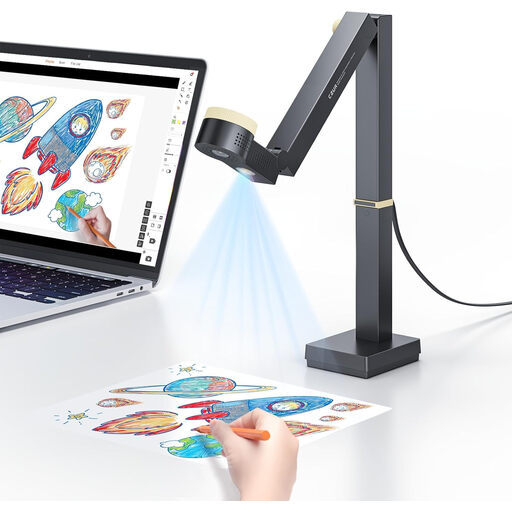
Why This Fits Their Persona: This 3-in-1 device is a document camera, webcam, and scanner all in one. Perfect for the professional who presents online, teaches, and regularly needs to digitise documents up to A3 size. Its flexibility makes it an all-rounder for the office or home.
The CZUR Fancy S Pro offers a smooth 1080p stream at 60 fps for live video and a 4K mode (15 fps) for detailed scanning. The flexible arm easily covers the A3 size, so you won't face any unpleasant surprises.
3-in-1 functionality (camera, webcam, scanner). Includes software with useful features like Picture-in-Picture. Compact and foldable design.

Why This Fits Their Persona: For a document camera for teachers just starting with hybrid teaching, simplicity is king. An affordable, entry-level model that works out of the box and gets the basics right is often all that's needed to clearly share worksheets and books with the class.
These models focus on the essentials: a stable 1080p resolution at 30 fps and simple plug-and-play via USB. You don't pay for advanced features you won't use anyway.
Affordability and ease of use. No complicated installation; just plug it in and get started in your favourite video app.
Why This Fits Their Persona: For recording tutorials, unboxings, or art projects, the highest possible image quality is a must. This user needs a camera that captures details with razor-sharp clarity and delivers professional results for video content.
Premium models deliver a true 4K resolution at a usable frame rate of 30 fps or higher. They combine this with superior optical sensors and lenses, ensuring the image remains sharp and noise-free even in low light.
Unmatched image quality for professional productions. Often includes advanced software for colour correction and manual focus.
We have compiled a complete, up-to-date list of products that meet these strict selection criteria and current EU regulations.
Most modern document cameras are 'plug-and-play'. This means you connect the camera to your computer using the included USB cable. Your computer and software like Microsoft Teams, Zoom, or Google Meet will automatically recognise the device as an available camera. For some models with advanced features, you may need to install the accompanying software from the manufacturer's website.
A standard webcam is designed to capture your face during a video call and usually sits on your monitor. A document camera is specifically designed to film objects on your desk. It has an adjustable arm and a downward-facing camera, allowing you to display documents, books, or 3D objects live. Some models, like a versatile webcam for homeschooling, can perform both functions.
Yes, many document cameras are excellent for this, especially models that can function as an A3 document scanner. For the best results, look for a model with a high resolution (12MP or more). The accompanying software may include extra useful features, such as automatically flattening curved pages and text recognition (OCR), which allows you to edit the scanned text.
