
Vandaag of morgen in huis

Kwaliteit gegarandeerd

Welkomstaanbiedingen ontgrendelen: GRATIS bezorging | Tot 80% korting | Gratis 30 dagen JoyPlus-proefperiode
Download de app
Piles of notebooks, loose notes, and the endless search for that one crucial point from last week's meeting. Sound familiar? A digital notebook promises to bring order to the chaos. But the market is flooded with devices that overpromise and underdeliver. Before you invest in a new tool, it's essential to know the common pitfalls that can render your purchase useless.
Many users run into the same problems:
To avoid buyer's remorse, focus on the specifications that truly matter for daily use.
The most important part of a digital notebook is the screen. An e-ink tablet is a popular choice in this category. Unlike the glossy screens of traditional tablets, an e-ink screen has a matte finish that reflects light like paper. This is easier on your eyes, even during long periods of reading and writing. Pay special attention to latency: this is the delay between your pen movement and the line appearing on the screen. Low latency is crucial for a natural writing feel, comparable to pen on paper. A good writing tablet replicates this experience as closely as possible.
A smart notebook is more than just a digital notepad. Its value lies in the smart features that help you organize and use your notes. Functions like converting handwritten text to typed text (OCR) and making your notes searchable are indispensable. A modern AI notebook can take it a step further by summarizing meetings or organizing your tasks. For professionals and students who attend many meetings or lectures, a speech-to-text tablet can be a game-changer, converting spoken words directly into text.
Your notes should be available wherever and whenever you need them. Check if the digital notebook easily syncs with your computer and smartphone via an app or cloud service. Support for standard file formats like PDF and TXT is a must, so you're not locked into a single manufacturer's ecosystem. Integration with calendars, such as Google Calendar, helps you manage your schedule and notes in one place.
Based on these criteria, we've selected a few options and combinations that suit different needs.

Why This Fits Their Persona: This device is designed for those who seek efficiency. It combines a natural writing feel with powerful AI tools for transcribing meetings, summarizing texts, and organizing tasks. Ideal for a packed work schedule or a demanding academic semester.
The low-latency e-ink screen prevents an unnatural writing feel. The AI features, such as transcription in 16 languages, are practical and immediately usable without hidden subscription fees.
Real-time speech-to-text transcription and synchronization with PC and mobile via the AINOTE apps. At 4.2mm, the device is ultra-thin and portable.
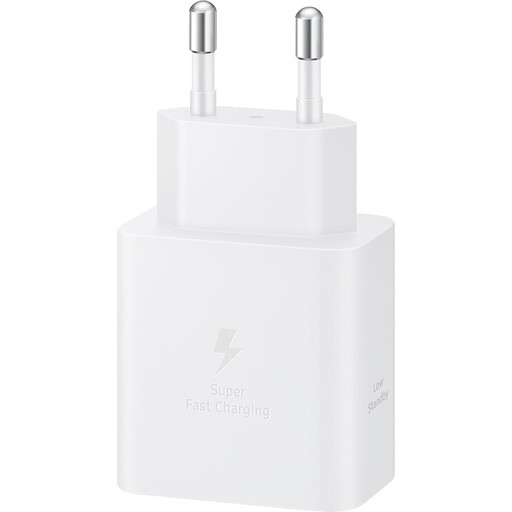
Why This Fits Their Persona: For those who depend on their equipment, a dead battery is not an option. A powerful charger like the Samsung 45W charger, combined with a robust cable like the Xiaomi 6A Braided USB-C cable, ensures your digital notebook and other devices are always ready to use quickly.
Many high-end devices are sold without a charger. This combination avoids the pitfall of slow charging with a subpar charger, which can hinder productivity.
Support for fast charging (Power Delivery) and a braided, durable cable designed for heavy use and transport.
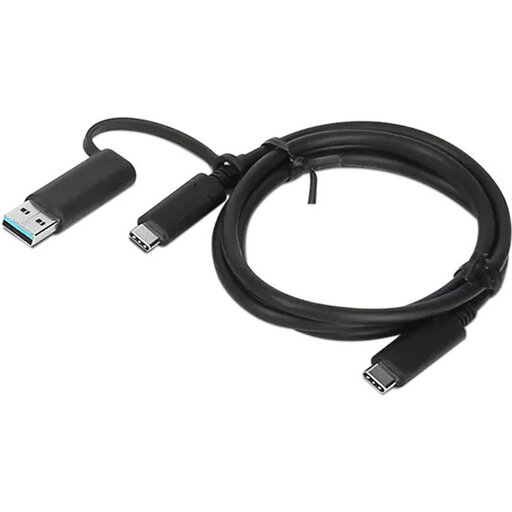
Why This Fits Their Persona: Do you work at the office, at home, and on the go? Then you need flexible connection options. A versatile cable like the Lenovo USB-A/USB-C to USB-C cable ensures you can connect your digital notebook to both older laptops (USB-A) and modern devices (USB-C) for data transfer.
This prevents the frustration of not being able to connect your new device to existing hardware. You avoid 'dongle hell' and aren't limited to a single port type.
Supports USB 3.2 Gen 1 for fast data transfer. The combination of USB-A and USB-C in one cable offers maximum flexibility for different workspaces.
A digital notebook is the core, but the right cables and adapters ensure a seamless experience. Discover our range of connections that meet high quality standards.
The battery life of an e-ink tablet is one of its major advantages. Because the screen only consumes power when the page refreshes, they last much longer than traditional tablets. With normal use (about 30-60 minutes per day), you can often expect a battery life of one to several weeks. The standby time can even extend to months. This, of course, varies by model and usage intensity.
Yes, this is one of the most powerful features of a modern smart notebook. Most devices use Optical Character Recognition (OCR) technology to convert your handwriting into digital, searchable text. This means you can search all your notes with a keyword, just as you would search a document on your computer. The accuracy of the OCR can vary depending on the software and the legibility of your handwriting.
For tasks like taking notes, reading documents, and summarizing, a digital notebook for studying is often a better choice. The e-ink screen is easier on the eyes, which is pleasant during long study sessions. The absence of distractions like social media and video apps, which are present on a regular tablet, helps you stay focused. A regular tablet, on the other hand, is more versatile for media consumption, such as watching videos or playing games. The choice, therefore, depends on your primary purpose.
