For inspecting nibs at a market stall, a stable set-up and the right viewing angle matter more than the highest stated magnification. The Goulet Pen Company recommends viewing the nib along the writing surface. Choose a model with a screen if visitors need to look without a laptop, or a USB microscope if you’re bringing a compatible laptop. Test the power supply, reflections on the metal nib and the space available for the stand in advance.
Who is a digital microscope for fountain pen nibs suitable for?
Anyone who checks nibs repeatedly
If you carry out the same inspection several times at a busy fair, keeping the pen and microscope in a fixed position can help you repeat the viewing angle. The Goulet Pen Company describes assessing the nib along the writing surface; Bresser, Celestron and Dino-Lite describe models supplied with a stand.
Anyone who wants visitors to look without a laptop
A built-in screen can be useful for showing the image straight away, provided the power supply and base fit your stall. Andonstar lists a built-in screen for the AD407.
Anyone who wants to view or capture details on a laptop
If you’re bringing a laptop, check the software, connection and lighting for the exact model. Bresser, Celestron and Dino-Lite describe USB models that need a computer to display the image.
What should you look for in a microscope for your market stall?
Microscope with a built-in screen
A good fit if: you want to show visitors the image straight away without a laptop. Andonstar lists a 7-inch screen for the AD407.
Keep in mind: you’ll need space for the base and a suitable power supply. Andonstar lists 5 V DC power and no PC support for the AD407.
USB microscope with a laptop
A good fit if: you’re bringing a compatible computer and want to view or save the image on it.
Keep in mind: your set-up will need a computer, cables and compatible software. Check support for your device for each individual model.
| What to consider |
What should you check? |
Who is this important for? |
| Stable focusing |
Check that the pen and stand stay at the viewing angle you want, and that you can focus without touching the nib. |
If I want to view the nib along the writing surface repeatedly, I need a consistent viewing angle and a sharp image. Around 36% of consumers prioritise stable inspection. |
| A set-up that works at your stall |
Test the connection, software, cable length, power supply and available space in advance, using the complete set-up. |
I want to avoid the screen, computer and power supply failing to work together at the fair. Around 29% of consumers prioritise a reliable on-site set-up. |
| Showing the image straight away |
Check the screen’s viewing angle and position. Only check external display options if you need them. |
If I want to share the image with visitors straight away, a screen that doesn’t rely on a laptop is important. Around 21% of consumers prioritise showing the image directly. |
| Reducing reflections |
Try the lighting on a metal nib and see whether you can adjust the brightness or polarisation. |
I want to see details on a reflective nib without glare getting in the way. Around 14% of consumers prioritise controlling reflections. |
Common mistakes when choosing and using a microscope
-
Comparing only the highest magnification
Stated magnification can depend partly on how the image is displayed on screen, and doesn’t by itself tell you how useful the image of a nib will be. Bresser lists a working distance for the DST-1028 of 110 mm at 10×, down to 10 mm at 280×; the stated display magnification is based on a 27-inch screen.
Check that you can see the whole nib before zooming in clearly, with enough room to position the pen.
-
Assuming USB means it displays on a laptop
Andonstar lists no PC support for the AD407, despite USB appearing in the product name. Connections and display options vary by model.
Before buying, check the live video output, supported device and required software for the exact model.
Brands and model examples as a guide
The features below apply to the named models and product ranges; they are not a general judgement on any brand.
Bresser
The DST-1028 5MP is a USB model designed for use with a Windows computer.
- Bresser says this model has eight adjustable LEDs. The manufacturer lists a working distance of 110 mm at 10×, down to 10 mm at 280×.
- The listed software is for Windows 10 and 11. The manufacturer bases the stated magnification on display on a 27-inch screen.
Celestron
The Handheld Digital Microscope Pro, item 44308, is a USB model with an adjustable stand for viewing on a computer.
- Celestron says the model has a 5 MP sensor, adjustable LED lighting and software for Mac and Windows.
- According to Celestron, the model has no built-in screen or memory. Check that the software supports your computer.
Andonstar
The AD407 is an example of a microscope with a built-in screen, suitable for demonstrations without a laptop.
- Andonstar lists a 7-inch screen, a metal base, HDMI and 5 V DC power.
- The specifications list no PC support. The stated maximum magnification is based on display on a 27-inch HDMI screen.
Dino-Lite
According to Dino-Lite, the AM4113ZTL is a USB model for use with a Mac or Windows computer, with a longer working distance and an adjustable polariser.
- Dino-Lite recommends using a stand with this model. Its adjustable polariser may be useful for reducing reflections from metal.
- The manufacturer lists an official range of 20–90×; focusing at a lower magnification depends on the distance. Don’t confuse these specifications.
Plugable
The USB2-MICRO-250X is a compact USB microscope with a flexible arm stand, designed for use with a compatible display device.
- Plugable lists an included arm stand and adjustable LED lighting.
- Check that the connection and camera app work with your laptop or tablet. Broad compatibility is a claim made by the manufacturer.
Joybuy product selection
This Joybuy selection is a digital microscope with a detachable screen. Test it with your own fountain pen to see whether you can get a clear view of the nib and whether the set-up is stable enough.
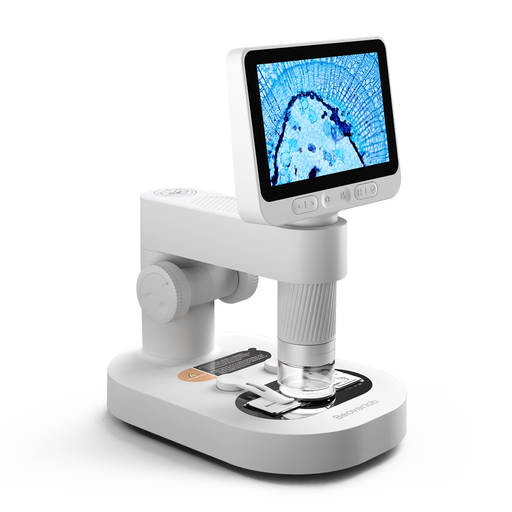 No image available
Digital Microscope for Kids with Detachable Screen
The product title mentions a detachable screen, and the product description includes a stand. Test it with your own fountain pen to see whether you can get a clear view of the nib and keep the set-up stable.
The title also mentions prepared slides and accessories. The product information warns that the camera and small accessories should be kept out of reach of children under 3 years old, and that children should use the product under the direct supervision of an adult.
View at Joybuy
Frequently asked questions
How can I check whether the two sides of a nib are aligned?
View the nib along the surface that touches the paper. The Goulet Pen Company explains that if one tine sits higher than the other, it can scratch the paper in one direction of writing. Clean and dry the nib first. A microscope image alone can’t definitively identify the cause of writing problems.
Can I use a USB microscope at my stall without a laptop?
Only if the USB model you choose can display the image itself. Celestron describes the Handheld Digital Microscope Pro as a model that uses a computer screen to display the image. Andonstar lists a built-in screen for the AD407, but no PC support. Check the capabilities of the exact model.
How can I keep the microscope image clear during inspection?
Set the stand and pen down securely, start with an overview of the nib, then adjust the focus for a sharper image. The Goulet Pen Company recommends cleaning and drying the nib; if you see reflections, try adjusting the lighting. Before you set off, also check the power supply, cables and display device you’ll need.


