
Woodworker with pieces to show
Wants to show grain and surface texture on the spot. A manageable lens, a useful field of view and a steady image may matter more than the highest magnification.


Choose a handheld model with its own screen if you want to demonstrate without a laptop at your trade stand. Consider a USB model with a stand if you’ll be using a computer and want to view the wood steadily. Then compare the visible area at your preferred magnification, the lighting on finished wood and how you’ll save images. Higher magnification isn’t automatically the most practical choice for showing grain.
Wants to show grain and surface texture on the spot. A manageable lens, a useful field of view and a steady image may matter more than the highest magnification.
Wants to show visitors an image directly on a built-in screen. Screen size and the stated battery life are worth considering when planning your set-up.
Wants to view details on a reflective surface. Adjustable lighting may be useful; if glare makes it difficult to see, a model with a polariser could be worth considering.
First, decide whether you can use a computer at your stand or need a built-in screen. Then compare the image on your wood, the lighting controls and the storage options that suit your demonstration.
| What to consider | What should you check? | Who should prioritise this? |
|---|---|---|
| Seeing the grain in context | Ask about the visible area and working distance at the magnification you plan to use. Check that a stand will work with your piece. | If I want to show a recognisable part of a piece, I care more about seeing it in context than having the highest number. Around 33% of consumers say a useful view of the grain is their top buying priority. |
| Showing images without a laptop | Check whether the model has a built-in screen, how visitors can view the image and the battery life stated by the manufacturer. | If I want to demonstrate without a computer, a self-contained screen set-up matters most to me. Around 27% of consumers prioritise being able to show images without a laptop. |
| Reflections and lighting | Check whether the lighting is adjustable and decide whether you need a polariser for your reflective pieces. | When working with glossy finished wood, I want to be able to manage distracting reflections. Around 20% of consumers say managing reflections is their top buying priority. |
| Saving images | Check whether images are saved to a memory card or via a computer and its software. Also check which connections the exact model has. | If I want to save or share images after the demonstration, I look for storage that suits my set-up. Around 20% of consumers say capturing or sharing images is their top priority. |
A high magnification figure doesn’t tell you how much of the grain will remain visible at once. For a demonstration, a recognisable overall view may be more useful than extra detail alone.
Ask about the field of view and working distance at the magnification you plan to use. Start with an overall view, then adjust the focus.
A USB model may need a computer to display the image. Levenhuk says that the DTX 500 Mobi has its own screen; check how visitors will be able to see the image for each model.
Plan the entire set-up in advance, including the screen, power supply and any cables you’ll need.
Celestron uses product number 44308 on two product pages with differently described features. The number alone therefore doesn’t make it clear which version is being offered.
Compare the full product name, connection, sensor, accessories and manufacturer’s description for the version you’re viewing.
BRESSER describes the DST-1028 5MP USB digital microscope as suitable for material samples and viewing on a computer, among other uses.
Levenhuk describes the DTX 500 Mobi as a handheld model with a built-in 3-inch screen, battery and microSD storage.
The manufacturer describes the Handheld Digital Microscope Pro as a USB model with an adjustable stand and controllable lighting.
Dino-Lite lists a built-in polariser and computer set-up for the AM4113ZT.
This selection features handheld microscopes with a screen, suitable for demonstrations at a trade stand.
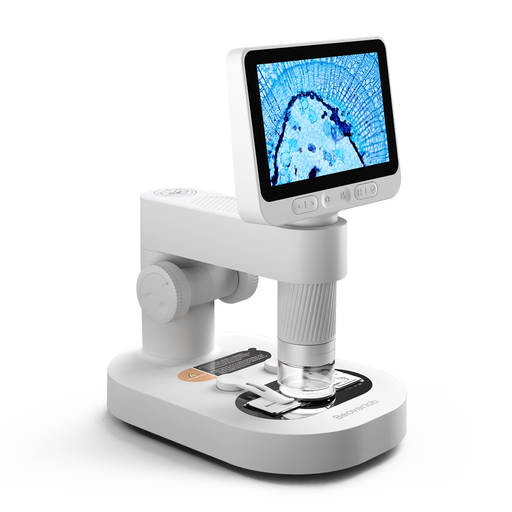 No image available
The handheld design with a detachable screen could suit a demonstration where you want to view details directly on the screen.
The product name mentions prepared slides and accessories. It is described as a children’s microscope: use it under adult supervision and keep the camera and small accessories out of the reach of children under 3.
Not necessarily. Research into the macroscopic structure of wood, published in Forests by MDPI, notes that an experienced observer may be able to see features with the naked eye or using a 10–15× magnifying glass. That doesn’t mean every type of wood or every detail will be recognisable at that magnification. For a demonstration, start with the overall view you want to show.
Place a suitable wood sample on a stable surface, start with an overall view, then adjust the focus and lighting. Check in advance whether your model needs a computer: Celestron describes the Handheld Digital Microscope Pro as a USB model for use with a computer, while Levenhuk says the DTX 500 Mobi has its own screen.
Check how the exact version is charged and stores images before setting up your stand. Levenhuk states that the DTX 500 Mobi offers up to 4 hours of standalone use and stores images on microSD. For a longer demonstration, make sure you have a suitable power supply and follow the instructions for charging and cleaning.
Statutory rights apply in addition to any manufacturer’s guarantee. According to ACM ConsuWijzer, the seller must offer an appropriate solution free of charge if a product breaks during normal use sooner than you could reasonably expect. There is no fixed, universal guarantee period.
No. According to the European Union, CE marking is required for products covered by applicable harmonised EU rules; by applying it, the manufacturer declares that the product complies with the relevant rules. Which rules apply depends on the product’s version and features.