
Viewer with limited work space
You want to examine a single dried seed steadily and put the microscope away after use. Allow space for the stand and, with a USB model, for the computer too.


If you already have a suitable computer, a USB microscope may be a good fit. Check that the stand and working distance suit your work surface and chosen magnification. If you’d rather view the image without a computer, compare a handheld microscope with its own screen and a benchtop model with a screen and stage. The latter gives you a fixed place for the seed, but requires room for the complete setup. For a specific model, also check its connection and the product requirements that apply.
You want to examine a single dried seed steadily and put the microscope away after use. Allow space for the stand and, with a USB model, for the computer too.
You want to see texture and small differences on the outside. So don’t just look at the stated magnification: consider focusing, working distance and adjustable lighting too.
You want to save images of the same seed or compare them. A stable setup and a storage method that suits the way you work are important.
A good fit if: you already have a suitable computer and want to view or capture images on it. BRESSER lists adjustable LED lighting and software-based image capture for the DST-1028.
Keep in mind: the computer takes up space too. For the BRESSER DST-1028, the manufacturer specifies a working distance of 110 mm at 10× and 10 mm at 280×.
A good fit if: you want to view images directly on the device without a computer. Levenhuk says the DTX 500 Mobi has a built-in 3-inch screen and comes with a stand.
Keep in mind: check that the supplied support keeps the seed steady while you focus.
A good fit if: having a fixed place for the seed and a screen as part of the same setup matters to you. Levenhuk lists a stage with clips for the DTX 500 LCD.
Keep in mind: this is a different model from the DTX 500 Mobi. Consider how much space the complete setup takes up.
| What to consider | What to look for | Who is this important for? |
|---|---|---|
| Stable setup | Check how much space the microscope, support and any computer will take up together. | If you have limited worktop space, you’ll want to view the seed steadily and put the setup away afterwards. Around 40% of consumers prioritise a stable setup that fits on their work surface. |
| Focusing and lighting | Check the working distance at the magnification you plan to use and whether the lighting is adjustable. | If you’re mainly looking at a seed’s surface, consider focusing, the space beneath the lens and lighting controls. Around 30% of consumers prioritise being able to see the seed’s surface. |
| How the image is displayed | For USB models, check the connection, software and required operating system. For a model with a screen, also consider the space needed for the stand. BRESSER lists Windows 10 and 11 for the DST-1028. | If you want to view images without a computer, a built-in screen is useful. A USB model also needs a suitable computer. Around 20% of consumers prioritise how the image is displayed. |
| Saving images | Check where images are saved and whether you have the necessary software or storage card. | If you want to compare images of the same seed later, consider how you’ll store the files and position the seed in the same place again. Around 10% of consumers prioritise saving images. |
The stated working distance of the BRESSER DST-1028 varies with magnification: BRESSER gives 110 mm at 10× and 10 mm at 280×. So a higher magnification doesn’t tell you how much room there’ll be beneath the lens.
Compare the working distances and check that you can position the whole seed beneath the lens at the magnification you want to use.
With a handheld microscope, you also need to consider how you’ll position the seed steadily. A USB model also requires a computer, which can make a compact microscope setup take up quite a lot of worktop space.
Allow space for the microscope, support, seed and, if needed, computer together.
Levenhuk describes the DTX 500 Mobi as a model with a screen and stand, and the DTX 500 LCD as a separate model with a stage and clips.
Check the full model number and what’s included before choosing a version.
The DST-1028 5MP is a USB microscope for viewing images on a computer you already own and comparing working distances at different magnifications.
The DTX 500 Mobi and DTX 500 LCD offer two different options: one model has a screen and stand, while the other has a stage with clips.
The Handheld Digital Microscope Pro is an option for viewing images on a computer, with an adjustable stand for three-dimensional objects.
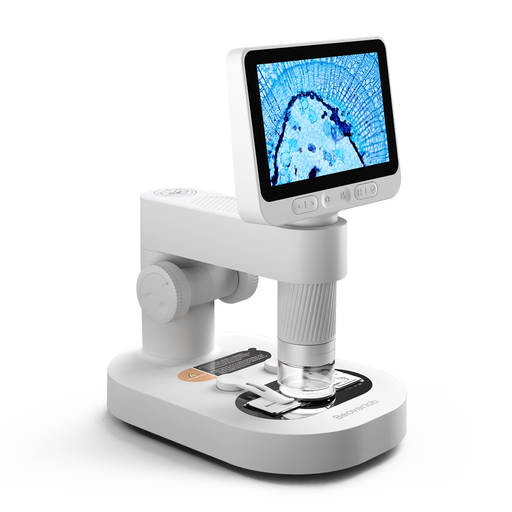
This selection focuses on handheld microscopes with their own detachable screen, for anyone who wants to view images without a separate computer.
 No image available
The built-in screen is a good option if you want to view images without a separate computer; according to the product information, the microscope can be used with a stand.
The description lists eight adjustable LED lights.
Keep the camera and small accessories out of reach of children under 3 years old; use only under the direct supervision of an adult.
To examine the outside of a whole seed, look for lighting from above. According to the manufacturers, the BRESSER DST-1028 and Levenhuk DTX 500 LCD have this type of lighting. For a different type of examination, such as a thin cross-section, you’ll need to work out what lighting is required.
Place the seed on a stable surface and use the stand or stage supplied with your chosen model. Levenhuk lists clips on the stage of the DTX 500 LCD; don’t assume that the DTX 500 Mobi has the same feature.
For a consumer purchase, the seller must provide a solution if the product doesn’t meet the legal requirements. The Dutch government advises you to contact the seller if there’s a problem; an additional guarantee doesn’t replace your statutory rights.
In the Netherlands, many applicable distance purchases from a business generally come with a 14-day cooling-off period. The Dutch government distinguishes between buying from a business and, for example, buying from a private individual; check the terms that apply to your purchase.
Applicable European product requirements apply to electrical and electronic equipment. According to the Dutch Ondernemersplein, once the requirements have been met, the manufacturer must affix the required CE marking and draw up an EU Declaration of Conformity. The rules that apply can depend on the version, so check the information for the exact model.