Choose a USB microscope with a stable stand if you have a computer at your workbench. If there’s no room for a computer, opt for a model with its own screen. Also decide whether you want to examine the surface of a loose flake or a cross-section of the paint layers. For the cross-section analysis described by the Rijksmuseum, the sample is embedded and polished. Finally, measure the space needed for the complete set-up, and check the lighting and connection options rather than focusing only on the magnification figure.
Who is this for?
Paint layer researchers
If you want to find out how paint layers are structured, you need to distinguish between the surface of a loose flake and a prepared cross-section. For cross-section analysis, the Rijksmuseum describes a sample that is first embedded and polished.
People with a small workbench
If you have limited table space, consider the complete set-up: the stand and the space needed for a computer or built-in screen. BRESSER, Celestron and Andonstar list different stand dimensions.
Inspectors who want to capture images
If you want to review or save images, decide in advance between viewing them on a computer using software and using a microscope with its own screen and storage. BRESSER and Celestron describe software features; Andonstar lists microSD storage for the AD206.
What should you look for?
First decide what you want to examine on the flake. Then choose a set-up that fits your workbench and works with the equipment you want to use.
| What to consider |
What should you check? |
Who is this for? |
| Viewing the surface or paint layers |
Decide whether you want to examine the surface or a prepared cross-section. Check the focus, lighting and sample holder. |
If I want to examine the paint structure, I first need to decide whether a loose flake can answer my question. Around 36% of consumers prioritise viewing the surface or paint layers. |
| Workspace and stability |
Measure the available space for the complete stand and allow room for a computer or built-in screen. |
With limited workbench space, I want to examine the flake steadily without the complete set-up taking over my work area. Around 29% of consumers prioritise space and a stable position. |
| Adjustable lighting |
Check whether the lighting is adjustable and whether you can position the sample properly beneath it. |
If the light doesn’t fall well on my paint flake, I want to be able to adjust the lighting to suit the set-up. Around 21% of consumers choose adjustable lighting as their main consideration. |
| Saving images and connectivity |
Check the connection, software compatibility and how images are stored. |
If I want to review images later, I need to know whether I’ll need a computer or standalone storage. Around 14% of consumers give documentation and connectivity top priority. |
Buying pitfalls
-
Focusing only on the magnification figure
The stated magnification of the BRESSER DST-1028 is based on viewing the image on a 27-inch monitor. Celestron also notes that the final magnification depends on the monitor size.
Compare the focus, lighting and image capture options too, and consider how much of the flake you want to keep in view.
-
Comparing only the dimensions of the handheld unit
The handheld unit may be small, but the stand and the screen or computer you need can take up extra space. Models also differ in their connection and storage options.
Measure the space available for the complete set-up, and check before buying which stand, computer or storage you’ll need and what’s included.
Depending on the model you choose, you’ll also need to allow space for a stand, computer or storage device.
-
Mistaking a surface image for an analysis of the paint layers
A photograph of the top surface won’t automatically show how the individual layers are structured. For the cross-section analysis described by the Rijksmuseum, the paint sample is embedded in resin and polished.
Decide in advance whether you want to examine the surface or a cross-section. A consumer microscope is no substitute for material identification or professional conservation analysis.
Brands to compare
BRESSER
BRESSER describes the DST-1028 5MP as a USB handheld microscope for applications including material samples and quality control. You’ll need a compatible Windows computer to use it.
- According to the manufacturer, the model has adjustable ring LEDs and software with a measurement function.
- The stated magnification is based on viewing the image on a 27-inch monitor. The working distance varies with the magnification setting, so check that the complete set-up will fit.
Celestron
Celestron describes the Handheld Digital Microscope Pro, model 44308, as a handheld microscope with an adjustable stand and computer display.
- According to the manufacturer, the model has adjustable LEDs, image capture software and a calibration ruler.
- The microscope has no built-in screen. The stated stand dimensions are 175 × 140 × 110 mm.
Andonstar
According to the manufacturer, the Andonstar AD206 has its own 7-inch screen, making it a good option if there’s no room for a computer beside the sample on your workbench.
- Andonstar lists built-in LEDs, two lamps by the stand and microSD storage.
- The stated stand dimensions are 20 × 12 × 19 cm. The product specifications don’t mention PC support.
Carson
According to the manufacturer, the Carson eFlex MM-840 is a USB microscope with a flexible stand and base, designed for viewing on a computer screen.
- The flexible stand can position the camera above a small sample.
- Measure the available space for the complete set-up before choosing this model.
Joybuy products for this purpose
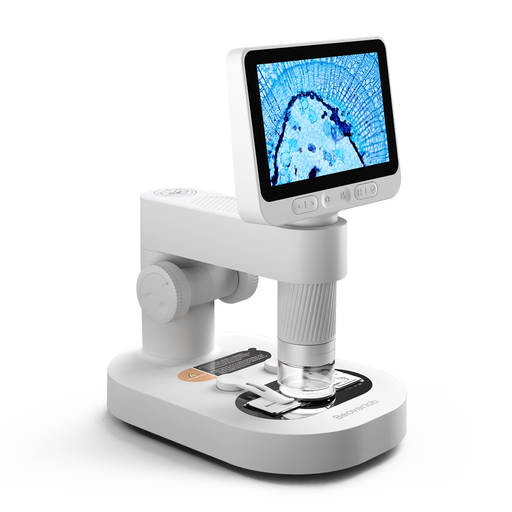
This product selection focuses on a digital microscope with its own screen for viewing small objects. Check that the complete stand set-up will fit in your available workspace.
 No image available
Digital children's microscope with detachable screen, slides and accessories
A good fit if you want to view a small object on the built-in screen and use the microscope on its stand.
The description lists eight adjustable LED lights and a detachable design.
Keep the camera and small accessories out of reach of children under 3. Use the product only under the direct supervision of an adult.
Joybuy
Frequently asked questions
Can I tell how all the paint layers are structured by examining a loose paint flake?
Not necessarily. For the cross-section analysis described by the Rijksmuseum, a paint sample is embedded in resin and polished before the cross-section is examined using microscopy techniques. So first decide whether you want to view the surface or a cross-section.
How much space should I allow for a small work area?
Measure the space needed for the sample, the stand and, if required, the computer. Celestron gives the dimensions of the stand for model 44308 as 175 × 140 × 110 mm; Andonstar lists 20 × 12 × 19 cm for the AD206. Also allow for the space your complete set-up will need.
What should I do if the microscope turns out to be faulty after buying it online?
If it’s faulty, contact the seller first. According to the Dutch government, the seller must resolve the problem or contact the manufacturer to do so. When you buy online from a business, you’ll also usually have a 14-day cooling-off period. This is separate from any remedy for a faulty product.
Does a CE mark prove that the image quality is suitable for examining paint?
No. A CE mark doesn’t tell you how sharp the microscope’s image is or whether it’s suitable for examining paint. According to the European Commission, CE marking is required only for products covered by specific harmonised EU rules.


