
Maker inspecting a paint flake
Wants to examine the surface and visible layers without holding the loose flake beneath an unstable lens. The Rijksmuseum explains that the angle of the light affects how paint texture appears.


A microscope with its own screen is a good choice if visitors want to look at the image at your stall without using a computer. A USB model is suitable if you have a compatible computer to view or save the image. With either type, check that the stand holds the flake steady and that the focus, working distance and lighting are right for the detail you want to see. A magnified image shows visible features, but it cannot determine the chemical composition of the paint.
Wants to examine the surface and visible layers without holding the loose flake beneath an unstable lens. The Rijksmuseum explains that the angle of the light affects how paint texture appears.
Wants to display the image at the stall, and so chooses between a microscope with its own screen and a USB setup with a compatible computer.
Wants to save or compare images of a flake, so checks how the chosen model saves images, connects and works with the software they use.
Start by deciding where visitors will view the image: on the microscope’s own screen or on a compatible computer. The Rijksmuseum explains that the angle of the light can change how visible the paint texture is, so also check the lighting and how stable the setup is.
| What to consider | What should you look for? | Who is this important for? |
|---|---|---|
| Sharp, stable image | Check the focus, field of view and stand at the magnification you want to use. | If I want to examine the texture or edge of a loose flake, I need to keep the area I’ve chosen steady in view; around 33% of consumers give clear visibility of the surface and edge top priority. |
| Sharing the view at your stall | Choose between a built-in screen and computer display; also check the power supply, connections and table space. | If visitors want to look at the image straight away, I need to know in advance what screen I’ll need at the stall; around 27% of consumers prioritise viewing the image together. |
| Saving images | Check how the model saves or transfers photos, and whether it requires a memory card or compatible computer software. | If I want to compare several flakes later, I need to be able to save the images; around 20% of consumers give documentation top priority. |
| Reflections and lighting | Compare the adjustable lighting and, if glare makes it difficult to see, check whether the model has a polariser. | If a shiny or delicate surface is difficult to examine, I want to control reflections without damaging the flake; around 20% of consumers prioritise this. |
For the BRESSER DST-1028, the manufacturer lists a shorter working distance at higher magnifications. A high magnification figure alone doesn’t tell you whether the flake will appear sharp or fit comfortably beneath the lens.
Compare the focus, working distance, field of view and stand against the detail you want to examine.
A USB microscope displays the image on a computer. Without a compatible computer and suitable connection, you won’t be able to use the setup to show a live image at your stall.
First decide where visitors will view the image, then check the connections, software and power supply for the specific model.
Visible structures or layers don’t reveal which chemicals are in the paint. The Rijksmuseum describes separate analytical techniques for examining the composition of paint samples.
Use the microscope for visual inspection and documentation; don’t draw conclusions about pigments or safety from the image.
The DST-1028 5MP is a USB microscope for inspecting materials on a computer.
The Handheld Digital Microscope Pro 44308 is a USB model that displays images on a computer.
The AM4113ZT is a USB model with an adjustable polariser for inspecting reflective surfaces.
The DTX 500 LCD is designed for live viewing and saving images without needing to use a computer as a screen all the time.
The USB digital microscope is an option for use with a computer.
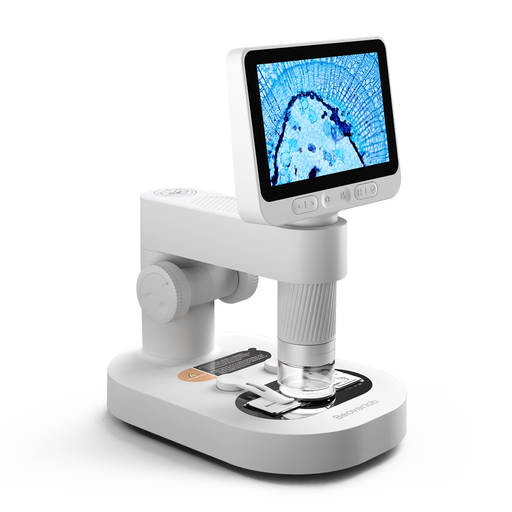
This Joybuy pick is suited to anyone who wants to view a paint flake on a screen without using a computer.
 No image available
The model with a detachable screen is a good fit if you want visitors to view a live image at your stall without using a computer as the display.
The product name lists prepared slides and accessories. Keep the camera and small accessories out of reach of children under 3; according to the product description, the product should only be used under the direct supervision of an adult.
No. Don’t use an ordinary digital image to draw conclusions about chemical composition or safety. You can use it to examine visible structures or layers. The Rijksmuseum describes several analytical techniques for examining the composition of paint samples.
Place the flake securely beneath the lens and start with a field of view that lets you find the relevant area again. Then focus the image and adjust the lighting. Before you begin, check that the holder and sample fit within the working distance at your chosen magnification.
When you buy as a consumer in the Netherlands, you’re entitled to a product that matches the contract. If it’s faulty, contact the seller to find a solution. For an eligible online purchase from a business, you’ll usually have a 14-day cooling-off period, although exceptions apply. Check the terms and conditions that apply to your order.
That depends on the EU product rules that apply to the specific model. According to the European Commission, CE marking is only compulsory for product categories where harmonised EU rules require it. So don’t assume that the same requirements apply to every model, or that a CE marking proves it’s suitable for examining paint.
Scraping or sanding isn’t necessary to choose a microscope or visually examine a loose flake. Arboportaal warns that harmful substances can be released when certain coatings containing chromium-6 are worked on or removed. That doesn’t prove your flake contains chromium-6 or lead; have its origin and a safe way of working assessed separately before disturbing an unknown old coating.