Who is this type of microscope suitable for?

Leaf enthusiast with a small work surface

If you want to view visible veins and the surface of a leaf, and put the device away after use, a USB microscope is worth considering. Allow for the space your computer will need too; with USB models such as those from Celestron, the image is displayed on a monitor.

Leaf enthusiast without a computer

If you want to view specimens directly on the device, consider a model with a built-in screen. The Celestron FlipView and Levenhuk DTX 500 Mobi are examples of this design. Also check that the screen and stand will fit where you plan to view leaves.

Leaf specimen maker

If you want to view structures in a thin specimen, consider a biological microscope with transmitted light. BRESSER describes the Biolux NV as suitable for specimens using incident and transmitted light. Allow for space for the specimen stage and the complete setup.

What should you look for when choosing one?

USB microscope with top lighting

Choose this option: if you mainly want to view the surface and visible veins of a whole leaf, already have a suitable computer and want to be able to put the device away.

Keep in mind: the computer and any stand also take up workspace; top lighting is not the same as transmitted light for viewing a specimen.

Handheld model with a built-in screen

Choose this option: if you want to view specimens directly without a separate computer screen.

Keep in mind: check that the screen and stand can be positioned comfortably; the handheld models mentioned use top lighting.

Biological microscope with transmitted light

Choose this option: if you want to view thin, light-transmitting leaf specimens and need a specimen stage.

Keep in mind: a microscope, specimen stage and any computer take up more space than a standalone handheld microscope.

What to consider What to look for when buying Who should consider this?
Space for the complete setup Compare the dimensions of the device and stand with your workspace; allow room for the leaf and computer too. My small work surface needs to fit the microscope, leaf and, if required, computer at the same time, and I want to be able to put everything away afterwards. Around 37% of consumers are mainly looking to limit the total workspace needed.
Viewing veins on the leaf surface Start with a large visible area of the leaf and check the focus, lighting and working distance at the magnification you plan to use. I want to see the veins on a whole leaf without immediately losing too much of the field of view. Around 27% of consumers prioritise seeing veins on the leaf surface.
Viewing without a computer Check whether the image appears directly on the device and what stand and power supply come with the model you choose. I want to view specimens directly on the microscope, without needing a computer screen beside my leaf. Around 18% of consumers mainly want to view specimens without a computer.
Thin specimens and transmitted light Check whether the model has transmitted light, how to position the specimen and how much space the setup takes up. For veins in a thin specimen, I want to position it properly and illuminate it from below. Around 18% of consumers prioritise thin specimens and transmitted light.

Common buying mistakes

  • Focusing only on maximum magnification

    A stated magnification does not, by itself, tell you how much of the leaf you can see at once or how easy it is to focus on a vein. BRESSER states that the working distance of the DST-1028 varies with magnification; Celestron notes that the final magnification of a handheld microscope also depends on the monitor size.

    Compare focusing, the visible area of the leaf, working distance and lighting at the magnification you actually plan to use.

  • Assuming a small USB microscope is a complete space-saving setup

    With USB models, the image appears on a computer, which takes up space alongside the device, stand and leaf.

    Measure the space needed for the whole setup, or consider a model with its own screen if you do not want to use a computer beside the leaf.

  • Confusing top lighting with lighting for a transparent specimen

    The handheld models discussed use top lighting. By contrast, BRESSER describes the Biolux NV as having both incident and transmitted light for specimens.

    Before buying, decide whether you want to view the surface of a whole leaf or a thin specimen. For the latter, make sure the model has transmitted light.

Relevant brands to consider

BRESSER

BRESSER offers both USB handheld microscopes for use with a computer and the Biolux NV, which has a camera and incident and transmitted light.

  • According to BRESSER, the DST-1028 has adjustable top lighting and its stated working distance varies with magnification.
  • The Biolux NV uses a specimen stage; the features of this model do not automatically apply to the USB handheld microscopes.

TOOLCRAFT

The DigiMicro Profi is a USB option if you want to view the image on a computer.

  • The product name specifies a 5 MP photo resolution.
  • Check the video requirements and the space taken up by the stand separately; a camera specification alone does not tell you how clearly you will see leaf veins.

Celestron

Celestron offers both a USB handheld microscope and a FlipView model with a built-in screen.

  • According to Celestron, the Handheld Digital Microscope Pro has an adjustable stand and USB connection, while the FlipView has a built-in screen.
  • The manufacturer's specifications for these models do not confirm whether a particular model is suitable for leaf specimens.

Levenhuk

The DTX 500 Mobi is a portable digital microscope with a built-in screen.

  • According to Levenhuk, the model can save photos and videos to a microSD card and has adjustable LEDs.
  • Check that the controls, screen position and complete setup suit your workspace.

Joybuy products

This Joybuy selection focuses on viewing leaves with a digital microscope that has a built-in screen, without needing a separate computer screen.
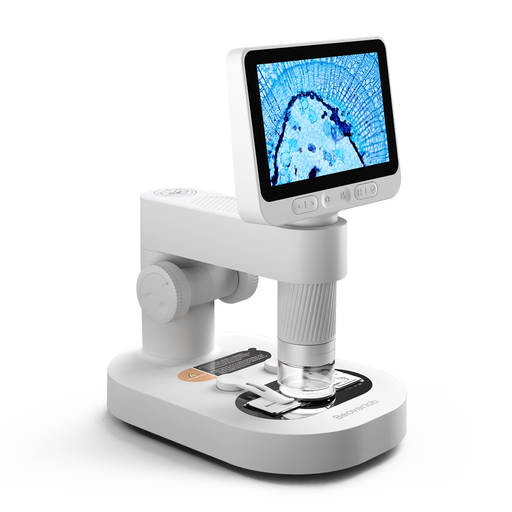
Digital children's microscope with detachable screen

Digital children's microscope with detachable screen

The built-in screen is designed for viewing leaves directly; according to the product description, the microscope can be used on its stand or as a handheld model.

The description mentions eight adjustable LEDs and says adult supervision is required. Keep the camera and small accessories out of the reach of children under 3 years old.

Check the CE marking and product information for the specific device. The Netherlands Food and Consumer Product Safety Authority states that CE marking is mandatory for electrical products covered by those rules.

Joybuy

Frequently asked questions

Can I view a leaf with a USB handheld microscope without a computer?

Not with the BRESSER DST-1028: it displays the image on a computer. Check each model, as the Celestron FlipView, for example, has a built-in screen.

How do I get started with viewing a leaf?

Place the leaf on a stable surface, start with an overview, then focus on the vein you want to see. Adjust the lighting if the surface looks too bright or too dark. For a thin specimen, check that the microscope has transmitted light.

What can I do if my digital microscope does not work properly after purchase?

If the product is faulty, you can contact the seller to find a solution. According to the Dutch government, there is no fixed statutory guarantee period for all products in the Netherlands; what you can expect also depends on the product and the information you were given when you bought it.

Do I have a cooling-off period when buying online?

For distance purchases from a business, a 14-day cooling-off period applies in many cases, but exceptions and the type of seller matter. The Dutch government explains this cooling-off period for distance purchases; also check the returns information for your specific order.

Which product safety marking should I check on a digital microscope?

Check the CE marking and product identification on the specific device. The Netherlands Food and Consumer Product Safety Authority states that CE marking is mandatory for electrical products covered by those rules; the marking does not tell you whether a microscope is suitable for viewing the veins on your leaf.
