Who is a digital microscope for knife edges suitable for?

Sharpener with a small workbench

Wants to inspect the edge while sharpening without setting up a large, permanent station. Check that there’s room for both the stand and the knife alongside the rest of your workspace. Plugable and Andonstar describe a compact USB option and handheld models with stands.

Inspector of shiny edges

Wants to examine visible grind marks or irregularities and is looking for a way to reduce distracting reflections. Bear in mind that an optical image isn’t a direct measurement of sharpness. Science of Sharp discusses the limitations of optical inspection, while Dino-Lite describes polarisation for the AM4113ZT model.

Sharpener who saves images

Wants to view or capture inspections on a computer. Check that the connection and software are compatible with your computer. Plugable describes using the USB2-MICRO-250X with a suitable connection on a Mac.

What should you look for when buying a microscope for a knife edge?

What to consider What should you check? Who is this important for?
Workbench space Consider the space needed for the camera, stand, knife and any computer or screen together. If my workbench is full, I want to fit the complete setup alongside the knife, not just the camera head. Around 40% of consumers say space is their top purchasing priority.
Viewing reflective steel Check whether you can adjust the lighting and whether the model has an adjustable polariser. If controlling reflections is my main concern, I want a clear view of the edge without glare obscuring the details. Around 30% of consumers say this is their top purchasing priority.
Positioning and working distance Compare how adjustable the stand is and the space between the lens and the knife at your preferred magnification. If I want to move the camera along the edge, I need to be able to reposition it securely. Positioning is the top purchasing priority for around 20% of consumers.
Connection and saving images Check the connection, compatibility with your computer and whether the model can capture images. If you want to view or save inspections on a compatible device, you’ll need equipment that connects to it. Around 10% of consumers say connection and image capture are their top purchasing priority.

Common mistakes when buying digital microscopes

  • Comparing only the highest magnification figure

    A magnification claim doesn’t tell you how much detail you can actually distinguish. On some models, working distance decreases as you zoom in further.

    Compare the lighting, image and working distance at the magnification you want to use for your knife.

  • Assuming a small camera means a small overall setup

    The total space required also depends on the room needed for the knife and stand, and how you view the image.

    Measure the space available alongside the knife and check that the supplied stand suits your preferred viewing setup.

  • Mistaking reflections for details of the edge

    Direct light on shiny metal can make an optical image harder to interpret. According to Science of Sharp, optical inspection can provide information, but it may be indirect and open to misinterpretation.

    Adjust the lighting or viewing angle. Only compare models with polarisation if reflections are a significant issue for your needs.

Brands to compare for this use

Plugable

The USB2-MICRO-250X is a compact USB option supplied with a flexible stand for use with a computer.

  • Plugable lists adjustable LED lighting and the option to use it handheld or with the stand.
  • Whether the stand is stable enough for you to inspect your knife properly depends on your setup.

Dino-Lite

The AM4113ZT is a USB model with adjustable polarisation for viewing shiny surfaces.

  • Dino-Lite says the AM4113ZT’s polariser helps reduce reflections; images can be captured using computer software.
  • Check that a suitable stand and enough working space are available. The optical image doesn’t directly measure the sharpness of the very edge.

Andonstar

According to Andonstar, the AD115 combines a handheld design with a built-in screen and adjustable arm.

  • The manufacturer says you can use the model without a permanent computer setup and also connect it to a computer via USB-C.
  • Check that the supplied arm fits in the space you have alongside the knife.

BRESSER

The DST-1028 5MP is a USB model with stated magnifications and working distances that you can compare with your setup in advance.

  • BRESSER lists magnification of 10×–280×, an adjustable LED ring and software for Windows 10/11.
  • The stated working distance decreases from 110 mm at 10× to 10 mm at 280×. Check that this distance works for your knife and preferred viewing angle.

Joybuy product selection for inspecting a knife edge

The product selected below is a handheld model with a screen and stand. Check that the stand and focusing method suit the space and positioning you need for your knife.
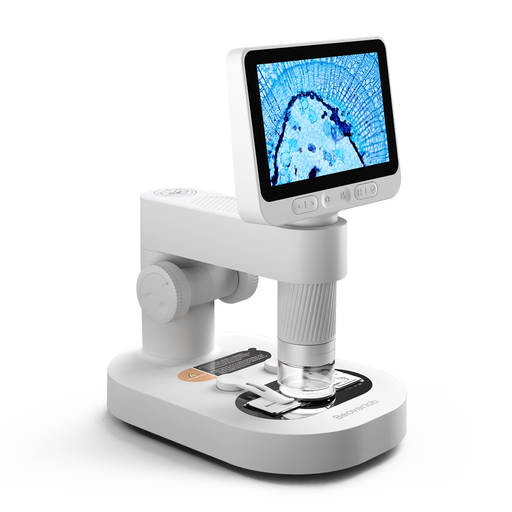
Digital microscope for children with detachable screen, prepared slides and accessories

Digital microscope for children with detachable screen, prepared slides and accessories

The built-in screen and supplied stand are a good fit if you want to view images without a permanent computer setup. Check that the arrangement suits the space where you inspect your knife.

The product description lists a handheld 2-in-1 design with a stand, a detachable screen and eight adjustable LEDs.

The warning states that the microscope and small accessories should be kept out of reach of children under 3 years old; use is only permitted under the direct supervision of an adult.

Joybuy

Frequently asked questions about microscopes for knife edges

Can I use high magnification to determine how sharp my knife is?

No, not from the magnification figure alone. Resolution, contrast, lighting and viewing angle all affect what you can see. As Science of Sharp explains, a side view can lead you to misjudge the geometry of the very edge.

How do I view a reflective edge?

Position the knife and camera securely, then adjust the lighting or viewing angle if the metal reflects directly into the camera. Don’t touch the edge while focusing; check your model’s manual for instructions on using its stand and focusing mechanism.

What should I check after use and if there’s a fault?

Follow the microscope’s manual for cleaning and storage. If a consumer product is faulty, the seller is responsible for handling your statutory guarantee in the Netherlands; a manufacturer’s warranty doesn’t replace this right, according to the Dutch government.

Do I have a cooling-off period when buying online in the Netherlands?

For many applicable consumer purchases made at a distance, a 14-day cooling-off period applies. Check who the seller is and which exceptions apply; the Dutch government also distinguishes between buying from a business and buying from a private individual.

Does a CE logo prove that a microscope is suitable for inspecting knives?

No. According to the European Commission, a CE mark indicates that the manufacturer declares the product meets the applicable CE requirements. It isn’t an independent test of image quality or suitability for your knife edge.
