What should you look for when choosing?
First decide whether visitors need to be able to see the image without an additional display device. Then consider how you’ll manage reflections, keep the knife stable and save images, if needed, with the setup you’ll be taking to the market.
| What to consider |
What should you check? |
Who is this important for? |
| Viewing the image straight away |
Check whether the model has its own screen and whether the stand, viewing angle and power supply suit your stall. |
If I want to show visitors the edge straight away, I don’t want to rely on a separate computer as a screen. Around 31% of consumers give immediate viewing top priority. |
| Managing reflections |
Look up the full model number to check for an adjustable polariser or lighting; assess the image with your knife and lighting. |
With a polished knife, I want to be able to see whether glare is hiding details. Around 25% of consumers prioritise reflection control. |
| Stable positioning |
Check the working distance at your preferred magnification and whether the stand gives you enough room to position the knife securely. |
When inspecting a sharp edge, I don’t want to have to keep holding the knife while I look. Around 25% of consumers prioritise a stable setup and a practical working distance. |
| Saving images |
Check the connection or app, whether it’s compatible with your device, and how you can save images. |
If I want to look at or compare knife edges later, the connection needs to work with the device I bring along. Around 19% of consumers make saving images their top priority. |
Joybuy products
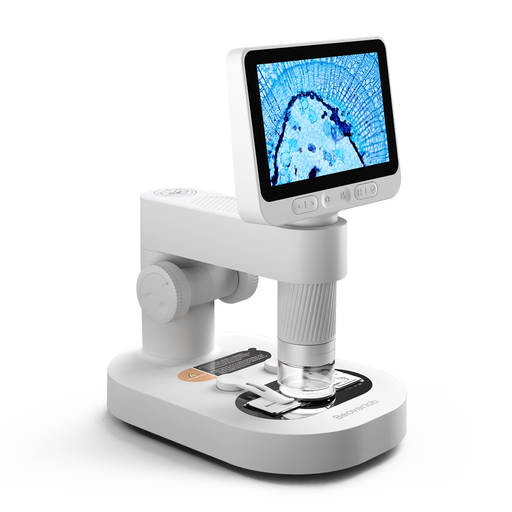
This product selection is suited to a setup with its own screen, so visitors can view the image at your stall.
 No image available
Children’s digital microscope with detachable screen
The built-in screen is ideal for viewing images without a separate computer. The product title is aimed at children, so check that the stand and the space beneath the lens are suitable for your setup with a knife.
The product description lists eight adjustable LEDs and use on a stand or handheld. Bear in mind the warning that adult supervision is required, and keep small accessories out of reach of children under 3 years old.
View at Joybuy
Frequently asked questions
Should I choose the highest stated magnification for inspecting a knife edge?
No. First check whether you can focus at your preferred magnification while retaining enough working distance and a sufficiently large visible area. Bresser bases the stated magnification of the DST-1028 5MP on full-screen viewing on a 27-inch monitor, so don’t compare figures like these without taking their intended use into account.
How can I position a knife safely and care for the lens?
Position the knife securely, with the edge away from your hands, before focusing. A Bresser manual warns of injuries from sharp tools and recommends cleaning lenses carefully with a soft, lint-free cloth. Follow the manual for the microscope you buy, too.
Do I automatically get a 14-day cooling-off period if I buy the microscope online for my stall?
For an online purchase by a consumer in the Netherlands, there is generally a statutory cooling-off period of 14 days after delivery, subject to exceptions, according to ACM ConsuWijzer. Ondernemersplein explains that this consumer cooling-off period doesn’t apply to a business purchase between businesses. So check whether you’re buying as a consumer or for your business, and review the applicable terms.
What if the microscope breaks too soon during normal use?
For a consumer purchase in the Netherlands, statutory warranty is separate from any manufacturer’s warranty. According to ACM ConsuWijzer, if a product doesn’t do what you could reasonably expect under normal use, the seller must resolve the issue in line with the applicable terms. If you’re buying mainly for business use, don’t assume the same consumer protections apply.
Is CE marking mandatory for a digital microscope?
That depends on the product category and the applicable EU rules. The Netherlands Enterprise Agency lists electrical and electronic equipment as a product group that may be subject to CE rules, with exceptions and requirements varying by product type. Check the product information and rules for the specific model; a CE marking alone doesn’t tell you whether all its features are right for your needs.


