If you already have a computer next to your workspace, start with a compact USB microscope and check that the stand, pen and your hands all fit. If you want to view the image without a computer, compare a model with a built-in screen against the space taken up by the complete setup. When considering magnification, also check that the nib stays in focus, that you can turn the pen and that you can reduce reflections; a higher stated magnification does not automatically mean a better view.
Who is this choice relevant to?
Fountain pen owner with a small desk
You want to inspect a nib and then put the setup away easily. So consider the stand and the space for the pen, not just the camera’s dimensions. Plugable and Dino-Lite describe stand options and compact USB microscopes.
Careful nib inspector
You want to turn the pen while viewing a still image so you can check the alignment and reflective surfaces. Working distance, mounting and lighting control are all relevant factors; Dino-Lite and Plugable describe features that may suit this purpose.
Viewer without a dedicated computer
You want to view the image on a phone, tablet or built-in screen. The choice then comes down to whether a wireless connection is compatible with your devices and how much space a screen model with its stand takes up. K&F Concept and Andonstar describe these alternatives.
What should you look for when buying?
First decide where you want to view the image. Then measure the space for the complete setup, and consider focus, working distance and reflections in light of how you plan to inspect the nib.
| What to consider |
What should you check? |
Who is this important for? |
| Desk space |
Measure the space for the stand or base, the pen and your hands. Also think about where you will store the setup. |
If I have limited workspace, I want to be able to put the pen down and pack the microscope away after use. Around 33% of consumers prioritise a setup that fits next to the pen and can be stored away. |
| Focusing and moving the pen |
Check the working distance at the magnification you want to use, and whether you can turn the pen beneath the lens. |
If I want to view the nib from different angles, the image needs to stay in focus while I position the pen. Around 27% of consumers prioritise stable focusing and enough room to move the pen. |
| Reflections |
Check whether you can adjust the light angle or brightness, and whether a polariser is included with the exact model. |
If glare obscures details on my nib, I want to be able to adjust the lighting. Around 20% of consumers prioritise reducing reflections. |
| Screen and connection |
Check the connection, supported devices, required software and options for saving images. |
If I want to view the image on my computer, phone, tablet or a built-in screen, the connection I choose needs to work with my equipment. Around 20% of consumers prioritise how they view and connect the device. |
Common pitfalls
-
Assuming magnification figures are directly comparable
Stated magnification can depend on distance, focus or how the image is displayed on screen. BRESSER links the stated range of the DST-1028 5MP to a full-screen display on a 27-inch monitor; Plugable explains how magnification varies with distance and focus.
Compare the visible detail, working distance and screen display used for the inspection you want to carry out.
-
Looking only at the camera
Even a compact camera needs a suitable stand. With a model that has its own screen, the complete setup also needs to fit on your desk, with enough room to move the pen.
Measure the space for the complete setup and decide where you will store it after use.
-
Treating an inspection image as a reason to alter the nib
Inspecting and removing material are two different things. Goulet Pen Company warns that using Micro-Mesh to sand many pens can affect the manufacturer’s warranty; the terms for your own pen are what matter.
Use the image for inspection first, and check the warranty terms before removing any material from the nib yourself.
Brands to consider
Dino-Lite
Compact USB handheld microscopes, including the AM4113T and AM4113ZT, for use with a computer you already own.
- Dino-Lite lists USB connectivity and software for Windows and macOS. According to the model specifications, the AM4113ZT has an adjustable polariser; the AM4113T does not.
- Check which stand suits your workspace. The features listed are not independent tests of fountain pen nibs.
Plugable
The USB2-MICRO-250X is a USB microscope with a flexible stand, designed for use with an existing screen.
- Plugable lists a stand, adjustable LED lighting and USB and USB-C connection options.
- According to Plugable, magnification depends on distance and focus, rather than a traditional zoom control. Check that it will work with your computer and workspace.
BRESSER
The DST-1028 5MP is a USB microscope for viewing and documenting images on a PC.
- BRESSER lists a ring light and a magnification range of 10×–280× when displayed full-screen on a 27-inch monitor.
- That magnification range is linked to this screen display. Also check that the stand and PC suit your setup.
K&F Concept
The GW45.0013 is described as a Wi-Fi and USB option for viewing with a mobile device or computer.
- K&F Concept lists two lenses, Wi-Fi, USB and adjustable lighting.
- Assess how useful the image is on your own nib, and check compatibility with your device. A stated magnification figure alone does not show how much useful detail you will see.
Andonstar
The AD207S is a microscope with its own screen and an HDMI connection, for viewing without a computer.
- Andonstar lists a 7-inch screen, adjustable lighting and a bracket with an extension.
- The complete combination of screen, bracket and base needs to fit on your workspace. The information provided does not show that it is specifically suitable for fountain pen nibs.
Joybuy product
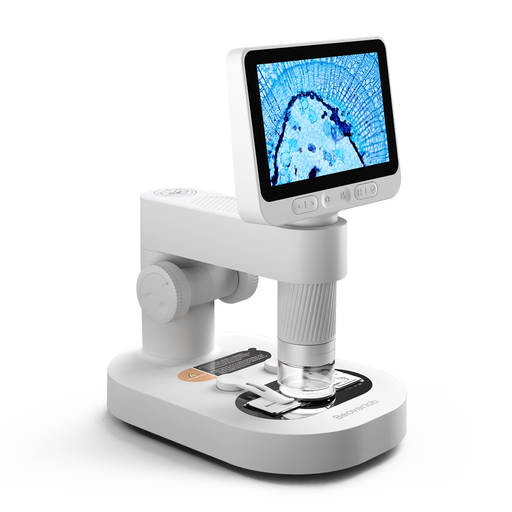
This product is a digital microscope with a detachable screen. Check whether the setup suits inspecting fountain pen nibs in your workspace.
 No image available
Digital microscope for children with detachable screen, prepared slides and accessories
The product name mentions a detachable screen, prepared slides and accessories, and the microscope is intended for children. Check exactly which accessories are included and whether the image and setup are suitable for inspecting your nib.
Before buying, check which CE marking applies to this electrical product. The Dutch government emphasises that CE marking is not a quality mark.
Joybuy
Frequently asked questions
How do you start inspecting a nib?
Set the pen and camera down securely, start with an overall view and then focus closer. Look at the nib from more than one angle. According to Plugable, magnification on the Plugable USB2-MICRO-250X changes with distance and focus, not via a standard zoom control.
Does a shiny nib need a polariser?
Not necessarily; try adjusting the light angle and brightness first. If glare still obscures the detail, a model with an adjustable polariser may be a useful option. Dino-Lite lists this feature for the AM4113ZT.
What should you check about the connection and maintenance?
Before buying, check that your chosen model works with your computer or phone, and follow the instructions for cleaning the lens. Dino-Lite lists USB software for Windows and macOS for the AM4113ZT; that does not tell you whether other models will work with your devices.
What are your rights if a microscope bought online does not work properly?
For a consumer purchase in the Netherlands, the product must be of satisfactory quality, and the seller is your point of contact if something is wrong. According to the Dutch government, there is no fixed statutory guarantee period that applies to all products. For many online purchases from a business, you will generally have a 14-day cooling-off period.
Does CE marking matter for a digital or Wi-Fi microscope?
Electrical and electronic equipment placed on the market in the Netherlands must comply with the applicable rules and carry the required CE marking. Radio equipment, such as a Wi-Fi model, must also meet the relevant radio requirements. The Dutch government explains that CE marking is a declaration by the manufacturer, not an independent assessment of image quality or suitability for inspecting nibs.


