
Repairer with a small workbench
Wants to examine a damaged connector without the base, screen and cables getting in the way. Andonstar lists the AD407 tripod as measuring 20 × 12 × 19 cm.


If you already have a suitable computer, start with a compact USB microscope and consider the stand as part of the overall setup. If you want to work without a computer, check that the entire base will fit. Don’t choose on maximum magnification alone: at your intended working distance, check that the connector stays in view, reflections are manageable and there’s room to position it.
Wants to examine a damaged connector without the base, screen and cables getting in the way. Andonstar lists the AD407 tripod as measuring 20 × 12 × 19 cm.
Wants to assess reflections and small areas of damage, and may already have a computer for the live view. Bresser explains why a wider view at lower magnification can be useful for electronics work.
Needs more than a clear view of the connector: there also needs to be room to position the component or use tools. Bresser explains the importance of working space between the object and the lens.
On a cramped workbench, it’s the space taken up by the entire setup that matters, not just the camera. Also compare the view, working distance and connection.
| What to consider | What to look for | Who is this most important to? |
|---|---|---|
| Space for the setup | Measure the base, stand and cable route together. Andonstar lists the AD407 tripod as measuring 20 × 12 × 19 cm. | If my workbench is already full, I want to know how much room the base, stand and cables take up together. Around 40% of consumers want to make sure the complete setup will fit. |
| View of the damage | Check how much of the connector stays in view at the magnification you use, and look out for reflections. Bresser explains how lower magnification can give you a wider view. | If I want to assess the whole connector, I need detail without losing the overall view. Around 30% of consumers prioritise seeing the damage clearly. |
| Working distance and positioning | Check the available clearance and whether the stand holds the lens steadily above the connector, particularly if you use tools beneath the lens. | If I want to use tools beneath the lens too, the available working distance matters. Around 20% of consumers prioritise positioning and room for tools. |
| Connection and operation | Check that a USB model works with your computer. A built-in screen may let you view the image without a computer, but you’ll need space for the device; Andonstar states that the AD407 does not support PCs. | If I don’t want to use a computer beside my workbench, I want to know whether a built-in screen suits the way I work. Around 10% of consumers prioritise standalone operation. |
The camera may be compact, but the stand, base and cables can still take up a lot of room.
Measure the complete setup and leave space to position the connector too.
High magnification doesn’t automatically give you a view of the whole connector. Bresser explains that lower magnification can offer a wider field of view for electronics work. According to Andonstar, the Andonstar AD407’s magnification claim of up to 270× applies when used with a 27-inch HDMI monitor.
Assess the field of view and working distance at the magnification you actually intend to use.
The Andonstar AD407 is called an HDMI Digital USB Microscope in its product title, but Andonstar’s specifications don’t list PC support.
Check the features of the exact model rather than relying on the title or a similar model number.
For anyone who wants to view the image on a built-in screen without using a computer. Andonstar says the AD407 has a 7-inch screen and does not support PCs; the manufacturer lists a tripod measuring 20 × 12 × 19 cm.
A USB model such as the AM4113ZTL may suit you if you want to view the image on a compatible computer. Check compatibility and how much space your chosen stand will need.
Plugable recommends the USB2-MICRO-250X for uses including circuit board inspection and describes it as having a flexible stand.
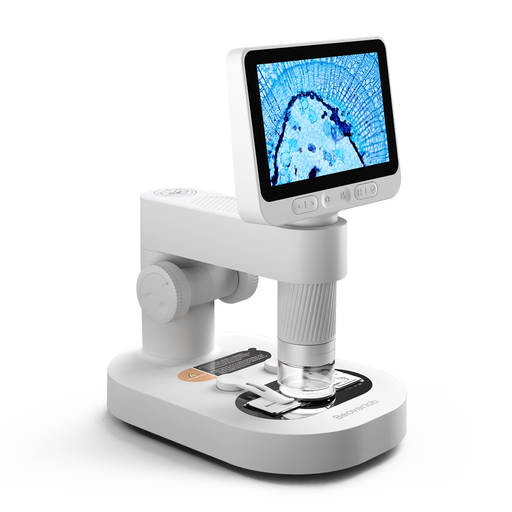
This Joybuy selection features a digital microscope with a detachable screen. Check whether this child-focused set is suitable for inspecting connectors.
 No image available
The product name is aimed at children; check whether the setup is practical for viewing a connector.
The product name mentions a detachable screen, microscope slides and accessories. Check that the stand and working distance suit the way you want to inspect the connector.
No. Also check how much of the connector remains in view at once and what working distance is available. Bresser discusses the importance of a wider view for electronics work; according to Andonstar, the Andonstar AD407’s magnification claim of up to 270× applies with a 27-inch HDMI monitor.
Measure the space needed for the complete base or stand, and allow for cables and room to position the connector. If you use tools beneath the lens, also check the clearance and stability of the setup.
A USB model is an option if you already have a suitable computer and have checked that it’s compatible with your system. A built-in screen may let you view the image without a computer, but you’ll need space for the device; Andonstar states that the AD407 does not support PCs.
The Dutch government’s Ondernemersplein website explains the relevant European safety requirements and manufacturers’ obligations regarding CE marking and an EU declaration of conformity. This general guidance doesn’t confirm that any specific model or item offered for sale complies with them.
In many cases, you have a 14-day cooling-off period when buying online from a business, although exceptions depend on the circumstances. The Dutch government states that there’s no fixed period for the statutory guarantee and that the seller must provide an appropriate solution if a product is faulty; this is separate from cancelling a purchase.