
Baker with a longer dough resting time
Wants to set a resting time in hours in one go, so checks the confirmed countdown range first. TFA Dostmann and Brabantia list different maximum ranges for the timers mentioned.


First, choose a timer with a countdown range long enough for the dough resting time you want to set in one go. According to TFA Dostmann, the TFA 99HOURS has an hours mode that counts down for up to 99 hours and 59 minutes, while the Brabantia Tasty+ counts down for up to 99 minutes, according to Brabantia. A magnet or hanging option can save cupboard space if you have a suitable, clearly visible spot. Use the alarm as a reminder to check the dough, not as a sign that it has finished proving.
Wants to set a resting time in hours in one go, so checks the confirmed countdown range first. TFA Dostmann and Brabantia list different maximum ranges for the timers mentioned.
Wants to keep the timer outside the cupboard and looks for a magnet, hanging option and compact dimensions. TFA Dostmann, Brabantia and IKEA describe models with magnetic attachment; IKEA also lists the dimensions of the LJUNGPIPARE.
Wants a distinctive alarm and to check the remaining time quickly, but also assesses the dough themselves. King Arthur Baking explains that conditions such as temperature and humidity can affect how quickly dough rises.
First compare your longest planned dough resting time with the exact model’s countdown range, then decide where you can place the timer.
| What to consider | What to look for | Who is this important for? |
|---|---|---|
| Countdown range | Compare the longest dough resting time with the maximum range, and check whether you can enter hours and minutes in a single setting. | If my recipe calls for a resting time of more than 99 minutes, I want to be able to set the whole duration in one go. That’s why around 36% of consumers prioritise a sufficient countdown range. |
| Space and attachment | Check the dimensions and whether a magnet, stand or hanging option will work where you plan to put it. | With limited cupboard space, I want to keep the timer outside the cupboard without losing sight of it. Around 29% of consumers put saving space first. |
| Alarm and readability | Check the model’s alarm and display features, and whether you can see or hear them from your chosen spot. | If I’m doing other tasks while the dough rises, I want a timely reminder to check it. Around 21% of consumers place the greatest value on a noticeable reminder. |
| Controls and batteries | Compare how the timer is set, the battery type and whether batteries are included. | For regular use, I want to be able to reset the timer without any hassle and know in advance which batteries it needs. Around 14% of consumers give this the highest priority. |
According to Brabantia, the Brabantia Tasty+ counts for up to 99 minutes; according to TFA Dostmann, the TFA 99HOURS also has an hours mode.
Before buying, check both the maximum range and how hours and minutes are set.
Magnetic attachment only saves space if you have a suitable surface and can still see the timer where it’s placed.
Decide where the timer will go beforehand, then compare the model’s attachment options and dimensions.
The alarm tells you when to check; as King Arthur Baking explains, temperature and humidity can affect how quickly dough rises.
Use the alarm as a prompt to check, and assess the dough according to your recipe’s instructions.
What’s included varies between the models mentioned: Brabantia lists an included CR2032 battery, while the TFA 99HOURS needs two AAA batteries, which are not included.
Check the battery type and the contents of the packaging for the exact model.
The 99HOURS 38.2049.02 is an option for longer dough resting times, with several ways to attach it.
The Tasty+ kitchen timer with magnet is designed for a resting time that falls within its stated range in minutes.
The LJUNGPIPARE combines a clock and timer in a compact device with a magnet.
HEMA lists magnetic digital kitchen timers as an option when worktop space is limited.
These Joybuy products are digital timers for keeping track of dough resting time, with different countdown ranges and ways to view or position the timer.
 No image available
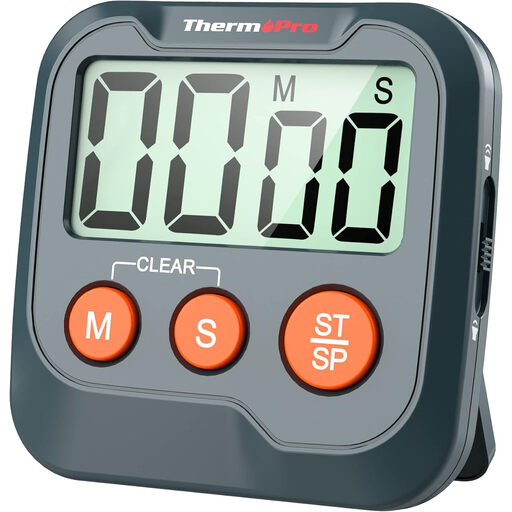
Suitable for a dough resting time within its maximum range if you want to keep the timer outside the cupboard.
The countdown range is up to 99 min. 59 sec.; a longer resting time cannot be timed in a single setting. The product description lists an LCD display, adjustable volume, magnet, stand and hanging option.
 No image available
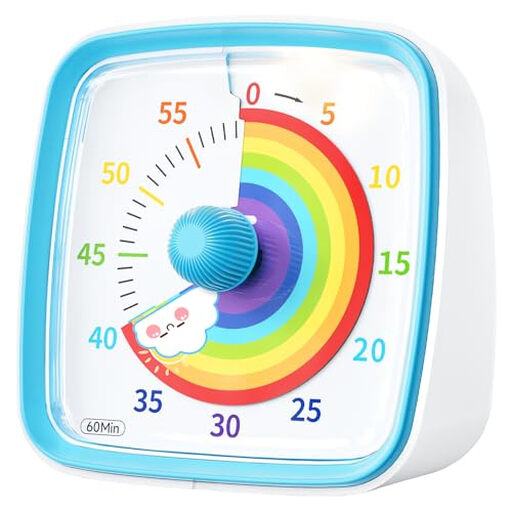
May suit a dough resting time of up to 60 minutes if you want to follow its progress visually.
The description lists a visual progress display and a silent countdown. It has a maximum range of 60 minutes; according to the description, a night light comes on when the timer ends.
That depends on the length of time you want to set in one go. Compare your recipe with the stated range of the exact model: Brabantia lists a maximum of 99 minutes for the Tasty+, while TFA Dostmann also gives an hours and minutes mode for the 99HOURS.
Not necessarily; the alarm is a reminder to check the dough. Its progress can depend partly on the conditions, so follow your recipe’s instructions and assess the dough yourself.
Choose a suitable spot where you can see the display and hear the alarm. IKEA says the LJUNGPIPARE can be attached to a metal surface; check that your chosen spot and the attachment are suitable for the model you select.
Check the product information and the contents of the packaging for the exact model. According to Brabantia, a CR2032 battery is included with the Brabantia Tasty+; according to TFA Dostmann, the TFA 99HOURS needs two AAA batteries, which are not included.