
Evening baker with a long prove
After an evening class, you may want to plan a long stage or a check for the following morning. A timer helps you remember when to check, but the condition of the dough is what matters.


Choose a kitchen timer based on the longest period you want to track in one go, how many stages of proving you need to time at once, and the type of alarm that suits a late evening. Use the alarm as a reminder to check the dough, not as proof that it is ready: temperature and how the dough develops affect proving time.
After an evening class, you may want to plan a long stage or a check for the following morning. A timer helps you remember when to check, but the condition of the dough is what matters.
If you’re keeping track of two loaves or overlapping proving and checking times, separate timers running simultaneously make it easier to keep the timings apart.
When baking late, adjustable sound or a visual signal can be important. A silent alarm is only practical if you’re staying awake and the timer is somewhere you can see it.
Start with the longest uninterrupted period you want to track, then decide how many timers you need running at once and choose an alarm to suit your evening. King Arthur Baking points out that proving time depends on the dough and its surroundings; time alone doesn’t always tell you when dough is ready.
| What to consider | What to look for when buying | Who is this important for? |
|---|---|---|
| Range for a long prove | Check the maximum countdown time in hours and minutes for the exact model. Also see whether it has a pre-alarm. | If I want to track a long stage after class, I don’t want to reset the timer halfway through; around 36% of consumers make a long prove their top priority. |
| Several timers running at once | Check how many independent countdowns can run simultaneously; saved times aren’t necessarily separate timers. | When I’m keeping track of overlapping stages or several loaves, I want to time them separately; around 29% of consumers prioritise several stages running at once. |
| Alarm for late in the evening | Check whether you can turn off the sound, whether a visual signal remains, and where you can put the timer. | If other people are asleep, I want a suitable reminder without unnecessary noise; around 21% of consumers make a quiet evening alarm their top priority. |
| Setting a short check | Consider the controls, readability and maximum countdown time of the version you choose. | For a quick check after class, I want to set a reminder quickly without features I don’t need; around 14% of consumers make simple, short checks their top priority. |
According to Brabantia, the Tasty+ has a maximum of 99 minutes, while the TFA 99HOURS 38.2049.02 supports countdowns in hours. If the timer’s range is too short, you’ll need to reset it.
Compare the maximum countdown setting with your longest planned interval between checks, not just with the first short prove.
If a stage lasts longer than the timer’s range, you’ll need to reset it or use another timer.
Changes in temperature and the surrounding environment can mean dough is ready earlier or later than a recipe suggests. King Arthur Baking stresses that time isn’t always the best way to judge whether dough is ready.
Use the alarm as a reminder to check, then assess the dough using the recipe and appropriate visual or tactile cues.
According to TFA, the TFA 99HOURS 38.2049.02 has saved times; the separate Dual Timer 38.2025 model specifies two countdowns running simultaneously.
Look for specifications that explicitly state that independent countdowns can run at the same time.
For overlapping stages, you may need a second device if your chosen timer only supports one countdown at a time.
According to TFA, the TFA models reviewed are supplied without AAA batteries, while Brabantia lists a CR2032 battery for the Tasty+ version mentioned here.
Check which battery type the exact model needs and whether batteries are included. Ask for confirmation of the number of batteries required for the HENDI dual timer.
The models mentioned offer a choice between one long countdown and two countdowns running simultaneously.
The magnetic Tasty+ reviewed is designed for simple, short checks.
According to OXO, the Triple Timer is designed to track three times simultaneously.
On its Dutch product page, the KLOCKIS combines a clock, timer, alarm and temperature display.
The dual timer reviewed is designed for two relatively short checks.
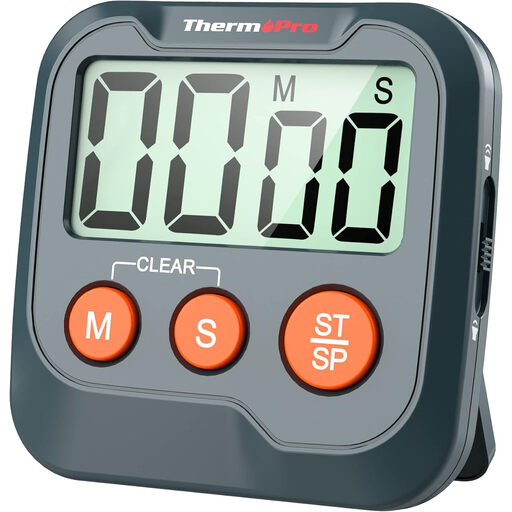
This selection from Joybuy is for short checks, with a digital countdown of up to 99 min. 59 sec.
 No image available
Suitable for short checking intervals after class; use the alarm as a reminder to check the dough.
The countdown runs for up to 99 min. 59 sec. The description lists adjustable volume, a magnetic back, a stand and a hanging hook for different placement options.
This range isn’t long enough to track a longer stage without resetting the timer.
No, use the signal as a reminder to check the dough. The time it needs to prove varies with factors such as temperature and the condition of the dough. For the final prove, its appearance and, where suitable for the bread, the poke test can help.
Proving the dough slowly in the fridge can slow the process and help with planning, but it won’t give you a set baking time. After taking it out, check whether the dough needs to prove further and set the timer for your next check.
Before use, check which battery type it needs and whether batteries are included; this varies between versions. In the Netherlands, take used batteries to a collection point in line with government guidance, such as a shop that sells batteries, and don’t put them in general waste.
In the Netherlands, online consumer purchases generally come with a statutory 14-day cooling-off period from delivery, subject to applicable exceptions. Separately, a product must meet the standards you could reasonably expect when used normally; if it’s faulty, contact the seller. ACM ConsuWijzer explains these consumer rights.