
Playing in a shared space
You play with headphones, but want to check whether other people can hear your mouse clicks. Quiet buttons may matter more than gaming features in this case. Trust and CHERRY list quiet buttons on specific models.


You don't necessarily need a gaming mouse for digital board games played with headphones. Choose a standard mouse with explicitly stated quiet buttons if the clicking noise might bother others at home. A gaming model makes sense when your game can make practical use of its extra controls. Prioritise fit, connectivity and the buttons you actually use over a high DPI; manufacturers' specifications are not comparative usability tests.
You play with headphones, but want to check whether other people can hear your mouse clicks. Quiet buttons may matter more than gaming features in this case. Trust and CHERRY list quiet buttons on specific models.
You want a mouse that suits your hand and how long you use it for. Compare the shape, size and connection before choosing extra features.
You like having extra mouse buttons or scroll functions, provided your game supports them. Trust and Razer describe these features on specific gaming models.
Choose this option if: you mainly click on menus, maps and turns, and quiet buttons are important to you or the people you live with.
Consider: whether the button layout and connection meet your needs. According to CHERRY, the GENTIX SILENT has three buttons and USB-A.
Choose this option if: your game lets you assign commands to extra mouse buttons or scroll functions.
Consider: whether the game and software you use support these features. Quiet operation has not been confirmed for these gaming models.
Choose this option if: you're looking for a wired gaming mouse and want to take its stated weight into account.
Consider: SteelSeries lists the wired Aerox 3 Onyx at 59 g. That figure alone doesn't tell you whether the mouse will suit your hand.
| Concern | What to look for | Who is this important to? |
|---|---|---|
| Audible clicks | Check whether quiet buttons are explicitly listed for the exact model; this does not mean the noise level has been measured independently. | If you play near other people, you may want to avoid disturbing them with mouse clicks. Around 29% of consumers prioritise quiet clicks. |
| Fit and comfort | Compare the size and shape with your hand and grip. Don't assume it will be comfortable for you just because it's lightweight or described as ‘ergonomic’. | If you do a lot of pointing and clicking, you'll want a shape that suits your hand. Around 29% of consumers prioritise fit and comfort. |
| Extra buttons and scroll controls | Check whether your game supports the commands you want to use, and what features the model offers. | If you want to assign recurring in-game actions to mouse buttons, focus on useful extra controls. Around 21% of consumers prioritise this. |
| Connection and freedom of movement | Check whether your computer supports the required port or Bluetooth, and whether you'd rather play with a cable. | If you need freedom of movement or a connection to a specific device, you'll want to know how the mouse connects before you buy. Around 21% of consumers prioritise connectivity. |
A high maximum DPI rating does not, by itself, offer an advantage when pointing at menus or turns in a digital board game.
Choose adjustable sensitivity only if you want to customise it. Start with the fit and controls you need.
The quiet models described here are explicitly labelled as having quiet buttons, but this has not been confirmed for the gaming models discussed.
If you play near other people, check whether quiet buttons are listed for the exact version.
Trust describes the GXT 929 Helox as a wireless gaming mouse and the Yvi+ as a compact, quiet mouse for multiple devices.
CHERRY describes the GENTIX SILENT as a wired, quiet mouse and the STREAM MOUSE COMFORT as a mouse with quiet buttons and a right-handed shape.
Razer describes the Basilisk V3 35K as a wired, right-handed gaming mouse for people who use its adjustable controls and scroll functions.
The wired Aerox 3 Onyx is an option to compare if you're looking for a lightweight gaming mouse.
Logitech G describes a range of gaming mice with different shapes, button counts and connections.
This selection includes wired and wireless gaming mice with extra controls, as well as a compact, quiet Trust mouse. Check each model's connection, button layout and fit for your computer and game.
 No image available
Suited to anyone looking for wired gaming controls with extra buttons and scroll functions.
Wired via USB; the product title lists 35,000 DPI and 11 buttons. Razer describes adjustable controls and scroll modes for this model.
 No image available
Suited to anyone looking for programmable controls and a choice of connection methods.
The product title lists wired, 2,4G wireless and Bluetooth connections, 12,800 DPI and 7 programmable macro buttons. The product description mentions quiet microswitches.
 No image available
Suited to anyone looking for programmable buttons and wanting to compare different connection options.
The product title lists 26K DPI, 2.4G, USB-C and Bluetooth, a 400 mAh battery and a weight of 56 g. The description mentions five programmable buttons and a magnetic charging dock. According to the product description, the dock contains magnets and should be kept away from pacemakers, medical implants and payment cards.
 No image available
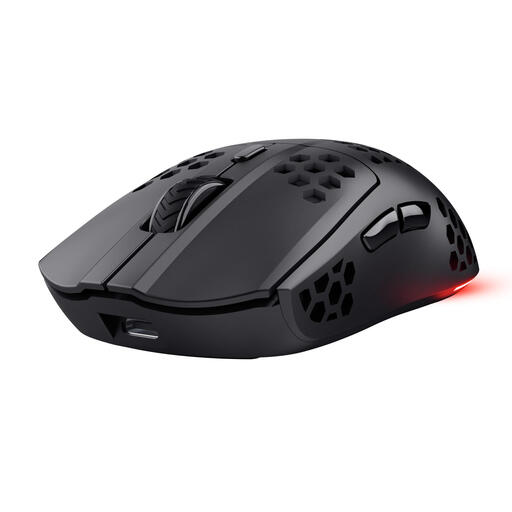
Suited to anyone who wants to play wirelessly and use extra buttons for commands supported by their game.
Trust describes this model as having 6 programmable buttons and a rechargeable battery. The product title lists a maximum of 4,800 DPI.
 No image available
Suited to anyone who mainly wants to point and click and values quiet buttons.
The product title describes a compact wireless mouse with quiet buttons and 1,600 DPI. Trust also lists a USB receiver and Bluetooth connectivity for the Yvi+.
No, not necessarily; it depends on whether the clicks bother you or other people. If you want a quiet mouse, check whether quiet buttons are explicitly listed for the exact model. The manufacturers' information doesn't provide directly comparable noise measurements.
Check your computer's ports and wireless options. CHERRY lists USB-A for the GENTIX SILENT; Trust lists Bluetooth and a 2,4 GHz connection for the Yvi+. If you choose a wireless model, also check how it's powered.
For an online purchase in the Netherlands, you generally have 14 days from delivery to change your mind, subject to legal exceptions; ACM ConsuWijzer explains these rules. A product must also meet what you could reasonably expect when used normally. If it breaks unexpectedly soon, contact the seller about your statutory guarantee; in the Netherlands, there is no fixed general two-year limit for this.
Electrical and electronic equipment must meet the applicable European requirements. Business.gov.nl refers to the Radio Equipment Directive for equipment with Bluetooth or a radio-frequency module. This requirement alone doesn't prove that an individual item for sale has already been checked.