Who is this advice for?

Creator with a growing home archive

You keep lots of completed projects in one place and need space for your files as well as a recoverable copy. The National Cyber Security Centre explains the importance of keeping multiple versions and storing one copy elsewhere.

Creator who works from external storage

You regularly open or move large work files and want to know whether an SSD and your computer’s USB connection suit the way you work. Manufacturers quote speeds, but those won’t necessarily be the speeds you get on your workstation.

Creator who switches between Windows and Mac

You switch between computers or use Time Machine. The drive’s connection, format and intended use can all make a difference. Apple also gives specific advice on the capacity needed for a Time Machine backup.

What should you consider when choosing?

Desktop HDD for an archive kept in one place

A good fit if: you want to keep lots of existing and future art files in one fixed location.

Bear in mind: the desktop models reviewed need a power adapter and are less suitable for taking with you regularly.

Portable HDD for copies you move between locations

A good fit if: you move copies occasionally and want a model powered via USB.

Bear in mind: the file system and cable of the exact model. Toshiba says Canvio Basics is formatted as NTFS for Windows and needs reformatting for macOS.

External SSD for regular project work

A good fit if: you often open projects from external storage or transfer them between devices.

Bear in mind: quoted speeds are manufacturer specifications. Check your computer’s USB connection and cable too.

What to consider What to look for when buying Which consumers is this for?
Recoverable copy Decide where the original and separate copies will be kept, set a regular backup routine and check that you can restore your files. I want to be able to recover my work if a copy fails; around 36% of consumers put recoverability first.
Archive space Check the size of your current archive, allow for project versions and work out how much storage your backup method needs. I want room for my growing collection and saved versions; around 29% of consumers put archive space first.
Access to projects Compare the USB specifications of the drive, cable and computer. Check that the capacity suits the projects you want to store on it. I often open or move large projects and want a connection that suits my workstation; around 21% of consumers prioritise working speed.
System and formatting Check the port, cable and file system, and whether the drive is intended for shared files or Time Machine. Before formatting, make a copy of any files already on the drive and store it elsewhere. I want to use the drive with my Mac, Windows PC or Time Machine without any surprises; around 14% of consumers prioritise system compatibility.

Common pitfalls

  • Using the archive drive as your only remaining copy

    Moving files to free up space on your work computer doesn’t count as a backup if you don’t keep a separate copy afterwards.

    Before moving anything, decide where the original and a separate recovery copy will be kept.

    If the drive is lost or fails, you may be unable to recover your work; keeping a separate copy requires extra storage or another location.

  • Expecting the quoted SSD speed on every computer

    Manufacturers quote sequential speeds for some SSDs. Your workstation’s USB connection and the cable you use also affect the connection.

    Compare the USB specifications of your computer, cable and drive before choosing based on a quoted speed.

    A speed rating that your connection can’t take advantage of may not deliver the expected benefit for the way you work.

  • Assuming every drive is ready for Mac backups

    A drive formatted for Windows may need reformatting for macOS. Formatting can erase files already on the drive.

    Before use, check the file system and what you’ll be using the drive for. First, make a copy elsewhere of any files on the drive you plan to format.

Brands to consider

Western Digital

The Elements Desktop range offers a desktop HDD option for an archive kept in one place. Western Digital lists an 8 TB model.

  • The manufacturer lists a USB connection and mains adapter for the desktop range.
  • Check the full model number of the version you choose to make sure the capacity and model match.

Toshiba

Canvio Basics is a portable HDD range. Toshiba lists, among other options, a 4 TB model.

  • According to Toshiba, the range is powered via USB.
  • Toshiba says the drive is formatted as NTFS for Windows and needs reformatting for macOS. Check the cable and make a copy of your files elsewhere before formatting.

Samsung

The T7 Shield is an external SSD range for anyone who regularly moves projects or works from the drive.

  • For model MU-PE2T0S/EU, Samsung lists USB 3.2 Gen 2 and sequential speeds of up to 1.050/1.000 MB/s.
  • These are manufacturer claims, not independent test results or measured speeds on your workstation.

Kingston

The compact XS1000 SSD range is designed for portable work files and backups, with 1 TB and 2 TB models available.

  • Kingston lists USB 3.2 Gen 2 and maximum sequential read and write speeds of 1.050/1.000 MB/s.
  • These figures are Kingston specifications; check the connection on your own computer.

Seagate

Expansion Desktop is another desktop HDD range. Seagate describes, among other options, an 8 TB model.

  • For model STKP8000400, Seagate lists USB 3.0 and a separate power adapter.
  • The model and accessory details listed come from a product page for the US market; check the exact version you choose.

Products on Joybuy

This selection includes portable HDDs for an archive you move between locations, SSDs for projects you regularly open or transfer, and a desktop HDD for a fixed workstation.

My Passport 4 TB Black portable hard drive

My Passport 4 TB Black portable hard drive

A portable HDD for an art archive you want to move occasionally.

4 TB storage; USB 3.0 and powered via USB. The product description mentions automatic backup software and 256-bit AES hardware encryption.

The product description says it offers plug-and-play use with Windows 10 and Windows 8.1. Don’t use this drive as the only copy of work you can’t replace.

Joybuy

Toshiba Canvio Basics 4 TB external hard drive, black

Toshiba Canvio Basics 4 TB

A portable HDD for an archive copy you want to use without a separate mains adapter.

4 TB storage and powered via USB. The product title lists USB Type-A/Micro-USB B and USB 2.0/3.2 Gen 1.

The product description says it needs reformatting for macOS. Before formatting, make a copy elsewhere of any files already on the drive, and keep a separate recovery copy too.

Joybuy

Samsung Portable SSD T9 4 TB black, MU-PG4T0B

Samsung Portable SSD T9 4 TB black (MU-PG4T0B)

A portable SSD for large projects you want to open or transfer regularly.

4 TB storage. The product description lists USB 3.2 Gen 2x2 and sequential speeds of up to 2.000 MB/s.

The quoted speeds are product specifications and depend in part on your computer’s connection; they aren’t measured performance on your workstation. Keep a separate backup too.

Joybuy

Samsung MU-PE2T0R 2 TB external SSD, blue

Samsung MU-PE2T0R 2 TB, blue

A portable SSD for projects you regularly open or transfer from external storage.

2 TB storage and USB 3.2 Gen 2. The product description lists maximum sequential read and write speeds of 1.050/1.000 MB/s.

The quoted speeds are manufacturer claims and depend in part on your computer’s connection. The product description lists IP65 protection; the drive isn’t designed to be submerged. Keep a separate backup too.

Joybuy
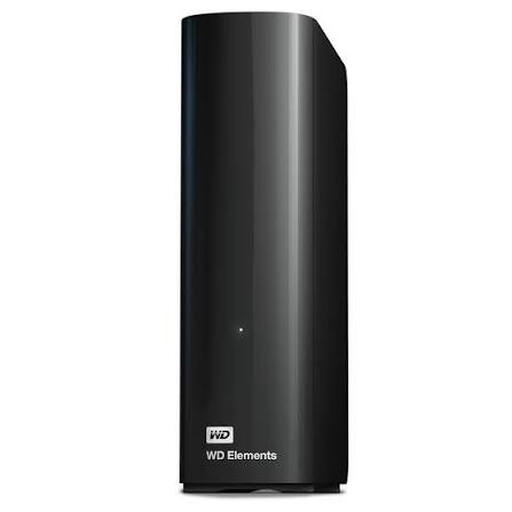
WD Elements Desktop Storage 8 TB, black

WD Elements Desktop Storage 8 TB, black

A desktop HDD for a large archive that stays in one place.

8 TB storage and USB 3.0; the product description also lists backwards compatibility with USB 2.0 devices.

This desktop model is suited to a fixed setup. Keep a separate copy of work you can’t replace too.

Joybuy

Frequently asked questions

Is one external drive enough to archive irreplaceable art files?

No, not if it’s your only copy. The Dutch National Cyber Security Centre’s guidance on business backups recommends keeping three versions of your data, on two types of storage media, with one copy stored elsewhere. This is backup advice, not a legal requirement when buying a drive.

What should I check before setting up a new drive for a Mac or Windows PC?

First, check the connection, cable and format of the exact model. Toshiba, for example, says Canvio Basics is formatted as NTFS for Windows and needs reformatting for macOS. Before formatting, make a copy elsewhere of any files already on the drive.

How much storage do I need for Time Machine?

For a Time Machine backup of a Mac, Apple ideally recommends a drive with at least twice the storage capacity of that Mac. This advice is for backup use and isn’t a general minimum capacity for a standalone folder of art files.

Who can help if an external drive bought in the Netherlands fails?

When you buy as a consumer, you’re entitled to a product that works properly. According to the Dutch government, the seller must provide a solution if something goes wrong. Your statutory rights apply alongside any manufacturer’s warranty.
