
Dictating in a noisy classroom
You want to dictate your own words while other people are talking nearby. The distance between your mouth and the microphone is therefore an important consideration.


If classmates are talking nearby, a USB headset with a boom microphone that you can position close to your mouth is a sensible option. If you’d rather not wear a headset, a standalone USB microphone may suit you, provided you can position it close by and point it towards yourself. Check the computer’s USB connection and dictation feature, then test with a short dictation to see how much background noise ends up in the text. Product specifications cannot guarantee accurate transcription in your classroom.
You want to dictate your own words while other people are talking nearby. The distance between your mouth and the microphone is therefore an important consideration.
You’d rather not wear a headset and can point a standalone microphone towards the speaker. Bear in mind that the stand and cable will take up space.
You need to check that the microphone, computer and dictation software work together. If the application processes pupils’ data, the school’s privacy arrangements for that use also need to be reviewed.
First decide whether you want to wear the microphone on your head or place it on a fixed spot on your desk. Then check the connection, dictation software and how any pupil data will be used.
A good fit if: you dictate among talking classmates and want to keep the microphone close to your mouth.
Bear in mind: you’ll need to wear the headset and choose the right USB version for your computer.
A good fit if: you speak from a fixed position and can point the microphone towards yourself and place it nearby.
Bear in mind: positioning and classroom noise still matter, and a desk stand takes up space.
| Consideration | What should you check? | Who does this matter to most? |
|---|---|---|
| Classroom noise | Compare a boom microphone close to your mouth with a standalone microphone positioned to pick up your voice. If possible, test it in the room using the dictation software. | If I’m dictating among other speakers, I want to capture my voice without assuming the microphone will block out all classroom noise. Around 33% of consumers give the greatest priority to distinguishing their own voice. |
| Connection and dictation | Check the USB port, selected microphone input, microphone permissions and the dictation feature in the version of the email app you use. | If I want to dictate an email on the computer I’ll be using, I want to know that both the connection and the software work. Around 27% of consumers put this combination first. |
| Wearing it and workspace | Decide whether you want to wear a headset and whether there’s room for a standalone microphone stand. Check which cables and stand come with the version you choose. | If I’d rather speak without a headset, I need space to position a standalone microphone appropriately. If I change how I’m sitting, a boom microphone worn on a headset may be more practical. For around 20% of consumers, how the microphone is worn or positioned is the main consideration. |
| Privacy at school | Find out which application will be used and what it does with audio and text. Involve the school in the assessment if pupil data is processed. | If the chosen dictation application processes pupil data, I want to know what arrangements apply. Around 20% of consumers put this privacy question first. |
A product description of microphone technology doesn’t prove how accurately dictation software will recognise voices in a classroom.
Test it with your own voice, the app you plan to use and the surrounding noise. Read through the email draft and correct it before sending.
Allow time to proofread the text and correct any recognition errors.
According to Logitech, the Yeti Nano’s omnidirectional setting picks up sound from all directions. That doesn’t necessarily make it the right choice for capturing one voice among talking classmates.
For solo dictation, choose a setting directed towards you and check the result with a short test.
Jabra lists Evolve2 30 SE versions with different USB connections. The wrong version may not connect directly to the port available on your computer.
Check the full version name and connection against your computer before ordering.
The H540 is a USB-A headset with an adjustable boom microphone.
The Evolve2 30 SE is a headset range with mono and stereo versions and different USB options.
The ATR2100x-USB is a standalone dynamic microphone with USB and XLR connections.
The Q2U is a standalone dynamic microphone with USB and XLR connections.
The MV7+ is a standalone dynamic USB microphone with adjustable settings.
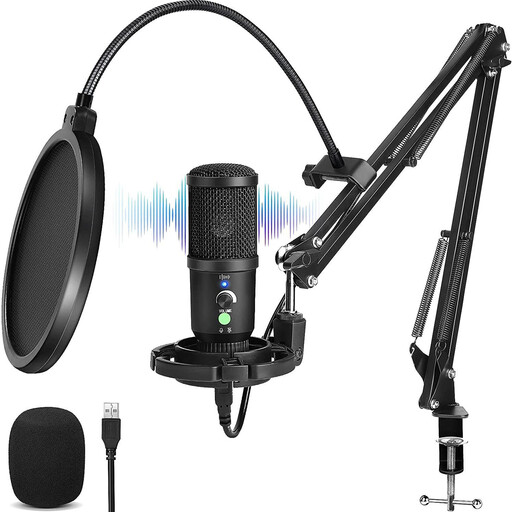
This selection includes wired USB headsets and a standalone USB microphone for voice input at a fixed workstation or on a computer.
 No image available
A headset option if you want to wear a microphone while dictating.
 No image available
A standalone USB microphone option if you can position it towards yourself in a fixed spot.
The product title specifies a cardioid pickup pattern.
 No image available
A wired USB headset if you want to use a wearable microphone while dictating.
This version uses USB-A. Logitech recommends positioning the adjustable boom microphone close to your mouth.
 No image available
A wired USB headset option if you dictate using a wearable microphone.
 No image available
A wired stereo headset option if you want to dictate using a headset with a built-in microphone.
No. You’ll need to use a dictation feature in the application. Microsoft describes dictation in supported versions of Outlook as requiring an enabled microphone and a reliable internet connection.
Position a headset microphone close to your mouth; Jabra recommends this for the Evolve2 30 SE. Point a standalone cardioid microphone towards yourself, then check with a short test that the selected input and position work.
Check which USB port is available and the headset’s full model version. Jabra lists separate USB-A and USB-C versions. Also check that the computer and application support the audio connection you’ve chosen.
For a consumer purchase in the Netherlands, the seller is responsible if the product doesn’t do what you could reasonably expect under normal use. The seller must then offer an appropriate solution. For distance purchases from a business, you’ll also usually have a 14-day cooling-off period. Check the terms that apply to your purchase.
No. The school must assess which rules apply to the specific processing. The Dutch Data Protection Authority highlights, among other things, the need for a legal basis and for pupils and parents to be informed when personal data is processed. If another party carries out the processing, the school remains responsible and may need a data processing agreement.