
Home practitioner using audio files
Wants to play local lines, record their own and listen back to both on a computer.


For practising with local dialogue files, a wired headset is a suitable choice as long as both the headphones and microphone work with your computer or another device. Choose USB for a fixed desktop setup, or a 3.5 mm combo plug if your device has a compatible combined port. Recording software lets you play the file and record your own lines on a separate track. If you need to move around a room or send audio to a venue's sound system, a wireless theatre system requires additional equipment and a check that the frequencies available at the venue are suitable.
Wants to play local lines, record their own and listen back to both on a computer.
Wants to record their own voice and considers fit and background noise during longer rehearsals.
Needs room to move or a connection to a venue's sound system, and wants to distinguish a wireless theatre system from a headset for listening to files.
Suitable if: you play local files on a computer and want to record your lines at the same time.
Bear in mind: the cable limits how far you can move. Check whether the headset uses USB-A or USB-C, and select it as both the input and output in your recording software.
Suitable if: your device has a compatible single port for both headphones and microphone.
Bear in mind: a port that only carries headphone audio won't work; you'll also be tethered to your device by the cable.
Suitable if: you need to move around during rehearsals or send a signal to a sound system.
Bear in mind: a headset microphone with transmitter and receiver doesn't automatically replace headphones for listening to local files. Also check the frequencies available at the venue.
When practising at home with local files, your choice comes down to playback and recording, monitoring your voice, comfort and how much room you need to move.
| What to consider | What should you check? | Who is this important for? |
|---|---|---|
| Local files and recording | Check that your device recognises the headset as both an input and output, and that your software can import a file and create an additional recording track. | If I want to play existing lines and record my own alongside them, my device needs to handle both tasks. Around 36% of consumers prioritise working with local files. |
| Listening back to your own voice | Check whether the microphone position is adjustable, then make a short test recording with both quiet and loud lines. | If your main concern is how your own lines sound, a test recording and a well-positioned microphone can help. Around 29% of consumers prioritise recording their own voice. |
| Fit and listening | Check the wearing style and fit of the exact model, and consider listening volume and duration too. | For longer rehearsals, I want a headset that feels comfortable and lets me listen back without turning the volume up unnecessarily high. Around 21% of consumers prioritise comfort and listening during longer sessions. |
| Freedom to move | Check the headset cable length or, for a wireless system, the receiver, connection and frequencies available at the venue. | If I need to move around the room while performing or use a venue's sound system, range and system setup are key. Around 14% of consumers prioritise freedom to move or a connection to a sound system. |
According to Shure, the Shure SLXD14+/SM35 system consists of a receiver, bodypack transmitter and SM35 headset microphone. These components aren't automatically headphones for listening back to local practice files.
Decide in advance whether you mainly want to play and record files on a computer, or whether you also need to send a signal to the venue's sound system.
A wireless setup may require a receiver as well as the headset microphone. You'll also need a separate way to listen to your practice files.
HP lists a 3.5 mm option for the Blackwire 3315 and 3325. The Blackwire 3320 has a USB-C connection with a USB-A adapter, so check the full model number and plug.
Compare the connection on the exact model with the ports on the device you'll use for practice.
Manufacturers describe microphone features for calls, but that doesn't tell you how a recording will sound in your rehearsal space.
Record a short section of your own lines and listen back before starting a longer practice session.
The Dutch Government says there is no fixed statutory warranty period in the Netherlands. A period mentioned for a product isn't automatically the same as your statutory rights.
Check exactly what's being offered, and distinguish between your statutory rights and any separate manufacturer's or seller's warranty.
The H390 is a wired option for a computer with USB-A, while the H111 uses a 3.5 mm combo plug for a device with a suitable combined port.
The Blackwire 3300 series offers wired models for computer use. Check whether the exact model is mono or stereo and what connection it uses.
The Evolve2 30 SE is a wired office headset for computer use, with microphone position and fit worth considering.
The PC 8 USB is a wired stereo headset for computer use, with volume and mute controls.
The SLXD14+/SM35 system is designed for performers who move around with a headset microphone and send the signal to compatible equipment.
These Joybuy product picks are wired headsets for playing local dialogue and recording your own lines on a connected device. Check that each model's connection is suitable for your computer or another device.
 Image unavailable
Listen and speak through a wired connection to your device. Check that the included USB audio adapter is suitable for your computer setup.
The product information lists a 3.5 mm connection, a USB audio adapter and a flip-up microphone.
 Image unavailable
A wired computer headset for listening to local lines and recording your own with the microphone.
The product information lists an adjustable microphone boom, stereo sound and in-line volume and mute controls. A mute indicator is also mentioned.
 Image unavailable
A wired USB headset for practising on a computer. Check that its USB connection is suitable for your device.
The product information lists digital stereo audio, an adjustable microphone and a plug-and-play USB connection.
 Image unavailable
A wired headset for a device with a compatible 3.5 mm connection. For a computer with separate headphone and microphone ports, the product information lists a Y-splitter.
The product information lists stereo sound, a flip-up-to-mute microphone and volume control on the ear cup.
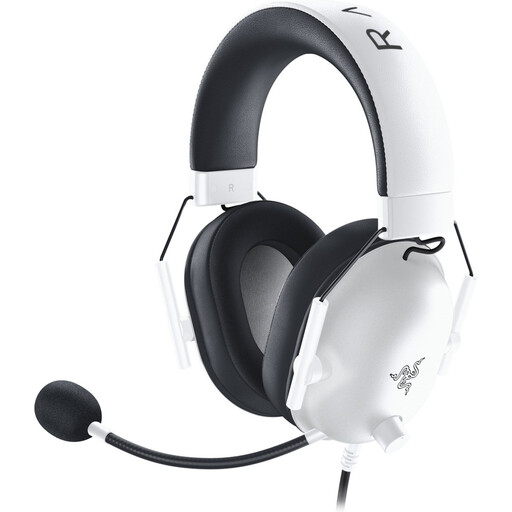 Image unavailable
A wired headset for a device with a compatible 3.5 mm connection, for listening to dialogue and recording your own lines.
The product information lists a cardioid microphone, volume control and a 130 cm cable.
No, you'll also need a connected device and suitable recording software. Audacity explains how to import an existing file and record an additional track. Check which microphone and output are selected in the software.
A headset with a combined 3.5 mm plug needs a device port that supports both headphones and a microphone. Logitech's setup guide specifically states that the H111 needs a single combined connection; a port that only carries headphone audio isn't suitable.
Import the local file into recording software and record your own lines on a new track. Audacity documents both importing and recording on multiple tracks; test your playback and recording settings with a short section first.
Not without first checking the frequency band and the situation at the venue. The Netherlands Authority for Digital Infrastructure says a licence is usually not needed for wireless microphones, but you must use the correct frequency range, and some bands do require a licence.
For qualifying online consumer purchases, the Dutch Government says you usually have a 14-day cooling-off period; check the terms of the specific purchase. You also have statutory rights if a product doesn't meet the requirements. The Netherlands has no fixed statutory warranty period of two years.