
Detective game player checking compatibility
You play a particular detective game on PC or console and want to check in advance that both your device and the game work with your chosen controller.


First, check whether your detective game supports controller input on the device you play on; choosing a compatible controller doesn’t guarantee that it will work. Then choose between replaceable AA batteries, USB power while you play, or a rechargeable controller you can charge using an available port. It’s a trade-off between playing without cables and managing batteries, finding time to charge, or having a cable that limits where you can sit.
You play a particular detective game on PC or console and want to check in advance that both your device and the game work with your chosen controller.
You don’t want to use a separate controller charger, so you’re comparing AA batteries, USB power and charging through a console dock that’s already in use.
You want to sit wherever you like during a relaxed investigation game, while keeping in mind that a wireless controller still needs batteries or charging.
First, check that the game and platform are supported. Then compare how the controller is powered and whether a cable or receiver will work with your setup.
| What to consider | What should you check? | Who is this important to? |
|---|---|---|
| Game and platform support | Check that your game supports controller input and that the exact model lists your platforms as compatible. | If I play a particular detective game, I want to know whether the controller will actually work with that game on my device. Around 33% of consumers put compatibility first. |
| Power supply | Check whether the model uses AA batteries, a rechargeable battery or USB power, and whether the required connection is available. | I want to play without using a separate power socket to charge my controller, so I look at how it gets its power. Around 27% of consumers give this the highest priority. |
| Freedom to sit where you like | Compare the cable length with your playing distance, or check the wireless connection required and whether you’ll need a receiver. | If I play from the sofa, I don’t want a cable to limit where I can sit. Around 20% of consumers consider freedom of movement the most important factor. |
| What’s included | Check the battery type and which cables or other accessories are included with the exact version. | I want to know in advance what else I’ll need besides the controller. Around 20% of consumers focus most on the total cost of buying and using it. |
A wireless controller may still need replaceable batteries or recharging. Xbox states that rechargeable AA batteries aren’t charged inside the controller.
Before buying, check the battery type, what’s included and where you can charge the controller or its batteries.
Depending on the version you choose, you may need to buy spare batteries or a separate rechargeable power solution.
A controller connecting to your device doesn’t automatically mean you can use it to play your detective game.
First, check the information for the specific game, then compare its listed platforms with those for the exact controller model.
According to 8BitDo, the 8BitDo Ultimate 2C Wireless uses 2.4 GHz on Windows and Bluetooth on Android. That doesn’t mean it supports Bluetooth on Windows.
Check the connection options for the exact version and make sure you have a suitable port available for a receiver.
The features listed below apply to the specific product ranges and versions mentioned, not automatically to every product from the same brand.
Xbox describes the wireless Xbox controller as supporting Xbox consoles and Windows PCs. It can use AA batteries.
According to PowerA, the Enhanced Wired Controller for Xbox Series X|S also works with Xbox One and Windows and uses a USB cable.
DualSense is a controller for PS5. PlayStation also describes using it via USB or Bluetooth with certain other devices.
The Switch Pro Controller is designed for use with Switch; Nintendo also describes pairing it with Switch 2.
According to 8BitDo, the Ultimate 2C Wireless is designed for use via 2.4 GHz on Windows and Bluetooth on Android.
This Joybuy selection focuses on wired Xbox controllers. Check each model to make sure your device and detective game support controller input.
 No image available
A wired option if you use an Xbox Series X/S, Xbox One or Windows 10/11 and have a USB port within cable reach.
 No image available
A wired Xbox controller to consider if you have an accessible USB port and the cable is long enough for your playing distance.
The product information lists Xbox Series X|S, Xbox One and Windows 10/11, as well as a detachable 3 m USB-C cable.
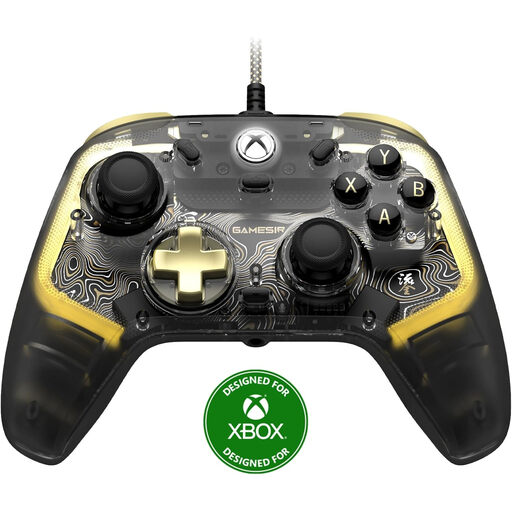 No image available
This wired controller may suit a fixed gaming setup with an available USB port.
The product title lists Xbox Series X/S, Xbox One and Windows 10/11. Bear the cable length in mind and check game support.
 No image available
A wired option if you use a compatible Xbox or Windows device with a free USB port.
The product title lists Hall Effect Joysticks and Triggers, with support for Xbox Series X|S, Xbox One, Windows 10/11 and Steam.
 No image available
Worth considering if you want to play wired on Xbox and check the listed wireless options for PC or mobile.
The title lists wired use with Xbox Series X|S and Xbox One, and wireless use with PC, Android and Steam. Check which connection your device uses.
No. Check whether the specific game supports controllers and whether the controller can connect to your PC. Then compare the platforms supported by the game with the information for the exact controller model.
No. Xbox states that rechargeable AA batteries aren’t charged inside the controller; charge them according to the battery manufacturer’s instructions. A compatible rechargeable Xbox battery for controllers with USB-C is a separate solution.
Nintendo describes charging through the USB port on a compatible Switch dock, using the included USB charging cable. The dock must be connected to power, and Nintendo says a full charge takes around six hours.
No. Dutch statutory consumer rights apply even if you haven’t bought an extended warranty. ACM ConsuWijzer explains that the retailer is responsible for providing a suitable solution if a product doesn’t perform as you could reasonably expect during normal use.
Radio equipment placed on the EU market is covered by the European framework set out in Directive 2014/53/EU, the Radio Equipment Directive. The European Commission describes this framework for placing radio equipment on the market; this alone doesn’t prove that an individual controller meets the applicable requirements.