What should you look for when choosing?
Start with your writing software and how you want to view text and sources. Then choose a form factor, accessories and storage to suit your workspace.
| What to consider |
What should you check? |
Who is this most important for? |
| Writing software and sections |
Check that the software works with the operating system and supports heading styles and document navigation. |
If I use headings and a consistent section layout for each column, I want to be able to find those parts in my document. Around 36% of consumers focus mainly on writing software and sections. |
| Screen for text and sources |
Choose between a built-in or separate screen, and check that the connections suit your setup. |
If I want to view my draft and sources at the same time, having a screen setup that suits this is a priority for me. Around 29% of consumers prioritise viewing text and sources. |
| Space and a complete workspace |
Compare the size of the computer and check whether a screen, keyboard and mouse are included with the exact configuration. |
If I have limited desk space, I want to know how large the computer is and what else I’ll need. Around 21% of consumers focus mainly on a compact, complete workspace. |
| Storage and backup |
Check the SSD capacity and any expansion options for the exact configuration. Also set up a backup and test that you can restore your files. |
If I keep instalments, source files and photos, I want enough storage and a way to restore my files. Around 14% of consumers prioritise their archive and being able to recover files. |
Joybuy products for your workspace
This selection includes mini PCs for use with a separately chosen screen, and all-in-ones with a built-in screen. For each configuration, check which connections and accessories suit your writing setup.
 Image unavailable
SOYO Y5Pro Mini PC
A mini PC to consider if you want to use a separately chosen screen.
The product title lists Windows 11, Intel Core i5 8250U/8350U, 8GB DDR4, a 256 GB SSD, Bluetooth 5.2 and Wi-Fi 5. Check that the connections suit your screen.
View at Joybuy
 Image unavailable
FIREBAT R3 Mini PC
A mini PC to consider for a workspace with a separately chosen screen.
The product title lists an AMD Ryzen 5 7430U, 16 GB RAM, a 512 GB SSD, Wi-Fi 6 and support for three 4K screens. Check which screen connection suits your setup.
View at Joybuy
 Image unavailable
Lenovo Yoga AIO 27IAH10 F0J2001DNY
An all-in-one to consider if you want the computer and screen in a single unit.
The product title lists a 27-inch QHD screen with 120 Hz, an Intel Core Ultra 7 255H, 16 GB LPDDR5X, a 1 TB SSD and Windows 11 Home. The description lists a wireless keyboard and mouse.
View at Joybuy
 Image unavailable
Apple iMac 24-inch M3 16GB 512GB, Silver (2023)
An all-in-one to consider for a permanent writing space with a built-in screen.
The product description lists a 4.5K screen and a QWERTY keyboard. Check that the screen setup and keyboard layout suit your work.
View at Joybuy
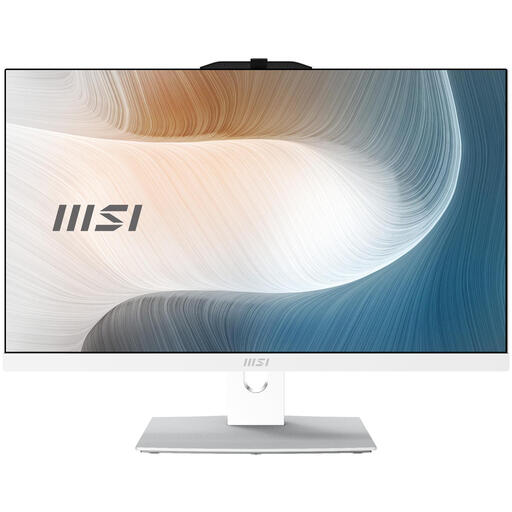 Image unavailable
MSI Modern AM242TP 1M-1229EU All-in-One
An all-in-one to consider if you’re looking for a built-in screen and a Windows setup.
The product title lists a 23.8-inch Full HD touchscreen, Intel Core 3 100U, 8 GB DDR5, a 256 GB SSD and Windows 11 Pro. According to the product description, the charger must be purchased separately.
View at Joybuy
Frequently asked questions
Do I need a special computer for section layouts?
Most importantly, check that your preferred writing software works with the operating system and supports heading styles. Microsoft Support explains that Word displays headings formatted with heading styles in the Navigation pane. This doesn’t mean you need a separate high-performance graphics card.
What should I check when setting up a mini PC?
Check that the screen connection is compatible and find out which accessories come with the exact configuration. Lenovo says a screen, keyboard and mouse are optional with the ThinkCentre reviewed here; Apple says displays for the Mac mini are sold separately.
How can I keep my drafts safe if my computer stops working?
Set up a backup and check that you can restore a file. Microsoft Support describes regular backups as useful for dealing with issues such as accidental deletion and hardware problems. In Windows, File History can be used with an external drive or network location.
Is a manufacturer’s warranty the same as a statutory guarantee?
No. According to the Netherlands Government, a manufacturer’s or seller’s warranty is in addition to the statutory guarantee. Also check the terms of any paid service plan.
Do online purchases always come with a 14-day cooling-off period?
Not always. The Netherlands Government says that a 14-day cooling-off period applies in many cases to distance purchases, but exceptions may apply. For example, a purchase from a private individual may not count as a distance purchase. Check who the seller is and which terms apply to your purchase.


