
Running multiple VMs
You work in several guest machines at once and want to avoid the host and VMs competing for the same memory or storage. Microsoft Learn explains why having enough memory and storage matters when running VMs concurrently.


A tower usually gives you more choice of memory and storage, making it a natural fit if you run several VMs at once or want to upgrade later. A mini PC is better if saving desk space is your priority, provided you check which components are included. Set aside memory, processor time and storage for both the host and the VMs you’re running. For Hyper-V on Windows, Microsoft Learn lists Windows 11 Pro or Enterprise, SLAT and enabled hardware virtualisation as requirements. Check these against the exact configuration you’re considering.
You work in several guest machines at once and want to avoid the host and VMs competing for the same memory or storage. Microsoft Learn explains why having enough memory and storage matters when running VMs concurrently.
You want to try Microsoft Hyper-V at home, so you check the Windows edition, processor requirements and virtualisation setting in advance. Microsoft Learn outlines the requirements for Hyper-V on Windows.
You’re short on desk space and considering a mini PC, but want to know in advance whether your chosen configuration includes memory, storage and an operating system. ASUS lists these supply details for the NUC 15 Pro kit reviewed.
| Consideration | What should you check? | Who is this important for? |
|---|---|---|
| Memory for running VMs at the same time | Add together the memory needed by your active guests and what the host needs. Check the installed RAM and upgrade options for the exact configuration. | If I want to run several VMs at once, I need enough memory for both the host and each active guest. Around 36% of consumers say memory for concurrent VMs is their main concern when buying. |
| Hypervisor compatibility | First decide which hypervisor you want to use. For Hyper-V on Windows, check the edition, SLAT and whether hardware virtualisation is enabled in the BIOS or UEFI. | If Hyper-V is a must-have, I want to know before buying whether the PC I’ve chosen meets the requirements. Around 29% of consumers prioritise hypervisor compatibility. |
| Storage capacity and drive usage | Allow for storage for the host operating system and VM files, then check the installed SSD and available expansion slots on the exact configuration. | For large VM disks or storage-intensive use, I need enough capacity and room to tailor my storage setup to my home lab. Around 21% of consumers say storage is their main concern when buying. |
| Desk space and complete configuration | Compare the dimensions and upgrade options of the exact configuration, and check whether RAM, storage and an operating system are included. | If my workspace is short on room, a compact design matters, but I also want to know which components I’ll still need. Around 14% of consumers say desk space is their main concern when buying. |
Minimum requirements don’t tell you how much memory the host and VMs will need for your workload. Microsoft Learn gives 4 GB as a minimum starting point, but this isn’t a buying recommendation for running several VMs at once.
Work out how much memory the host and the VMs you want to run concurrently will need. Then check how much RAM the exact configuration includes and whether you can upgrade it.
According to ASUS, the ASUS NUC15CRH-B kit reviewed is supplied without memory, storage or a pre-installed operating system. So you can’t compare it directly with a fully configured tower.
Check which components are included with the exact configuration and whether the setup you plan to build will suit your VM use.
A Windows licence on the host doesn’t automatically determine which rights apply to Windows VMs. Microsoft’s licensing guidance for Windows 11 virtualisation states that an OEM licence does not generally include virtualisation rights by default.
Check your intended host, guest and access use against the applicable Microsoft licence terms before planning to run Windows VMs.
The ThinkCentre M70t Gen 5 is worth comparing if you’re looking for a tower with a clearly specified business configuration. Lenovo lists these specifications for configuration 12U6CTO1WWNL3.
The Dell Pro Tower QCT1250 is worth considering if you’re comparing towers with a choice of processor, Windows and memory configurations.
The ASUS NUC 15 Pro is a compact option if desk space matters and you want to put together your own configuration.
The HP Pro Tower 400 G9, configuration 99P69ET#ABH, is a specific model to compare with a Windows 11 Pro tower.
These Joybuy desktops cater for different needs, from memory and storage to a compact workspace. For each model, check whether the listed Windows edition or operating system is suitable for the hypervisor and VMs you want to use.
 Image unavailable
The listed 32 GB DDR5 and 1 TB NVMe SSD are specifications to weigh against the memory and storage needs of your host and VMs. On their own, they don’t tell you how many VMs you can run at once.
The product name lists a Ryzen 7 7800X3D, a GeForce RTX 5080 and Windows 11 Trial. If you want to use Hyper-V, check which Windows edition comes with the final configuration.
 Image unavailable
The listed 32 GB DDR5 and 1 TB SSD are useful configuration details to compare with the expected workload of your host and VMs.
The product name lists Windows 11 Home. For Hyper-V on Windows, Microsoft specifies Windows 11 Pro or Enterprise, so check the edition if Hyper-V is your choice.
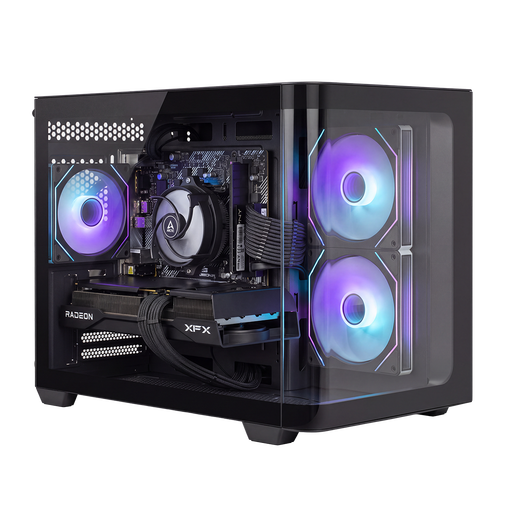 Image unavailable
The specified 1 TB M.2 NVMe SSD gives you a clear storage capacity to compare with the space your VM files will need.
The product information lists a Ryzen 7 5700X with 8 cores and 16 threads, 16 GB RAM and Windows 11 Home. For Hyper-V on Windows, Microsoft specifies Pro or Enterprise, so check this requirement if you want to use this hypervisor.
 Image unavailable
This mini PC is suited to a small workspace. Its listed Windows 11 Pro edition also meets the edition requirement Microsoft specifies for Hyper-V on Windows.
The product information lists 16 GB RAM, expandable to 64 GB, and a 512 GB SSD with room for up to three M.2 SSDs. The power adapter must be purchased separately.
 Image unavailable
This all-in-one desktop could be a good fit if you’re looking for a computer with a built-in display and its stated memory and storage capacity meet your VM requirements.
The product information lists an M3 chip with an 8-core CPU, 16 GB RAM, a 512 GB SSD and macOS 14 Sonoma. Check in advance that your chosen virtualisation software and guest operating systems are compatible.
Add up the expected memory requirements of each VM you’ll run at the same time, and leave memory available for the host too. Microsoft Learn gives 4 GB as a minimum starting point for Hyper-V, but this isn’t a buying recommendation for running several VMs.
Not under the edition requirements Microsoft lists for Hyper-V on Windows: Windows 11 Pro or Enterprise is required. Also check the processor requirements and whether hardware virtualisation is enabled in the BIOS or UEFI. This answer applies specifically to Hyper-V.
In Hyper-V, choose a virtual switch that suits your networking needs. Microsoft Learn distinguishes between external, internal and private switches; use an external switch if the VM needs to communicate with a network outside the host. Changing the connected network adapter may interrupt the connection.
No. Don’t treat a standard Hyper-V checkpoint as a complete backup. Microsoft Learn describes checkpoints as a way to roll back changes and warns that a standard checkpoint isn’t a full backup. Plan separate backups for important VM files.
Not automatically. Check the licensing rights for your intended host, guest and access use. Microsoft Licensing Resources states in its Windows 11 virtualisation guidance that an OEM licence does not generally include virtualisation rights by default. The applicable rights depend on the licence terms and how you use them.