
Editor with lots of source footage
You collect large recording files and want enough fast storage for media, cache and exports. Adobe recommends fast storage for video production and explains how to organise storage for your system, cache and media.


Start with your editing software, the codec and effects used in your footage, and the space you need for source files, cache and exports. Don’t choose based on the processor alone. A compact Mac may suit a macOS workflow if the configuration and any external storage are sufficient, while a Windows tower is worth considering if you want to be able to change the internal storage or components. Adobe describes proxies as a way to edit large video files more efficiently, but check that your clips and software support this workflow.
You collect large recording files and want enough fast storage for media, cache and exports. Adobe recommends fast storage for video production and explains how to organise storage for your system, cache and media.
You want to know how your codec and effects work with the editing software you use. Adobe describes proxies as a possible workflow for large video files; check whether your clips are suitable for them.
You’re looking for a suitable configuration and want to allow for possible changes later on. Also establish who is buying the computer: ACM ConsuWijzer explains that consumer protection does not automatically apply when an agreement is used mainly or exclusively for business purposes.
For a theatre showreel with large source files, storage, your actual editing workflow, room for upgrades and who is buying on the theatre’s behalf are all important considerations.
| What to consider | What should you check? | Who is this important for? |
|---|---|---|
| Space and speed for source files | Compare the SSD capacity of the configuration you’ve chosen with the size of your projects, and check whether a separate fast drive for media or cache is an option. | If I want to keep lots of footage locally and need working space for cache and exports, I’ll focus on the storage setup; around 33% of consumers make storage their top priority. |
| How well your footage can be edited | Make a note of the software version, codec, resolution and effects. Check the software requirements and whether proxies can be used in your workflow. | If I need my timeline to run smoothly with my own footage, I first want to know how demanding the codec and effects will be; around 27% of consumers prioritise a workable timeline. |
| Upgrading later | Check which storage bays and upgrade options are available for the exact model, and which components are already installed. | If projects grow, I want to know whether the internal storage or components can be changed later; around 20% of consumers make upgradeability their top buying criterion. |
| Purchase and service | Compare the complete configuration and any additional working storage you may need. Also establish who is entering into the agreement on the theatre’s behalf. | When buying for an association, I want clarity on the configuration and applicable service terms in advance; around 20% of consumers look at this first. |
The HP Z2 Tower G1i and Lenovo ThinkStation P3 Tower Gen 2 configurations reviewed list integrated graphics, even though other graphics options may be available in those product ranges. A product range name alone doesn’t tell you which components are included in the version you’ve chosen.
Check which GPU is actually supplied and compare it with the requirements of your editing software, codec and effects.
A different configuration or graphics upgrade may mean extra costs and require further compatibility checks.
Source footage, cache and exports all take up space. Adobe recommends fast storage for video production and describes a setup with storage for the system, cache and media.
Plan for source footage, cache and exports before you buy, and check whether the computer you’ve chosen has the connections you need for any external storage.
Additional fast working storage and room for cache may require extra equipment and space on your desk.
Adobe describes proxies as lower-resolution copies that can make large or demanding video files more efficient to edit. Whether they help depends, among other things, on your clips and software workflow.
First check whether your software supports proxies for your footage, then assess what hardware you still need.
Mac mini and Mac Studio are options for a macOS desktop setup.
The HP Z2 Tower G1i is a workstation tower for anyone looking for a configurable Windows desktop.
The ThinkStation P3 Tower Gen 2 is a tower range with various Windows configurations.
Dell describes the Pro Max Tower T2 as a configurable Windows tower, with choices including the processor and power supply.
The Joybuy desktops below are options to compare for editing with large source files. For each model, check that the configuration, operating system and storage suit your editing software and workflow.
 Image unavailable
Compare this configuration if you want to weigh up local working storage and graphics hardware for your editing tasks against your software requirements.
The product description lists a Ryzen 7 7800X3D, 32 GB DDR5, a 1 TB NVMe SSD and a GeForce RTX 5080 with 16 GB graphics memory. The installation includes an evaluation version of Windows 11.
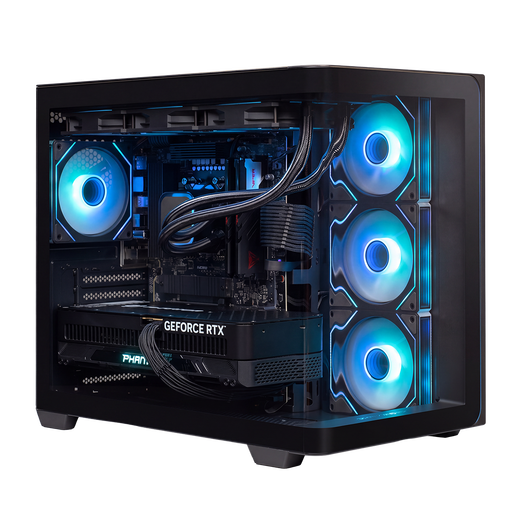 Image unavailable
Compare this version if the listed storage and graphics specifications suit your software and footage; they don’t guarantee a particular editing speed on their own.
The product description lists a Ryzen 9 9900X3D, 32 GB DDR5, a 2 TB NVMe SSD and an RTX 5090 with 24 GB graphics memory. Keep the ventilation openings clear.
 Image unavailable
Consider this configuration as an option to compare if you want to assess the listed components against your own editing software and project files.
The product description lists a Ryzen 7 9800X3D, 32 GB DDR5, a 2 TB NVMe SSD and an RTX 5090 with 24 GB graphics memory. Keep the ventilation openings clear.
 Image unavailable
Compare this tower if you’re looking for a desktop with the listed storage upgrade options; check which upgrades are compatible with the exact configuration.
The configuration described includes 32 GB DDR5, a 1 TB NVMe SSD and an RTX 5070 with 12 GB graphics memory. The description mentions support for up to 64 GB memory and expansion options for up to three M.2 SSDs and a 3.5-inch HDD.
 Image unavailable
Only include this compact computer in your comparison after checking that your editing software and workflow will work with it.
The product description lists 128 GB LPDDR5X memory, 4 TB M.2 SSD storage and NVIDIA DGX OS, which is described as optimised for AI and deep learning frameworks. Mention of creative workloads doesn’t confirm that your editing software is supported.
No. For Premiere, Adobe recommends fast storage and describes separate drives for the system, cache and media as one possible setup. According to Adobe, if you have two drives, media and cache can also share one drive; tailor your setup to the storage available and the size of your projects.
In Premiere, proxies can help you edit large or demanding video files more efficiently. Adobe describes them as lower-resolution copies for editing; check that your clips are supported and that the workflow suits your footage.
For the media cache in Premiere, Adobe recommends a fast SSD or NVMe drive, preferably a separate one if possible. Deleting cache files can free up space, but rebuilding them afterwards takes time.
For a consumer purchase, the Netherlands Authority for Consumers and Markets says the seller is responsible for the statutory guarantee if a product does not meet what a consumer could reasonably expect during normal use. If a theatre buys the computer, first establish who the contractual buyer is and whether consumer protection applies to the agreement.
Not without an applicable legal basis. The Dutch Data Protection Authority says organisations must comply with the GDPR when creating and publishing recognisable images, and notes that consent is often an obvious legal basis. Assess the publication of the specific images separately from your choice of computer.