What should you look for when choosing?
First, check that your writing software offers the chapter navigation you want. Then compare the screen set-up, storage for your files and how you’ll back them up.
| What to consider |
What to check |
Who should give this more weight? |
| Chapter outline and writing software |
Check that your programme supports heading styles and the outline feature you want on the operating system you’ve chosen. Microsoft Support explains the Navigation pane in Word for Windows, while Google Docs Help describes the document outline. |
If I want to find or rearrange chapters and scenes often, how my writing programme works is my first consideration. Around 33% of consumers making this choice prioritise chapter navigation. |
| Photos and source files |
Check the storage capacity of the exact configuration and consider how many of your own files you want to keep locally. Also consider whether you need a separate or built-in screen. |
If I want to view photos and sources alongside my text while writing, I’ll look at storage and the screen set-up. Around 27% of consumers making this choice prioritise files and photos. |
| Space and a complete workstation |
Compare an all-in-one with a mini PC and separate monitor. Check whether a screen, keyboard and mouse are included with each offer. |
If I have limited desk space, I want to know how many separate components I still need to fit or arrange. Around 20% of consumers making this choice prioritise a compact, complete workstation. |
| Keeping your files safe |
Choose a backup method and check that you can restore your files. A larger internal SSD is no substitute for a separate backup. |
If I don’t want to lose chapters or photos, I want to know how to restore recent files. Around 20% of consumers making this choice prioritise keeping their files safe. |
Desktops and mini PCs at Joybuy
This selection includes standalone desktops and mini PCs with a listed Windows environment. Check the writing software, included peripherals and specifications that matter for your files for each configuration.
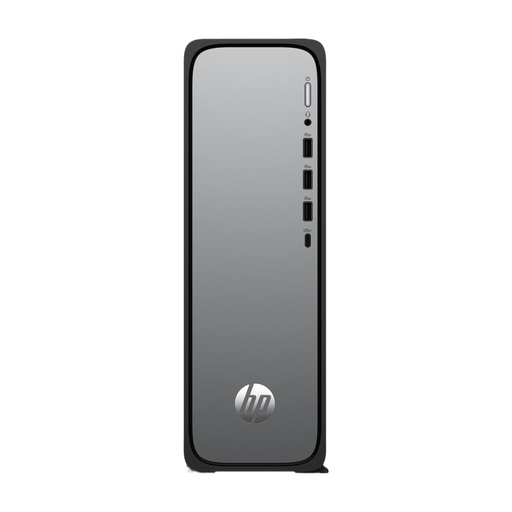 No image available
HP OmniDesk Slim S03-0006nd D49HREA#ABH
A good fit if you’re looking for a standalone desktop with Windows 11 for your writing set-up. Check whether the monitor and input devices you need are included.
Windows 11; 512 GB SSD.
View at Joybuy
 No image available
SOYO Y5Pro Mini PC, Intel Core i5 8250U/8350U
A good fit if you’re looking for a mini PC with Windows 11 and want to choose your own screen and peripherals. Check which of the two listed processor models comes with the configuration on offer.
8 GB DDR4; 256 GB SSD with SATA connection; Windows 11.
View at Joybuy
 No image available
RGB Gaming PC, RTX 5060, Ryzen 5
This standalone Windows desktop may suit you if you’re looking for a separate computer set-up. Consider whether the configuration meets your writing needs and check which peripherals are included.
16 GB memory; 480 GB SSD.
View at Joybuy
 No image available
Gaming Desktop PC Ryzen 7 7800X3D, GeForce RTX 5080, 32 GB DDR5, 1 TB NVMe SSD, Windows 11 Trial
A standalone desktop to compare if you’re looking for a Windows set-up. Before buying, check what Windows 11 Trial means for the way you plan to use it.
32 GB DDR5; 1 TB NVMe SSD; Windows 11 Trial.
View at Joybuy
 No image available
ASUS ROG G700TF-07265F666W Gaming Desktop PC
A good fit if you’re considering a standalone Windows desktop. Compare the listed configuration with what you need for writing and storing files.
Intel Core Ultra 7 265F; 32 GB DDR5; 1 TB SSD; NVIDIA GeForce RTX 5070 12 GB; Windows 11 Home; black.
View at Joybuy
Frequently asked questions
Do I need a powerful desktop to use a chapter outline?
Start with the features in your writing software, rather than making assumptions about processor speed. Word for Windows shows applied heading styles in the Navigation pane, and Google Docs uses headings for the document outline. The documentation cited doesn’t specify a minimum processor speed for this writing task.
How do I create an outline of the chapters in my travel story?
Apply heading styles to chapters and sections, then open your programme’s outline feature. Microsoft Support explains the Navigation pane in Word for Windows, while Google Docs Help describes the document outline. The steps vary by programme and platform.
How can I avoid losing my text or photos?
Regularly make a copy in another location, such as on external storage or in cloud storage, and check that you can restore your files. Microsoft Support covers backing up and restoring files as separate steps.
Should I buy an extended warranty with a desktop bought online?
You don’t need to pay for an additional warranty to have a legal guarantee in the Netherlands. ACM ConsuWijzer explains that the seller is responsible for providing a solution if a product doesn’t meet what you could reasonably expect under normal use. So check whether an additional warranty really offers anything extra. For a typical online consumer purchase, you generally have a 14-day cooling-off period from delivery, subject to legal exceptions.
What should I do with my old computer in the Netherlands?
When buying a similar new device, you can use the one-for-one take-back scheme as a private consumer to hand in an old device. The Dutch government also lists collection points and options provided by local councils.


