
Indexer of scanned diaries
You want to find names, places and dates in your scans. Text recognition depends, among other things, on image quality; Microsoft Support also warns that handwriting does not work well in OneNote for Mac.


First, choose the software you want to use to index your scans, photos and text, then check that the exact desktop configuration is suitable. Both a Windows desktop and a Mac mini could work for this, but the software environment, storage and peripherals you need will differ. An extra internal drive is no substitute for a separate backup that you can restore from.
You want to find names, places and dates in your scans. Text recognition depends, among other things, on image quality; Microsoft Support also warns that handwriting does not work well in OneNote for Mac.
You keep original scans, photos and an index, and want enough space for these files as well as a separate copy you can restore. Microsoft Support and Apple Support describe backup options for Windows and Mac.
You want to keep using a scanner, monitor or software. Before choosing, check the ports and operating system environment of the exact model.
Start with the indexing software and test it with your own scans. Then compare the storage, backup method and ports of the complete configuration.
A good fit if: you use Windows software or want to use File History for selected libraries.
Check: the connection for an external drive; Windows Backup with OneDrive is not the same as a local-only copy.
A good fit if: you want to use macOS software and have, or plan to connect, a suitable monitor and peripherals.
Check: that the storage in your chosen configuration suits your archive; Time Machine can work with external storage.
| What to consider | What should you check? | Who is this important for? |
|---|---|---|
| Searchable scans | Test your chosen OCR software with both printed and handwritten pages from your own archive. Microsoft Support notes that OCR depends on image quality. | If I want to find names and places in scanned diaries, I first want to know how well my own pages are recognised. Around 29% of consumers prioritise indexing over other considerations. |
| Restorable backup | Check how your chosen backup feature writes to external storage and whether you can restore a file after setting it up. Microsoft Support describes File History; Apple Support describes Time Machine. | If I want to be able to restore my original scans after loss or damage, I check that my copy is stored in a separate location. Around 29% of consumers prioritise restorable local backups. |
| Space for your archive | Compare the SSD capacity in the exact configuration with the size and expected growth of your scans and photos. Check expansion options for the complete model number; internal storage is not a backup. | If my collection is growing, I want room for source files and index files without counting my backup as working space. Around 24% of consumers prioritise archive storage. |
| Ports and setup | Check the ports for your scanner, monitor and external drive, as well as the operating system and included components of your chosen configuration. | If I want to keep using my existing devices, I want to know in advance whether they’ll connect to the desktop and whether my setup will be complete. Around 18% of consumers consider compatibility and setup the most important point. |
Extra internal storage helps you keep files on your computer, but it won’t protect you if you lose the entire computer.
Also keep a recent copy on separate storage and try restoring a file after setting it up.
Allow for a suitable external backup drive and time to test the restore process.
According to Microsoft Support, OCR depends in part on image quality; handwritten text can be difficult to recognise.
Test your intended software first with representative scans from your own diaries, then check the names and places it recognises.
ASUS distinguishes between pre-configured mini PCs and kits in its NUC 15 Pro range, including configurations without a pre-installed operating system.
Check the full variant number and which components are actually included in your chosen configuration.
Compare the product ranges described here against your chosen software, configuration and backup approach; a brand reference is not a judgement on every configuration.
The Mac mini is a compact macOS desktop. Apple describes Time Machine as a way to make automatic backups using external storage.
The Pro Micro QCM1250 is a configurable compact Windows desktop. Dell documents specifications by configuration, rather than as fixed features of every version.
The ThinkCentre neo 50q Gen 5 is a compact Windows product range with documented internal expansion options.
The Pro Mini 400 G9 is a compact business Windows product range; specifications and features apply to the relevant configuration.
The NUC 15 Pro range includes both pre-configured mini PCs and kits for which the buyer needs to arrange the components and installation.
This selection includes Mac mini configurations, mini PCs and all-in-ones for indexing and storing travel diaries locally. Check the software, storage, ports and required peripherals for each configuration.
 No image available
A Mac mini option to compare if you want to index your diaries using macOS software.
M6 chip with 12-core CPU and 12-core GPU; 24 GB of memory and 512 GB SSD.
 No image available
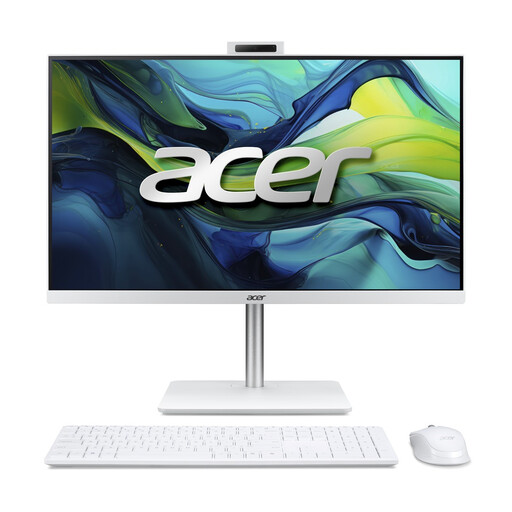
A Windows all-in-one to compare if you’d like a desktop with an integrated screen.
23.8-inch Full HD IPS screen, Intel Core 5 120U, 16 GB DDR5, 1 TB SSD and Windows 11 Home.
 No image available
A mini PC to compare if you’re looking for a compact Windows desktop for indexing.
Intel Core Ultra 7 155H, 16 GB DDR5, 1 TB SSD and Windows 11 Pro.
 No image available
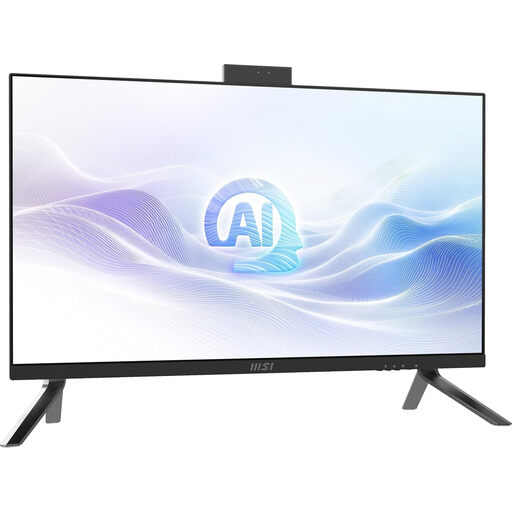
An all-in-one to compare if you want a Windows desktop with an integrated screen.
27-inch QHD screen with 2560 × 1440 pixels, Intel Core Ultra 7 155H, 32 GB DDR5, 1 TB SSD, Windows 11 Pro and Wi-Fi 6E.
 No image available
A Windows mini PC to compare if you’re looking for a compact desktop for local files.
Intel Core i7-14700T, 16 GB DDR5, 512 GB SSD and Windows 11 Pro. The power adapter must be purchased separately.
Don’t assume it will. Microsoft Support says OCR depends on image quality and that handwritten text does not work well in OneNote for Mac. Test your chosen software with sample pages of your own and check the names and places it recognises.
On Windows, choose a suitable external destination for File History and check which libraries are included; on a Mac, Time Machine can work with an external storage device. Once it’s set up, run a test backup and restore a test file.
No. The Windows Backup feature described by Microsoft Support uses OneDrive for selected user folders. For a separate local copy, you can look into the options available with File History.
In the Netherlands, the statutory guarantee is separate from any manufacturer’s warranty. According to the Government of the Netherlands, there is no fixed term for the statutory guarantee; contact the seller if the product is faulty.
The Dutch Data Protection Authority says that processing data solely for personal or household use falls outside the GDPR. For publishing other people’s personal data, this exception applies only under certain conditions, including sharing it with a limited group and not making it publicly searchable. This is not blanket permission to share data or photos publicly.