Start with a stereo pair that you can position symmetrically around your listening position and connect to your computer or audio interface. A compact desktop set can be practical if space is limited or you want a direct USB-C connection. Separate nearfield monitors give you more flexibility with placement, but check whether you need two units and the right cables. Assess potential self-noise from your usual listening distance and at your working volume: the available specifications do not identify one model as the quietest in every situation.
Who is this choice relevant to?
Film composer with a small desk
If you mix close to your monitors, you’ll need to balance the available space against symmetrical stereo placement and the effect of your desk and room. Genelec recommends an angle of 60° at the listening position for a stereo pair.
Editor who listens at low volumes
In a quiet room, you’ll want to assess subtle passages at your usual low working volume. So check how the monitor setup sounds from your listening position; a product specification alone cannot tell you whether self-noise will be audible.
Producer with an audio interface
If you already use analogue outputs, the right inputs and cables are important. Also compare a complete stereo set with monitors sold individually, so you know what you’ll need for left and right channels.
What should you look for when choosing?
Compact active desktop set
Best for: close-up mixing at a small desk when you want a stereo set with a direct connection to your computer.
Keep in mind: check the space required, what’s included and the connection type; a low quoted bass cut-off doesn’t prove how the bass will sound in your room.
Two separate active nearfield monitors
Best for: a setup with an audio interface and analogue outputs, if you want to position the monitors separately.
Keep in mind: some models are sold individually, so check how many monitors you’re buying and which audio and power cables you’ll need.
Stereo pair with a subwoofer
Best for: scores with information below the usable range of your main speakers, provided you can assess the combination from your listening position.
Keep in mind: adding a low-frequency source means considering its placement and setup; your room and distance from the walls affect what you hear.
| Factor to consider |
What to check before buying |
Who is this important to? |
| Placement and room |
Check the dimensions, height and placement settings; position the pair symmetrically towards your listening position. |
With a small desk, I want to be able to position the left and right monitors properly without overlooking the effect of the room or desk. Placement is the top priority for around 26% of consumers. |
| Quiet passages |
Listen from your usual distance and at a low working volume; don’t assume you’ll get silence from the power rating or maximum sound level. |
When I listen at low volumes, I want to assess subtle passages without the setup being distracting during quiet moments. Around 21% of consumers prioritise listening at low volumes. |
| Low frequencies in the score |
Compare frequency ranges only when you know how they were measured, such as at −3, −6 or −10 dB, and assess the bass once the monitors are in place. |
For low instruments and effects, I want to know what I can actually hear at my mixing position, rather than relying on a figure in Hz alone. Bass monitoring is the top priority for around 21% of consumers. |
| Connections |
Check the outputs on your computer or interface, the inputs on the exact model and which cables you’ll need. |
When I’m using my existing computer or audio interface, I want to know in advance which connections and cables will work. Connections are the top priority for around 16% of consumers. |
| Complete stereo set |
Check how many monitors are included and whether cables, stands and power supplies are supplied. |
To start working in stereo straight away, I want to know whether I’m buying a pair or individual monitors. A complete stereo set is the top priority for around 16% of consumers. |
Common buying mistakes
-
Taking a low Hz figure as proof of reliable sub-bass
Frequency ranges can be quoted using different dB definitions. Nearby walls can also boost the bass at your listening position or cause it to drop away.
Check how the specification was measured and assess the bass in your final setup before considering a subwoofer.
Moving your monitors and adjusting them again can take extra time.
-
Assuming one monitor is a stereo pair
According to the product information, the Yamaha HS5 and Genelec 8010A are packaged individually. You’ll need two for stereo.
Check the exact listing to see whether you’re buying one monitor or a pair, and which cables and accessories are included.
For stereo, you may need a second monitor as well as extra audio and power cables.
-
Mistaking adjustment switches for full room correction
Even with placement settings, room boundaries and reflections affect the response and stereo image.
Start with the most symmetrical setup you can manage and use any correction settings to help you assess the sound from your listening position.
Finding a suitable position can take time and may mean adjusting your listening position.
Brands to consider
ADAM Audio
According to ADAM Audio, the D3V is a compact active stereo set for desktop use, with USB-C and balanced TRS inputs.
- ADAM Audio lists detachable stands and placement correction switches.
- The quoted 45 Hz is measured at −6 dB; this doesn’t prove even bass or inaudible self-noise in a home studio.
Kali Audio
According to Kali Audio, the LP-UNF is designed for close-up desktop mixing, with USB-C, TRS and settings for different desk and wall positions.
- Kali Audio specifies 54 Hz–21 kHz at ±3 dB and 39 Hz–25 kHz at −10 dB.
- The brand’s claims of clarity and stereo imaging are manufacturer claims, not an independent assessment in this room.
Yamaha
The HS5 is an active nearfield monitor with XLR/TRS and ROOM CONTROL, suited to a setup with an analogue source.
- Yamaha quotes 74 Hz–24 kHz at −3 dB and 54 Hz–30 kHz at −10 dB.
- The HS5 is packaged individually. Check whether you’re ordering two monitors and the right cables; the quoted frequencies alone don’t show whether the sub-bass can be fully assessed.
Genelec
The 8010A is a compact active monitor with an analogue XLR input and room compensation switches.
- Genelec quotes a low-frequency cut-off of 67 Hz at −6 dB and states that one monitor is included per package.
- You’ll need two for stereo. The terms ‘neutral’ and ‘accurate’ are manufacturer claims.
PreSonus
The Eris 3.5BT 2nd Gen is sold as a pair, with TRS, RCA and 3.5mm inputs.
- PreSonus lists high- and low-frequency controls and a frequency response of 80 Hz–20 kHz.
- Bluetooth is an additional input; check separately whether the full editing setup suits your workflow. The specification alone doesn’t prove mixing accuracy.
Joybuy product selection
An active stereo set for close-up mixing, with RCA and 3.5 mm connections.
 No image available
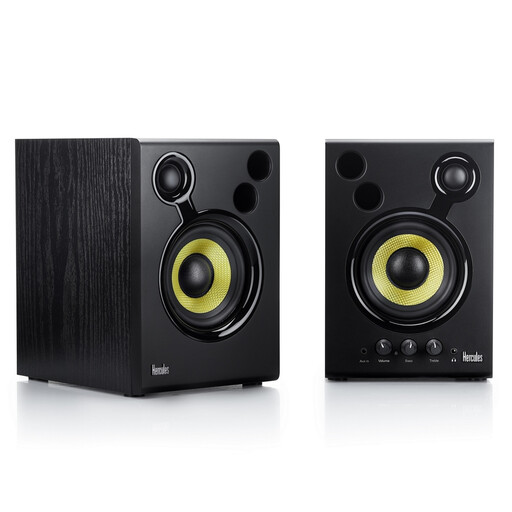
Hercules DJMonitor 42, black
The active set includes two speakers, making it suitable for close-up stereo mixing.
Inputs: RCA and 3.5 mm. The product information lists volume control and bass and treble settings.
Dimensions according to the product information: 48,80 × 26,60 × 21,80 cm; bear in mind the space needed on a small desk.
View at Joybuy
Frequently asked questions
How should I position a stereo pair for mixing?
Start by positioning the monitors symmetrically around your listening position, angle them towards you and assess the effect of your desk and walls. Genelec recommends an angle of 60° at the listening position for stereo; this is placement advice, not a guarantee of good room acoustics.
Do I need an audio interface for USB-C monitors?
For playback from a compatible computer via the ADAM Audio D3V, ADAM Audio says no additional audio interface is needed. If you’re using separate analogue monitors, check which outputs your source has and which cables are suitable.
How do I compare a complete set with separate monitors?
Check how many speakers are in the package and which audio and power cables are included. The Yamaha HS5 and Genelec 8010A are packaged individually, so you’ll need two of each for stereo.
How do I compare the cost and warranty?
Compare the cost of a complete stereo set with what you’ll need for two individually packaged monitors and their cables. For consumer purchases in the Netherlands, statutory warranty applies alongside any manufacturer’s warranty. ACM ConsuWijzer states that the seller is responsible if a product, when used normally, does not do what you could reasonably expect.
Can I try a set bought online at home and return it?
In many cases, distance purchases from a business in the Netherlands come with a 14-day cooling-off period, although there are exceptions. The Dutch government sets out these conditions; also check the terms of the specific purchase before planning a home trial.


