What should you look for?
First, establish which tools and operating systems your projects require. Then compare the configuration and connections with your build workload and shared workstation.
| What to consider |
What should you check? |
Which consumers should consider this? |
| Processing power for builds |
Check the exact processor and, where possible, compare build benchmarks for your own toolchain and project. |
I mainly want to know how my own projects build, rather than rely on a general speed claim; around 36% of consumers rank compile time as their top priority. |
| Memory and storage |
Take stock of your IDE, containers, project files and available disk space. For Visual Studio 2026, Microsoft Learn lists Windows 11, 64 GB RAM and a processor with 16 or more cores as a configuration on which the software runs best. |
If I use an IDE, containers and build files at the same time, I want to know what the configuration can handle; around 29% of consumers prioritise running development tools concurrently. |
| Shared workstation |
Count the monitor and USB connections you need, check the space available and discuss how user accounts will be managed. |
When several people use the same monitors and peripherals, connecting everything and managing accounts need to be practical; around 21% of consumers prioritise the shared workstation. |
| Platform and build tools |
Check the IDEs, toolchains, target platforms and container features you need against the exact operating system and configuration. |
If my work depends on Windows tools or macOS and Xcode, I need to get the platform right first; around 14% of consumers start by checking compatibility. |
Joybuy models for this workstation
The Joybuy options shown include compact Mac mini configurations and an ASUS desktop. Let the software you need and the space available determine which option suits your workstation.
 Image unavailable
Apple Mac mini M6, 12-core CPU, 12-core GPU, 16 GB, 256 GB SSD
A compact desktop option for a macOS workstation.
M6 chip with 12-core CPU and 12-core GPU; 16 GB memory; 256 GB SSD. The description lists three Thunderbolt 4 ports, two USB-C ports, HDMI and 2.5Gb Ethernet.
View at Joybuy
Image unavailable
Apple Mac mini M6, 12-core CPU, 12-core GPU, 16 GB, 512 GB SSD
A compact desktop option for a macOS workstation.
M6 chip with 12-core CPU and 12-core GPU; 16 GB memory; 512 GB SSD. The description lists three Thunderbolt 4 ports, two USB-C ports, HDMI and 2.5Gb Ethernet.
View at Joybuy
Image unavailable
Apple Mac mini M6, 12-core CPU, 12-core GPU, 24 GB, 512 GB SSD
A compact desktop option for a macOS workstation, with the listed memory and storage configuration.
M6 chip with 12-core CPU and 12-core GPU; 24 GB memory; 512 GB SSD. The description lists three Thunderbolt 4 ports, two USB-C ports, HDMI and 2.5Gb Ethernet.
View at Joybuy
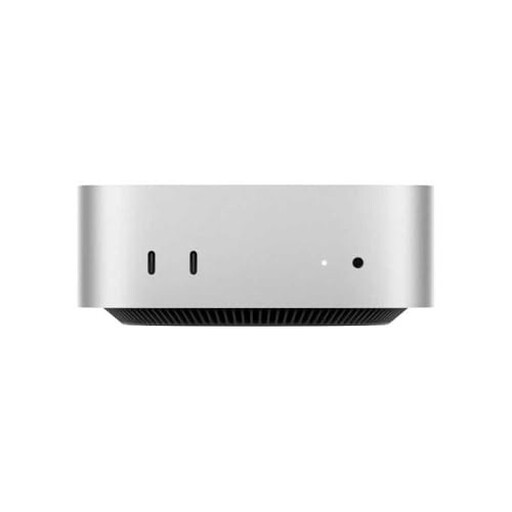 Image unavailable
Apple Mac mini M4, 10-core CPU, 10-core GPU, 16 GB RAM, 512 GB SSD
A compact Mac mini configuration for a macOS desktop setup.
M4 chip with 10-core CPU and 10-core GPU; 16 GB RAM; 512 GB SSD. The description lists Thunderbolt, HDMI and Gigabit Ethernet connections.
View at Joybuy
 Image unavailable
ASUS ROG G700TF-07265F666W, Core Ultra 7 265F, 32 GB DDR5, 1 TB SSD, RTX 5070 12 GB
A larger Windows desktop option if expandability and room for components matter more than having the smallest possible case.
Windows 11 Home; 20-core processor; 32 GB DDR5; 1 TB PCIe 4.0 NVMe SSD; NVIDIA GeForce RTX 5070 with 12 GB.
View at Joybuy
Frequently asked questions
Do I need to choose a Windows PC for Visual Studio 2026?
If you need Visual Studio 2026 itself, check that your chosen Windows version and hardware meet the system requirements on Microsoft Learn. Microsoft lists Windows 11, 64 GB RAM and a processor with 16 or more cores as a configuration on which the software runs best; check the other tools in your project too.
What should I check before installing Docker Desktop on a shared Windows PC?
Agree the installation with the person who manages the shared PC and check the requirements for your Windows and WSL configuration. Docker Docs recommends per-user installation for most users and selects this option by default.
How should I set up accounts if several people use the same desktop?
Agree who will manage accounts and access rights, particularly if the organisation processes personal data on the PC. The Dutch Data Protection Authority stresses that unauthorised people must not be allowed access to personal data.
Are there Dutch rules for a shared computer workstation?
For employees, working with a screen must not pose a risk to health or safety, according to Arboportaal. If you work with a screen for more than two hours a day, the screen and keyboard must not be attached to each other; whether this applies depends on the working situation.
Who should I contact if a product develops a fault after I buy it in the Netherlands?
For a consumer purchase, the retailer is your point of contact if there’s a problem with the product, according to the Dutch government. A manufacturer’s warranty is in addition to your statutory rights; what you can expect from a product that works properly depends, among other things, on the product and the circumstances of the purchase. For a business purchase, check the applicable terms separately.


