What should you look for?
Start with the report software you need and the arrangements for accounts and files. Then decide whether you want to choose a separate monitor or need a computer with a built-in screen.
Microsoft Support explains how separate Windows accounts let users have their own documents and settings. If an organisation processes personal data, it must put appropriate access controls in place; the Dutch Data Protection Authority stresses that unauthorised people must not be able to access it.
| What to consider |
What should you check? |
Who is this important for? |
| Access to documents |
Check that the operating system supports separate accounts and appropriate file permissions. |
If several people use the same PC, I don’t want everyone to have automatic access to the same files. Around 31% of consumers put separate access to documents at the top of their list. |
| Adjustable reading setup |
Check the screen size, adjustability and desk space, and whether each user can adapt the workspace. |
When reading for long periods, I want a screen setup that suits me and is easy to adjust again. Around 25% of consumers prioritise a readable, adjustable workspace. |
| Report software |
Compare the applications and file formats you need with the operating system and system requirements of the exact model. |
I want to open and review the report using the software required at work. Software compatibility is the top purchasing priority for around 25% of consumers. |
| Complete setup |
List what you already have and check the monitor, connections and input devices you’ll need. |
At a small desk, I want to know what else I’ll need before I can use the workspace. Space and a suitable complete setup are top priorities for around 19% of consumers. |
Joybuy products
This selection mainly features Windows all-in-one PCs, alongside a compact mini PC that requires a separate monitor.
 Image unavailable
Acer Aspire C24-A WI5418 NL
An all-in-one for anyone who wants to use the computer and screen as a single setup.
23.8-inch Full HD IPS screen; Intel Core 5 120U; 16 GB DDR5 memory; 1 TB SSD; Windows 11 Home.
The product description lists a wireless keyboard and mouse set.
Joybuy
 Image unavailable
Lenovo Yoga AIO 27IAH10 F0J2001DNY
An all-in-one to consider if you want a built-in screen; check that its dimensions suit the shared desk.
27-inch QHD screen with 120 Hz; Intel Core Ultra 7 255H; 16 GB LPDDR5X memory; 1 TB SSD; Windows 11 Home.
The product description lists an HDMI 2.1 input, which lets the screen be used as an external display.
Joybuy
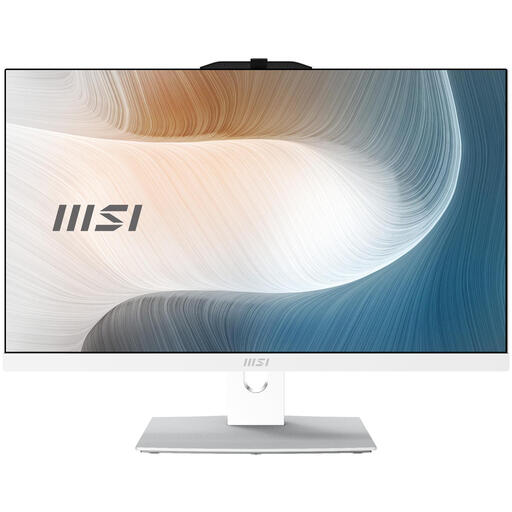 Image unavailable
MSI Modern AM242TP 1M-1229EU
An all-in-one with a touchscreen for anyone who wants to combine the screen and computer; check that its connections suit the rest of your workspace.
23.8-inch Full HD touchscreen; Intel Core 3 100U; 8 GB DDR5 memory; 256 GB SSD; Windows 11 Pro; Wi-Fi 6E.
The product description states that the charger must be purchased separately.
Joybuy
 Image unavailable
MSI Modern AM242P 1M-1223EU
An all-in-one with a built-in screen for anyone who doesn’t want to choose a separate monitor.
23.8-inch Full HD IPS screen; Intel Core 5 120U; 8 GB DDR5 memory; 512 GB SSD; Windows 11 Pro; Wi-Fi 6E.
The product description states that the charger must be purchased separately.
Joybuy
 Image unavailable
MSI CUBI NUC AI 1UMG-005EU
A compact mini PC for a desk where you want to keep the computer small; you’ll need a separate monitor for your workspace.
Intel Core Ultra 7 155H; 16 GB DDR5 memory; Windows 11 Pro. The video connections listed are HDMI, DisplayPort and USB-C.
Before choosing your setup, check which screen and other peripherals you want to connect.
Joybuy
Frequently asked questions
Can several people use one Windows PC with separate profiles?
Yes. Microsoft Support describes Windows accounts that let users have their own documents and settings. If an organisation processes personal data, it must also set appropriate access permissions, as the Dutch Data Protection Authority explains.
What should you set up on a computer at a shared desk?
Where appropriate, set up separate user accounts, decide who can access report files, and check that the screen and input devices suit the users. Let each user adjust the workspace to suit them, and allow for breaks from screen work.
Is a Windows 10 desktop still an obvious choice?
Standard support for Windows 10 ended on 14 October 2025, according to Microsoft Support. Check which security updates and any separate options apply to the exact PC, rather than assuming standard support is still available.
What rights apply to an online purchase or a faulty product?
For qualifying distance purchases made by consumers in the Netherlands, there is generally a 14-day cooling-off period; check whether any exceptions apply and whether you are buying as a consumer. The Dutch government states that there is no fixed statutory guarantee period in the Netherlands. If a product is faulty, contact the seller. Don’t assume that the same consumer rights apply to a business purchase.
Are there specific requirements for the screen and keyboard?
For employees who work with display screens for more than two hours a day, the screen and keyboard must not be attached to each other, according to Arboportaal, part of the Ministry of Social Affairs and Employment. This requirement does not specify a desktop brand or form factor, and is not a general product specification for every buyer.


