
Designer working live in 3D
You open and edit models during discussions. So compare the exact PC configuration with your CAD software’s requirements and the size of your projects.


For reviewing designs, choose a compact desktop with an external monitor that suits the table and has the connections you need. If you’ll be actively editing large 3D models, the exact memory and graphics configuration matters more than compact size alone. Autodesk recommends 32 GB or more of memory for demanding professional Fusion workflows, while McNeel recommends a graphics card compatible with OpenGL 4.5 and at least 4 GB of video memory for Rhino 8 on Windows. A monitor and peripherals aren’t necessarily included, so check the complete set-up and the requirements of your own software.
You open and edit models during discussions. So compare the exact PC configuration with your CAD software’s requirements and the size of your projects.
You want everyone around the table to see drawings and models clearly. The monitor you choose and how it connects to the desktop are key parts of the set-up.
You want the computer case to take up as little desk space as possible, while still allowing room for a monitor and peripherals.
First, decide whether the desktop will mainly display designs or whether you’ll use it to actively edit large 3D models during discussions. Then check the software requirements, monitor connection and which components are included with the version you choose.
| What to consider | What should you check? | Who is this important for? |
|---|---|---|
| Active 3D editing | Compare the CPU, RAM and GPU in the exact version with your software and project size. Autodesk recommends 32 GB or more for demanding professional Fusion workflows; McNeel recommends a graphics card compatible with OpenGL 4.5 and at least 4 GB of video memory for Rhino 8 on Windows. | If I want to open and edit large 3D models during a discussion, I first check that the configuration suits my CAD software; around 36% of consumers prioritise active CAD editing. |
| Viewing the screen together | Check the resolution, viewing angle and stated colour coverage of the exact monitor, and make sure the PC’s video output works with the monitor and cable. | If several people need to see details at the same time, I want a monitor that suits the table and the PC’s connections; around 29% of consumers prioritise reviewing designs together. |
| Table space | Check the dimensions and placement of the desktop you choose. A compact case alone says nothing about whether it’s suitable for intensive 3D work. | If the table is small and shared, I want to leave room for the monitor and controls; around 21% of consumers prioritise a tidy table. |
| Complete set-up | Check whether the monitor, keyboard, mouse and any required cables are included with each version or need to be sourced separately. | I want to know in advance what else I’ll need to use the workstation; around 14% of consumers focus mainly on the complete set-up. |
A compact case doesn’t tell you how much RAM or which graphics card the version you choose has. Requirements also vary between simply viewing designs and intensive CAD editing.
Compare the full configuration with the requirements of your own software and the size of your projects.
A monitor and input devices may not be included. The Lenovo version we looked at has an optional monitor, keyboard and mouse; the Dell configuration we reviewed had no keyboard or mouse selected.
Check what’s included with the exact version you choose and make a list of the components you’ll need beforehand.
A monitor’s specifications alone don’t show how a particular combination of screen, settings and files will look.
Check the exact monitor model and the colour settings that matter for your workflow. Treat manufacturers’ specifications as claims, not as independent measurements.
The ThinkStation P3 Tiny Gen 2 is a compact Windows workstation option for a table where design work takes place.
The Z2 Mini G1i is a compact workstation option for anyone expecting to do more intensive 3D work during discussions.
The Pro Max Micro FCM2250 is a configurable compact Windows desktop. Dell also offers separate monitors for a discussion set-up.
The Mac mini is a compact macOS option, provided your design software and files work with it.
These Joybuy products are Mac mini configurations for a compact desktop set-up with a separate monitor. Check that your design software and files work on macOS.
 No image available
Suited to a compact Mac set-up with an external monitor, if your software and files work on macOS.
According to the product name: M6 chip, 12-core CPU, 12-core GPU, 16 GB memory and 256 GB SSD. Autodesk recommends 32 GB or more for demanding professional Fusion workflows; this isn’t automatically a requirement for every use.
No image available
Suited to a compact Mac set-up with an external monitor, if your software and files work on macOS.
According to the product name: M6 chip, 12-core CPU, 12-core GPU, 16 GB memory and 512 GB SSD. Autodesk recommends 32 GB or more for demanding professional Fusion workflows; this isn’t automatically a requirement for every use.
No image available
Suited to a compact Mac set-up with an external monitor, if your software and files work on macOS.
According to the product name: M6 chip, 12-core CPU, 12-core GPU, 24 GB memory and 512 GB SSD. Autodesk recommends 32 GB or more for demanding professional Fusion workflows; this isn’t automatically a requirement for every use.
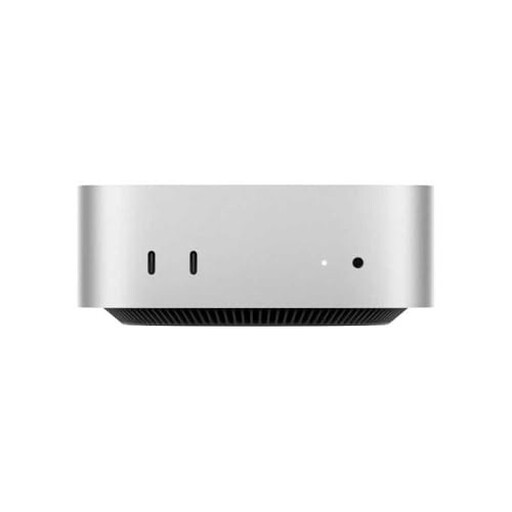 No image available
Suited to a compact Mac set-up with an external monitor, if your software and files work on macOS.
According to the product name: M4 chip, 10-core CPU, 10-core GPU, 16 GB RAM and 512 GB storage. Autodesk recommends 32 GB or more for demanding professional Fusion workflows; this isn’t automatically a requirement for every use.
Not just for that use. First check your software’s requirements and the desktop’s video output. If you’re actively editing 3D models, the recommendations for the software you use are relevant. For example, McNeel recommends a graphics card compatible with OpenGL 4.5 and at least 4 GB of video memory for Rhino 8 on Windows, but this isn’t a universal requirement for displaying designs.
Plan where the PC, monitor, keyboard and mouse will go as one complete set-up. Before installation, check that the chosen desktop’s video output is compatible with the monitor and find out which components you’ll need separately. The monitor and input devices are optional with the Lenovo version we reviewed.
Check which monitor, input devices and cables are included with the configuration you choose and what else you’ll need. For a consumer purchase in the Netherlands, the seller’s statutory responsibility is separate from any manufacturer’s warranty. According to the Dutch government, there is no fixed statutory warranty period in the Netherlands.
According to the Dutch government, when a consumer buys a similar new appliance, the old-for-new scheme applies: the retailer must take back the old appliance free of charge, including for an online purchase. The scheme doesn’t apply to equipment owned by businesses.
According to the Dutch government, consumers buying at a distance have a 14-day cooling-off period in many cases, but there are exceptions. Don’t assume the same right applies to a business purchase, and check the terms and conditions that apply to your purchase.