
Developer with a local development environment
You use several development tools while building, and may also run local containers. So check that the operating system and configuration of the model you choose are compatible with your software.


Choose a desktop based on your development environment and test plan. A compact Windows PC is a good fit for local development with Windows tools, while a Mac is worth considering if you need to inspect pages directly in Safari on macOS. Then compare the exact configuration for memory, storage, connections and included components. A desktop browser can simulate a mobile experience, but it can’t replace testing on a real mobile device.
You use several development tools while building, and may also run local containers. So check that the operating system and configuration of the model you choose are compatible with your software.
You compare the portal at different window widths and want enough space to view code and a browser side by side. Check the video connections, and test important mobile interactions on a real device too.
You need to inspect pages directly in Safari on macOS. That makes the operating system a more important consideration than the desktop’s shape or size alone.
Choose this option: if you develop locally with Windows tools and have limited desk space.
Bear in mind: a small size doesn’t guarantee good performance. Included memory, storage and operating system can vary between configurations.
Choose this option: if you have room for a larger case and may want to upgrade the hardware later.
Bear in mind: check the expansion options for the specific model. The case design alone doesn’t prove that every component can be replaced.
Choose this option: if inspecting pages directly in Safari on macOS is a regular part of your test plan.
Bear in mind: also check that your development software, displays and peripherals work with the configuration you choose.
| What to consider | What to check | Who it matters to |
|---|---|---|
| Local development environment | Operating system, any container backend, and the RAM and SSD included with the exact configuration. | If I use an editor, browser and possibly containers at the same time, I want to know whether the configuration is suitable for my software. Around 33% of consumers make local development their top priority. |
| Screen space and mobile testing | Types of video outputs, how your monitors connect, and access to a real mobile test device. | If I assess code and different layouts side by side, I consider both the displays I can connect and testing on a real device. Around 27% of consumers prioritise testing on screens and devices. |
| Space and complete setup | Whether the operating system, RAM, SSD, monitor, keyboard and required cables are included; check upgrade options for each model. | If my desk has limited space, or I want to upgrade components later, I compare the complete workstation rather than just the computer case. Around 20% of consumers make space and configuration their top priority. |
| Safari on macOS | Whether you need to inspect pages directly in Safari, and whether your other development tools are available on the Mac configuration you choose. | If my test plan requires page inspection in Safari, I want to choose a suitable macOS environment for the job. Around 20% of consumers prioritise direct Safari inspection. |
ASUS lists the ASUS NUC 14 Pro Kit as having no pre-installed operating system and no included RAM or SSD. Its contents may therefore differ from those of a complete configuration.
Check what’s included in the configuration you’re considering and which components you’ll need to supply yourself before comparing options.
You may still need memory, storage and an operating system.
Chrome for Developers explains that Device Mode simulates the mobile experience, but doesn’t actually run the code on a mobile device.
Use the simulation to check different screen sizes, and test important interactions on a real mobile device as well.
As well as desktop checks, you’ll need time and access to a test device.
For the ThinkCentre Neo 50q Gen 4 Tiny reviewed, Lenovo states that the monitor and keyboard are sold separately.
Compare what you already have with what’s actually included in the configuration you choose.
You may still need a monitor, keyboard and suitable cables for a complete workstation.
The Dell Pro Micro QCM1250 is a compact business Windows desktop worth considering if you’re looking for a ready-to-use development PC.
The Pro Mini 400 G9 is a compact business desktop, while the Pro Tower 400 G9 is a separate range for those considering a larger case.
The NUC 14 Pro is worth considering for a compact workstation with multiple display connections, as long as you distinguish between the Mini PC and Kit configurations.
The ThinkCentre Neo 50q Gen 4 Tiny is a compact business desktop worth considering if desk space is limited.
A Mac desktop is worth considering when inspecting pages in Safari on macOS is specifically included in your test plan.
These Joybuy products include compact Windows desktops and a Mac mini for local development, connecting multiple displays and testing in Safari on macOS.
 No image available
A Windows desktop worth considering if you develop locally and need multiple display outputs.
Intel Core Ultra 5 225F, 32 GB DDR5, 1 TB PCIe 4.0 SSD, NVIDIA GeForce RTX 5070 12 GB and Windows 11 Home.
 No image available
A compact Windows mini desktop for a small development workstation where you want to use multiple displays.
Intel Core Ultra 5 325, 16 GB LPDDR5X, 512 GB PCIe 4.0 SSD and Windows 11 Home. The product description states that it supports up to four independent displays and has a 0.65-litre case.
 No image available
A compact Windows desktop worth considering if you want to spread your code and windows across multiple displays.
Windows 11 Home, 16 GB DDR5 and a 512 GB SSD. The product description lists Thunderbolt 4, HDMI and DisplayPort, support for up to three independent displays, and a 1-litre chassis.
 No image available
A compact Windows mini PC worth considering for a development workstation with multiple displays.
AMD Ryzen 4300U (4C/4T, up to 3.7 GHz), 16 GB LPDDR4, 512 GB SSD and Windows 11 Pro. The product title lists HDMI, Type-C and DisplayPort for up to three screens.
 No image available
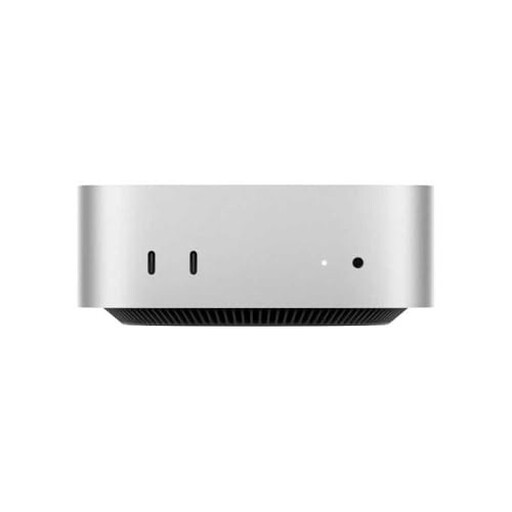
A Mac desktop worth considering if inspecting pages in Safari on macOS is part of your test plan.
M4 chip, 16 GB memory, 512 GB SSD and macOS. The product description lists Thunderbolt, HDMI and USB-C connections.
No. Chrome Device Mode simulates a mobile experience, but doesn’t actually run the page on a mobile device. Use the simulation for quick checks, and test important interactions on a real device too.
Check Docker’s current installation requirements and which backend you want to use. Docker Docs lists WSL 2 as the default backend for most Windows users; this only applies if Docker Desktop is part of your workflow.
Consumers generally have a 14-day cooling-off period for online purchases, starting from delivery, but there are exceptions. The Netherlands Authority for Consumers and Markets’ Consumer Information service (ACM ConsuWijzer) lists products made to the consumer’s specifications as one example. So check whether this exception applies to the configuration you’ve chosen. Consumer protections don’t necessarily apply to business purchases.
According to the Dutch government, you should contact the retailer for a solution under the statutory guarantee, not the manufacturer. An additional manufacturer’s guarantee doesn’t replace this right.
No. A PC model alone can’t make a portal GDPR-compliant. If the portal processes personal data, the organisation responsible must be able to demonstrate to the Dutch Data Protection Authority that the processing complies with the GDPR, and must take appropriate security measures. Whether a data processing agreement is needed depends on the role of the service providers involved.