What should you consider when choosing?
Compact Windows desktop
Choose this when: you use ArcGIS Pro locally or your research and calling software requires Windows.
Keep in mind: check the exact configuration, display outputs and peripherals you need. A compact case doesn’t tell you whether the configuration is suitable for your GIS projects.
Mac mini with separate workspace components
Choose this when: your applications work with macOS and you already have, or want to choose separately, suitable displays and calling equipment.
Keep in mind: Esri lists supported Windows systems for ArcGIS Pro, so check the software requirements before choosing a Mac mini.
Start with the mapping software you use and the workspace you already have. Esri outlines the Windows systems supported by ArcGIS Pro, while QGIS is available for Windows and macOS.
| What to consider |
What should you check? |
Who should pay particular attention? |
| Using several things at once |
Compare the memory and SSD in the exact configuration with your software requirements and the space your research files take up. |
If I keep reports, tables and browser-based maps open while on a call, I want to switch smoothly between tasks. Around 36% of consumers prioritise using documents and making calls at the same time. |
| Mapping software and screen space |
Make a note of your mapping software, the number of screens and their connections. Then check the operating system and display outputs on the exact desktop you’re considering. |
I want to view a map and report side by side, and know in advance whether my GIS software works on the system I choose. Around 29% of consumers prioritise software compatibility and screen space. |
| Calling equipment |
Check that you have a camera, microphone and speakers, and that they work with the calling app you use. |
If I need to join video calls while looking at documents, I want to know what equipment I’ll need. Around 21% of consumers prioritise having a complete calling setup. |
| Workspace components |
Compare what’s included in the configuration you choose with the display, keyboard, mouse and calling equipment you already have. |
I want to see straight away which components I already have and what else I need to use the desktop. Around 14% of consumers focus mainly on having a complete workspace. |
Joybuy products for this workspace
This selection of Joybuy products includes compact desktops for documents and calls, plus a Mac mini for software that works with the Mac configuration you choose. Before buying, check the operating system, the display connections you need and your calling equipment.
 Image unavailable
Lenovo Yoga Mini 01IPH11 Copilot+ PC
This compact Windows desktop is an option for bringing documents and calls together in one workspace. Check that Windows 11 Home is suitable for your software.
Intel Core Ultra 5 325; 16 GB LPDDR5X; 512 GB PCIe 4.0 SSD; Intel Graphics; Wi-Fi 7; Windows 11 Home; Seashell.
View at Joybuy
 Image unavailable
Lenovo IdeaCentre Mini
A mini PC to compare for a compact workspace. Check the full configuration, display outputs and the equipment you need for your setup.
View at Joybuy
 Image unavailable
SOYO M5 Mini PC, AMD Ryzen 4300U
The listed connections are worth considering if you want to use several displays side by side. Check that they’re compatible with your displays and software.
Windows 11 Pro; 16 GB LPDDR4; 512 GB SSD; HDMI 2.0, Type-C and DP 1.4; 4C/4T, up to 3.7 GHz.
View at Joybuy
 Image unavailable
FIREBAT R3 Mini PC, AMD Ryzen 5 7430U
This mini PC is an option to compare if you want to use several displays during calls. Check that it connects to your own displays.
16 GB RAM; 512 GB SSD; Wi-Fi 6; 4K display support on three screens; Bluetooth 5.2.
View at Joybuy
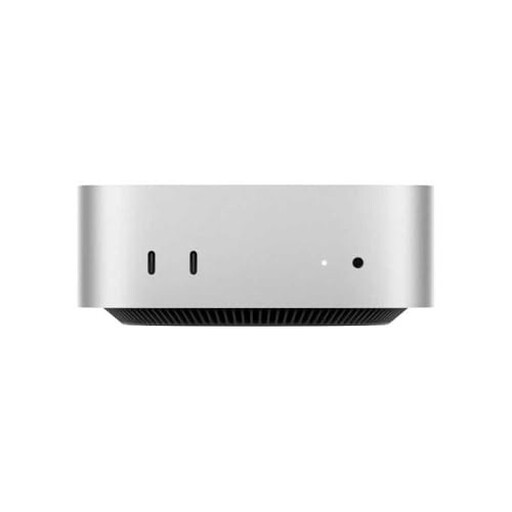 Image unavailable
Apple Mac mini, M4, 16 GB RAM, 512 GB
Consider this Mac mini if your research and calling software works with the Mac configuration you choose. Also check which peripherals you already have.
M4 chip; 10-core CPU; 10-core GPU; 16 GB RAM; 512 GB storage.
View at Joybuy
Frequently asked questions
Do I need a Windows desktop to view maps?
Not just to view maps: QGIS is available for Windows and macOS. If you want to run ArcGIS Pro locally, Esri lists supported Windows operating systems, so check which application you need first.
What do I need to talk on Teams while looking at documents?
Check the Teams system requirements for your operating system and make sure you have the necessary audio equipment. Microsoft also lists a camera for video calls. Compare this with the equipment included with your desktop and what you already have.
Who should I contact if my desktop develops a fault after purchase?
When you buy as a consumer, the product must meet the standard you can reasonably expect. According to the Dutch Government, you can contact the seller if there’s a problem; a manufacturer’s warranty does not replace your statutory rights.
Can I return a desktop bought online if the configuration isn’t right?
For a standard online consumer purchase, you generally have a statutory 14-day cooling-off period after delivery. ACM ConsuWijzer outlines exceptions, such as products made to your specifications. Also check that you’re buying as a consumer.
What should I consider when discussing confidential research?
Follow your organisation’s secure communication options. The Dutch Data Protection Authority says the organisation is responsible for secure video calls and chats with employees and customers. Choosing a desktop does not, on its own, ensure secure communication.


