What should you look for when buying?
Start with what you already have: a suitable monitor, a complete workstation or access to the same computer for more than one person. Then choose the form factor and configuration that suit your course and how you plan to use it.
| What to consider |
What should you check? |
Who is this important for? |
| Space and connections |
Measure the available space and compare the PC’s video outputs with the inputs on your monitor. Also check which accessories are included. |
If I want to use my existing monitor at the shared desk, the PC and its connections need to fit the available space. Around 33% of consumers put space and connections first. |
| Complete workstation |
Check whether the version has a built-in screen or includes a separate monitor, and whether a keyboard and mouse are included. |
If you don’t have your own monitor, you’ll want to know in advance what you need to use the study space. Around 25% of consumers prioritise a complete setup. |
| Separate accounts and projects |
Decide whether you’re sharing just the desk or the computer as well. If you share the PC, use separate accounts and consider a virtual environment for each Python project. |
If I’m sharing the computer itself, I want to manage my files, settings and project packages separately. Around 25% of consumers focus on keeping users and projects separate. |
| Performance and software |
Compare the RAM and storage in the exact version with the requirements of your course and programmes. Check the operating system and make sure it supports both Python and your chosen editor. |
If I’m using the PC for a course and my own projects, I want a supported system that works with the software I need. Around 17% of consumers prioritise software compatibility and suitable performance. |
Microsoft recommends a 1.6 GHz or faster processor and 1 GB of RAM for Visual Studio Code. These requirements apply to the editor, not necessarily to other programmes or future projects. You’ll also need to install the Python interpreter separately.
Regular support for Windows 10 ended on 14 October 2025, according to Microsoft Support. If you’re buying a new or refurbished PC, check whether its hardware is suitable for Windows 11, or whether another supported operating system is right for your course.
Joybuy products
This selection includes compact standalone desktops and mini PCs for a desk with a separate monitor, plus an all-in-one PC for anyone who doesn’t have a monitor yet. Check which accessories are included with each model.
 No image available
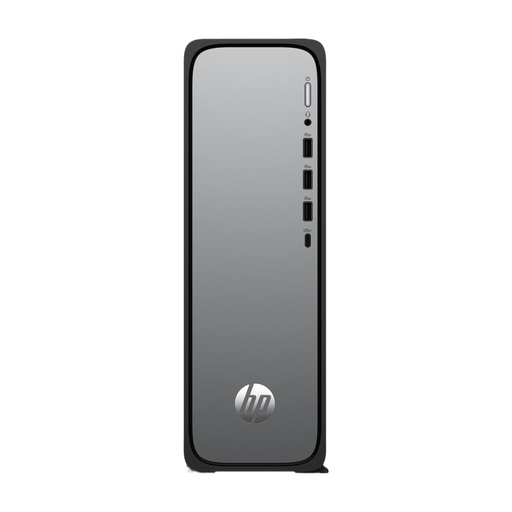
HP OmniDesk Slim S03-0006nd D49HREA#ABH
Suitable for a desk with a separate monitor if you’re looking for a compact standalone desktop.
The Joybuy product listing gives a depth of 10 cm, Wi-Fi 6 and HDMI. The listed configuration has Windows 11 Home, 8 GB DDR5 and a 512 GB SSD.
According to the product information, the charger must be purchased separately.
Joybuy
 No image available
HP 24 Inch All-in-One 24-cr0050nd 895R0EA#ABH
An option to compare if you don’t have a separate monitor and are looking for an all-in-one setup.
The Joybuy product listing gives a 23.8-inch FHD IPS screen, Windows 11 Home, a Ryzen 5 7520U, 8 GB of memory and a 512 GB SSD. A QWERTY keyboard is listed.
According to the product information, the power adapter must be purchased separately, and the 8 GB of onboard memory cannot be upgraded.
Joybuy
 No image available
SOYO Y5Pro Mini PC, Intel Core i5 8250U/8350U
Suitable for a setup with a separate monitor if you’re looking for a mini PC.
The product title lists Windows 11, 8 GB DDR4, a 256 GB SATA SSD, BT5.2 and Wi-Fi 5. The product information mentions two HDMI outputs, Type-C video output and USB ports.
Joybuy
 No image available
Lenovo Yoga Mini 01IPH11 Copilot+ PC Mini Desktop
A compact desktop to compare if you already have a monitor and want to save space on your desk.
The product title lists a 0.65-litre case, Windows 11 Home, 16 GB LPDDR5X and a 512 GB PCIe 4.0 SSD. It also lists Intel Core Ultra 5 325, Intel Graphics, Wi-Fi 7, HDMI and Thunderbolt 4.
Joybuy
 No image available
Lenovo IdeaCentre Mini Mini PC
A mini PC to compare for a desk with a separate monitor.
The Joybuy product listing gives a 1-litre case, Windows 11 Home, an Intel Core 5 210H, 16 GB of memory and a 512 GB SSD. Listed connections include HDMI, DisplayPort and Thunderbolt 4.
Joybuy
Frequently asked questions
Do I need a gaming desktop for my first Python exercises?
Not based on the requirements for Visual Studio Code alone: Microsoft recommends a 1.6 GHz or faster processor and 1 GB of RAM. That recommendation is for the editor, not every lesson, large datasets or several programmes running at once. Check your course requirements too.
Is installing VS Code enough to run Python code?
No. According to Microsoft’s official VS Code documentation, you also need to install a Python interpreter alongside the editor and Python extension to run Python code.
How do I set up one Windows computer for two students?
Create a separate Windows account for each user to keep their settings and documents apart. You can also use separate virtual environments for Python projects, so that each project’s packages stay separate.
What do I need to maintain after buying?
Keep the operating system supported and up to date, and manage Python packages separately for each project. Microsoft Support says regular support for Windows 10 ended on 14 October 2025. Microsoft also describes a separate Extended Security Updates programme; this is not the same as regular support resuming.
What are my rights when buying a desktop online in the Netherlands?
According to ACM ConsuWijzer, when you buy a product online in the Netherlands, the statutory cooling-off period usually ends 14 days after delivery; check the applicable exceptions and returns policy. Regardless of any manufacturer’s warranty, you’re entitled to a product that meets what you could reasonably expect under the statutory guarantee.


