First, choose a monitor that you can profile for your intended output. Then check that the desktop can handle your software, display connection and files. Adobe explains that colour management depends, among other things, on the monitor profile, so a more powerful computer won’t automatically make colours more accurate. A compact Mac or mini PC saves desk space, but you should assess noise levels and specifications for each model and workload.
Who is this guide for?
Product photographer delivering colour-critical work
You compare colours with a product or an agreed output and want to avoid unnecessary corrections caused by a misleading display. Adobe explains how a monitor profile represents the screen’s colour reproduction and recommends calibration equipment for colour-critical work.
Editor working in a quiet home office
You spend long periods working close to your computer and want to know how audible your chosen model will be under your workload. A Notebookcheck review describes a Mac mini M6 configuration with 24 GB of memory and a 512 GB SSD as generally quiet during light tasks. That review doesn’t automatically tell you anything about another model or demanding editing work.
Editor working with large batches of photos
You need enough memory and storage for your files and software, and are weighing up a compact setup against upgrade options. Adobe recommends 16 GB RAM or more for Photoshop 27.x; also check the requirements of your other programmes and your own workflow.
What should you look for?
Start with your colour workflow and the monitor you need. Then choose a desktop to suit your operating system, files and available space. A small case alone doesn’t prove that a computer is quiet.
Mac mini with a separate monitor
A good fit if: your software and peripherals work with macOS and you want to choose your own monitor.
Bear in mind: the M6 base configuration mentioned has 16 GB of unified memory and a 256 GB SSD; the noise test is for a different configuration.
Windows mini PC with a separate monitor
A good fit if: you need Windows and have limited desk space.
Bear in mind: the HP specifications listed don’t prove how quiet that model is during extended image editing. Also check what’s included with a configurable model.
Larger Windows desktop
A good fit if: you want to weigh up a larger case and a different combination of memory and storage against a mini PC.
Bear in mind: a bigger case or more storage doesn’t prove more accurate colour reproduction or lower noise. Assess the monitor and noise level separately.
All-in-one with built-in display
A good fit if: you want a single integrated device and the built-in display is demonstrably suitable for your colour workflow.
Bear in mind: check the screen profiling and required colour space separately; QHD or memory specifications alone don’t confirm that colours can be assessed accurately.
| Consideration |
What should you check? |
Who is this important to? |
| Colour assessment |
Decide on your intended output, check the monitor and connection, then profile the display. A different colour gamut may be relevant for print work than for digital previews. |
If I compare colours with a product or an agreed output, I first want to know whether my screen is suitable and profiled for the job. Around 36% of consumers prioritise colour assessment. |
| Noise while working |
Look for information on the exact model under a comparable workload, and distinguish between light tasks and extended, demanding editing. Notebookcheck describes a different Mac mini M6 configuration as generally quiet during light tasks. |
In a quiet home office, I want to know how audible my computer is while I work, not just how big the case is. Around 29% of consumers prioritise noise while working. |
| Memory and storage |
Compare the RAM, SSD capacity and upgrade options of the exact model with your files and software. Adobe recommends 16 GB RAM or more for Photoshop 27.x; this isn’t a universal requirement for every photo workflow. |
When working with large batches of photos, I want enough memory and space for my files and editing tasks. Around 21% of consumers prioritise this need. |
| Complete workstation |
Check what’s included with the configuration you choose and whether you already have a suitable monitor and input devices. The Lenovo configuration reviewed, 12RQCTO1WWNL1, doesn’t list a hard drive or keyboard. |
If I want to put together a ready-to-use workstation, I want to know in advance which components I already have and what else I need. Around 14% of consumers prioritise having a complete setup. |
Common selection mistakes
-
Assuming a fast desktop guarantees colour accuracy
Adobe explains that a monitor profile and ambient light affect how you judge colour. More computing power won’t fix an incorrect profile.
Choose and profile a screen for your intended output before treating extra desktop performance as a solution to colour differences.
A suitable screen and any calibration equipment you need are separate parts of your workstation.
-
Assuming ‘mini’ or ‘quiet’ means it’s been tested for your workload
The Notebookcheck review covers one Mac mini M6 configuration and describes its noise mainly during light tasks. It doesn’t tell you how another model will perform or what to expect during extended, demanding editing.
Compare tests of the same model under a workload similar to your editing, and ask for information about the specific workload if a model hasn’t been tested.
-
Treating a configurable PC as a complete computer
The Lenovo configuration reviewed, 12RQCTO1WWNL1, doesn’t list a hard drive or keyboard, so check the final specification and the components included.
Before choosing, check which storage and input devices you already have and what else you need.
You may also need storage, input devices or a monitor.
Relevant brands
These brands offer product ranges to suit different desktop setups. Check the specification and conditions for your colour workflow for each model.
Apple
Mac mini for people using macOS who want to choose their own display for colour work.
- Apple lists 16 GB of unified memory and a 256 GB SSD for the M6 base configuration.
- Notebookcheck describes an M6 test unit with 24 GB of memory and a 512 GB SSD as generally quiet during light tasks. This observation doesn’t necessarily apply to the base configuration or demanding photo editing; the review also notes limited maintenance options.
HP
Windows options include the compact EliteDesk 8 Mini G1i and the larger OmniDesk 16L.
- HP lists 16 GB RAM and a 512 GB SSD for the EliteDesk model 998U8ET#ABH. For the OmniDesk 16L M03-0612nd, HP lists 16 GB RAM and a 1 TB SSD.
- These model specifications alone don’t tell you how quiet the desktops are or how accurately a separate screen reproduces colour.
Lenovo
ThinkCentre M75q Gen 5 Tiny for anyone considering a compact Windows PC and weighing up upgrade options.
- Lenovo describes tool-free access to the memory and SSD.
- The Dutch configuration reviewed, 12RQCTO1WWNL1, doesn’t list a hard drive or keyboard. Check the configuration and included components before putting together a complete workstation.
ASUS
NUC 15 Pro is a compact PC range for people who want to assess the model and its components themselves.
- ASUS describes the NUC 15 Pro as having a 0.48-litre case with tool-free access.
- Check the exact model and local availability; the product information doesn’t give a noise level for a specific configuration during photo editing.
Mini PCs for use with a separate monitor
These Joybuy products are mini PCs and mini desktops designed for use with a separate monitor. Check the display connections, memory and storage you need for each model; the product specifications alone don’t show how quiet a computer will be under your workload.
 No image available
ACEMAGIC AK1PLUS Mini PC, Intel Celeron N5095, 16 GB RAM, 256 GB SSD
The two HDMI outputs are designed for connecting a separate monitor; check that your monitor supports the connection.
The title lists 16 GB LPDDR4X RAM, a 256 GB M.2 2280 SATA SSD and Windows 11 Pro. The product description lists HDMI 2.0 with 4K at 60 Hz.
View at Joybuy
 No image available
ACEMAGIC E3B Mini Desktop, AMD R5 7430U, 16 GB RAM, 512 GB SSD
The listed HDMI, DisplayPort and USB-C display connections give you options for a separate monitor; check which connection is right for your screen.
The title lists 16 GB LPDDR4X 3200MT/s RAM, a 512 GB M.2 2280 SATA SSD and Windows 11 Pro.
View at Joybuy
 No image available
FIREBAT R3 Mini PC, AMD Ryzen 5 7430U, 16 GB RAM, 512 GB SSD
This mini PC is an option for use with a separate monitor; the product description lists support for three simultaneous 4K displays.
The title lists 16 GB RAM and a 512 GB SSD. Check that the connections and capacity suit your monitor and files.
View at Joybuy
 No image available
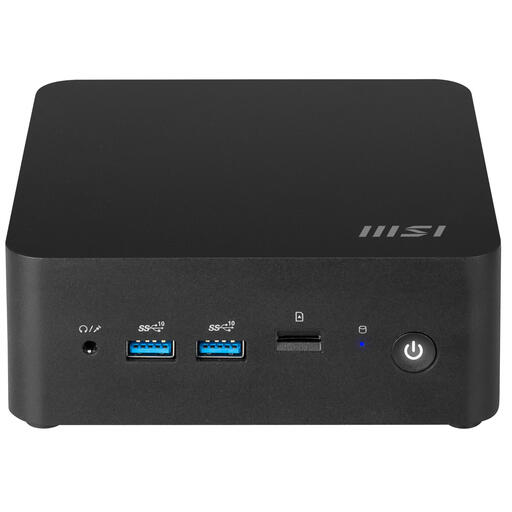
MSI CUBI NUC 1MG-244BEU barebone, 0.84 L
The description mentions HDMI and Thunderbolt 4 connections and support for multiple displays; check which connection your monitor requires.
The title lists an Intel Core 3 100U. Before choosing, check which components are included with this barebone model.
View at Joybuy
 No image available
SOYO Y5Pro Mini PC, Intel Core i5 8250U/8350U, 8 GB RAM, 256 GB SSD
The product description lists HDMI and Type-C video outputs for connecting a separate monitor.
The description lists 8 GB DDR4 RAM and a 256 GB SSD. Adobe recommends 16 GB RAM or more for Photoshop 27.x; compare this with your software and files.
View at Joybuy
Frequently asked questions
Will a more powerful PC automatically make the colours in your product photos more accurate?
No. Adobe describes monitor profiles, document profiles and ambient light as parts of colour management. Start with a screen and profile suited to your intended output, then decide which PC can handle your files and software.
How do you set up your workstation for consistent colour assessment?
Profile the monitor, use appropriate colour management and keep the ambient light as consistent as possible. Adobe recommends calibration equipment for colour-critical work; don’t change your screen settings after profiling without recalibrating.
Is 16 GB of memory enough for Photoshop?
Adobe recommends 16 GB RAM or more for Photoshop 27.x. Also compare the requirements of your other programmes and the size of your files; memory capacity alone doesn’t predict how quickly your workflow will run.
How can you tell whether a mini PC is quiet enough for your home office?
Look for noise information on the exact model under a workload similar to your own. A Notebookcheck review describes a Mac mini M6 with 24 GB of memory and a 512 GB SSD as generally quiet during light tasks, but that finding doesn’t automatically apply to other configurations or demanding editing.
What rights do you have when buying online in the Netherlands?
For qualifying distance purchases from a business, the Dutch government says that in many cases you have a 14-day cooling-off period, with some exceptions. This period is separate from your rights if a product is faulty: in the Netherlands, there is a statutory guarantee with no fixed statutory guarantee period, and the retailer is your point of contact.


